Inquire: Call 0086-755-23203480, or reach out via the form below/your sales contact to discuss our design, manufacturing, and assembly capabilities.
Quote: Email your PCB files to Sales@pcbsync.com (Preferred for large files) or submit online. We will contact you promptly. Please ensure your email is correct.
Notes: For PCB fabrication, we require PCB design file in Gerber RS-274X format (most preferred), *.PCB/DDB (Protel, inform your program version) format or *.BRD (Eagle) format. For PCB assembly, we require PCB design file in above mentioned format, drilling file and BOM. Click to download BOM template To avoid file missing, please include all files into one folder and compress it into .zip or .rar format.
Microprocessor vs Microcontroller: Key Differences Explained
When you’re specifying components for an embedded design, the microprocessor vs microcontroller decision fundamentally shapes your entire system architecture. Having designed boards using both for over a decade, I can tell you this choice affects everything from PCB complexity and power budget to BOM cost and development timeline.
This guide breaks down the MCU vs CPU comparison in practical terms—what actually matters when you’re selecting silicon for your next project, whether it’s a simple sensor node or a complex industrial controller.
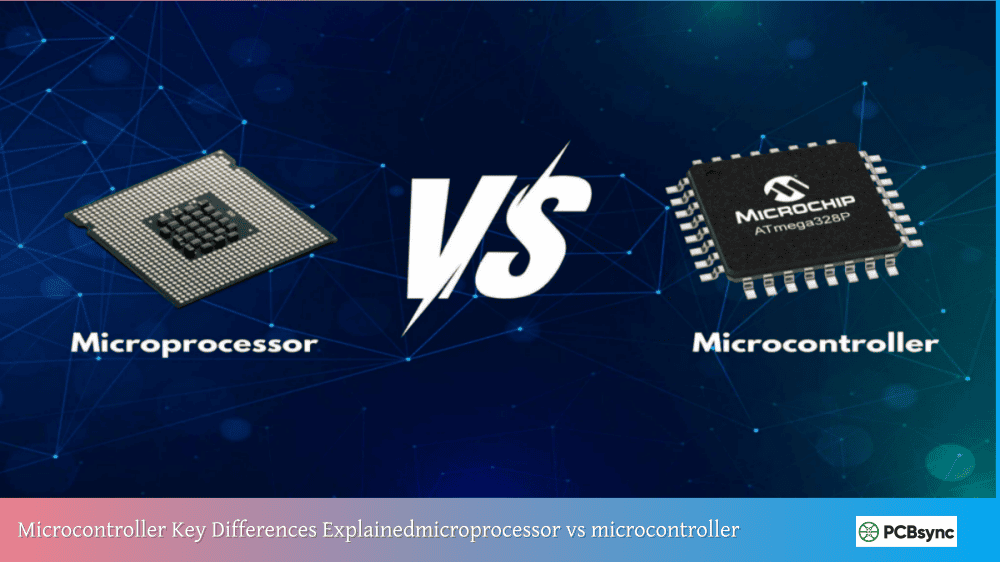
A microprocessor (often called MPU or simply CPU) is an integrated circuit that contains only the central processing unit—the computational brain of a computer system. It handles arithmetic operations, logic decisions, and control functions, but requires external components to form a complete computing system.
Think of a microprocessor as a highly capable chef who needs someone else to provide the kitchen, ingredients, and serving equipment. The Intel Core processors in your laptop, AMD Ryzen chips in gaming PCs, and ARM Cortex-A series in smartphones are all microprocessors.
Microprocessor Architecture
Microprocessors typically use the Von Neumann architecture, where program instructions and data share the same memory space and bus. Key components include:
Arithmetic Logic Unit (ALU): Performs mathematical and logical operations
Control Unit: Manages instruction execution and coordinates other components
Registers: High-speed temporary storage for immediate data access
Cache Memory: Fast memory that reduces latency when accessing frequently used data
Modern microprocessors add multiple cores, sophisticated branch prediction, out-of-order execution, and deep pipelines to maximize throughput for complex, unpredictable workloads.
What is a Microcontroller?
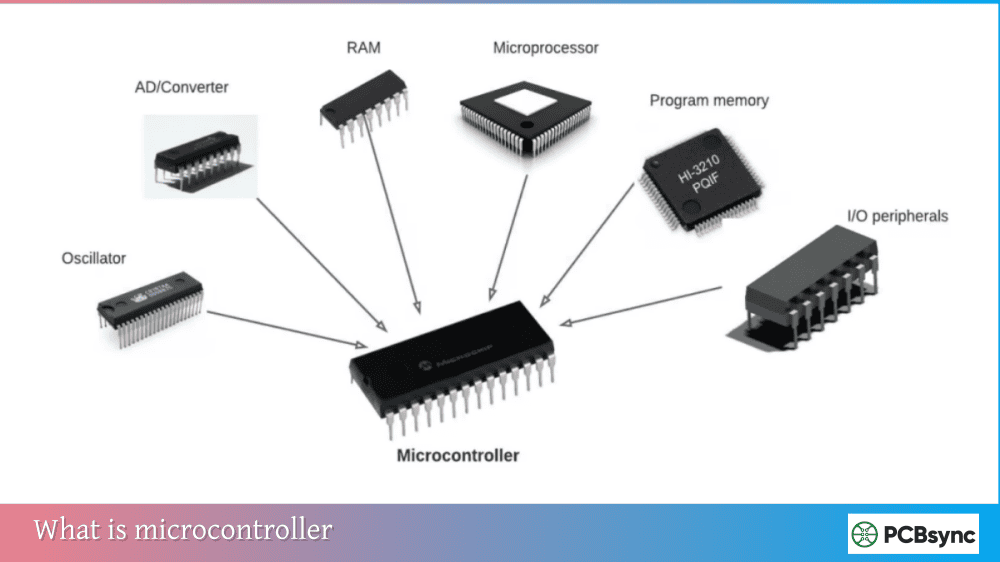
A microcontroller (MCU) is a complete computer system on a single chip. It integrates the processor core, program memory (Flash), data memory (RAM), and various peripherals—all in one package. The Arduino’s ATmega328, ESP32 for IoT projects, and STM32 series for industrial applications are microcontrollers.
Returning to our cooking analogy, a microcontroller is like a self-contained food truck—everything needed to prepare and serve meals comes built-in. This integration makes MCUs ideal for dedicated, repetitive tasks where simplicity and efficiency matter more than raw computing power.
Microcontroller Architecture
Most microcontrollers use the Harvard architecture, which separates program memory from data memory with dedicated buses for each. This allows simultaneous instruction fetch and data access, improving real-time performance. Integrated components include:
CPU Core: Usually 8-bit, 16-bit, or 32-bit architecture
Flash Memory: Non-volatile storage for program code (typically 16KB to 2MB)
SRAM: Volatile memory for runtime data (typically 2KB to 512KB)
Peripherals: GPIO, timers, ADC, DAC, UART, SPI, I2C, PWM, and more
Microprocessor vs Microcontroller: Core Differences
Understanding the fundamental differences between these components helps you make informed design decisions.
Architecture Comparison
Feature
Microprocessor (MPU)
Microcontroller (MCU)
Architecture
Von Neumann
Harvard (typically)
Integration
CPU only
CPU + Memory + Peripherals
Memory
External (GB range)
Internal (KB to MB range)
Peripherals
External chips required
Built-in on chip
Operating System
Required (Linux, Windows)
Optional (bare metal or RTOS)
Boot Time
Seconds (OS loading)
Milliseconds (instant-on)
Performance Comparison
Parameter
Microprocessor
Microcontroller
Clock Speed
1-5 GHz
8 MHz – 480 MHz
Processing Width
32-bit to 64-bit
8-bit to 32-bit
Cache
Multi-level (L1, L2, L3)
Minimal or none
Instructions/Cycle
Multiple (superscalar)
Typically single
Floating Point
Hardware FPU standard
Optional on some MCUs
Power and Cost Comparison
Aspect
Microprocessor
Microcontroller
Power Consumption
5W – 150W+
1mW – 500mW
Supply Voltages
Multiple rails required
Single rail (typically 3.3V)
Unit Cost
$20 – $1000+
$0.50 – $20
System Cost
High (external components)
Low (minimal external parts)
PCB Complexity
High (memory buses, power)
Low (simple routing)
MCU vs CPU: When to Use Each
Choose a Microcontroller When:
Your application has dedicated, predictable tasks: MCUs excel at reading sensors, controlling motors, managing displays, and handling communication protocols. If your device does the same operations repeatedly, an MCU handles it efficiently.
Power efficiency matters: Battery-powered devices, energy harvesting systems, and always-on sensors benefit from MCU sleep modes that consume microamps. A typical MCU draws 100-200mA active, dropping to under 1μA in deep sleep.
Cost sensitivity is critical: For high-volume products, the difference between a $2 MCU (complete system) and a $50+ MPU (plus external memory and power management) dramatically impacts margins.
Real-time response is required: MCUs provide deterministic timing—you know exactly when an interrupt will be serviced. This predictability matters for motor control, audio processing, and safety-critical systems.
Physical space is limited: Wearables, implantable medical devices, and miniaturized sensors need the compact footprint only integrated MCUs provide.
Choose a Microprocessor When:
Complex operating systems are needed: Running Linux, Android, or Windows requires the memory capacity and processing power only MPUs deliver. If your application needs a file system, networking stack, or graphical user interface, you likely need an MPU.
Processing demands exceed MCU capabilities: Image processing, machine learning inference, video encoding, and complex algorithms benefit from GHz clock speeds and multi-core architectures.
Memory requirements are large: Applications needing gigabytes of RAM or storage (databases, multimedia) exceed MCU capabilities.
Flexibility trumps efficiency: General-purpose computing where workloads vary unpredictably suits the MPU’s versatile architecture.
Common Applications
Microcontroller Applications
Industry
Application Examples
Consumer Electronics
Remote controls, smart appliances, toys
Automotive
Engine control, ABS, window controllers
Industrial
PLCs, motor drives, sensor nodes
Medical
Glucose monitors, pacemakers, infusion pumps
IoT
Smart sensors, environmental monitors
Home Automation
Thermostats, smart locks, lighting control
Microprocessor Applications
Industry
Application Examples
Computing
Laptops, desktops, servers
Mobile
Smartphones, tablets
Networking
Routers, switches, firewalls
Industrial
HMI panels, vision systems
Automotive
Infotainment, ADAS
AI/ML
Edge inference, training accelerators
Popular Microcontroller and Microprocessor Families
Leading Microcontroller Families
Family
Manufacturer
Bit Width
Key Features
STM32
STMicroelectronics
32-bit ARM
Wide range, excellent peripherals
ESP32
Espressif
32-bit
Built-in WiFi/Bluetooth
PIC
Microchip
8/16/32-bit
Mature ecosystem, low cost
AVR
Microchip
8-bit
Arduino platform, easy to use
MSP430
Texas Instruments
16-bit
Ultra-low power
nRF52
Nordic
32-bit ARM
Bluetooth Low Energy optimized
Leading Microprocessor Families
Family
Manufacturer
Architecture
Key Features
Core i-series
Intel
x86-64
Desktop/laptop performance
Ryzen
AMD
x86-64
Multi-core, gaming
Cortex-A
ARM (licensees)
ARM64
Mobile, embedded Linux
i.MX
NXP
ARM Cortex-A
Industrial, automotive
Snapdragon
Qualcomm
ARM
Mobile, connectivity
Design Considerations for PCB Engineers
When laying out boards for either component type, keep these practical considerations in mind.
Microcontroller PCB Design
MCU designs are generally straightforward:
Single power rail simplifies regulation
Integrated oscillators reduce external components
Direct GPIO connections to sensors and actuators
Minimal high-speed routing requirements
Two-layer boards often sufficient
Power Supply Design: Most MCUs operate on a single 3.3V or 5V rail. A simple LDO regulator often suffices, with 100nF decoupling capacitors near each VCC pin. Some MCUs have separate analog and digital supply pins requiring individual filtering.
Clock Sources: While many MCUs include internal RC oscillators suitable for non-timing-critical applications, external crystals provide better accuracy for UART communication or USB interfaces. Place crystals close to the MCU with short, matched traces.
Microprocessor PCB Design
MPU designs demand more attention:
Multiple voltage rails with sequencing requirements
Power integrity analysis for high-current transients
EMI management for GHz clock frequencies
Minimum four-layer boards, often six or more
Memory Interface Layout: DDR3/DDR4 interfaces require controlled impedance traces (typically 50Ω single-ended, 100Ω differential), length matching within tight tolerances (often ±25 mils), and careful attention to layer stackup. This is where the complexity cost of microprocessors really shows.
Power Distribution: An MPU system might need 0.9V core, 1.8V I/O, 1.35V DDR, 3.3V peripherals, and 5V USB—each with specific sequencing requirements. PMICs (Power Management ICs) help, but add BOM cost and design complexity.
Modern designs increasingly blur the line between MCU vs CPU with System-on-Chip devices that combine microprocessor cores with microcontroller-like integration.
SoC Examples
Device
Features
Target Applications
Raspberry Pi RP2040
Dual Cortex-M0+, built-in USB
Maker projects, IoT
NXP i.MX RT
Cortex-M7 @ 1GHz, MCU peripherals
Industrial, audio
TI Sitara AM335x
Cortex-A8 + PRU cores
Industrial Linux
STM32MP1
Cortex-A7 + Cortex-M4
Gateway devices
These devices offer the processing capability approaching microprocessors while maintaining some MCU simplicity. They’re worth considering when your application sits between traditional MCU and MPU requirements.
Cost Analysis: Total System Comparison
Beyond unit pricing, consider the full system cost when comparing microprocessor vs microcontroller solutions.
Bill of Materials Impact
Component
MCU-Based System
MPU-Based System
Processor
$3
$15
RAM
Integrated
$5 (DDR chip)
Flash/Storage
Integrated
$8 (eMMC)
Power Management
$1 (LDO)
$6 (PMIC)
Oscillator
$0.50
$2 (multiple)
Decoupling
$1
$5 (extensive)
PCB (2-layer vs 6-layer)
$2
$12
Total Estimate
~$7.50
~$53
These numbers are illustrative, but the ratio holds: MPU-based systems typically cost 5-10x more than equivalent MCU solutions when you factor in the supporting circuitry.
Development Cost Considerations
MCU Development:
Lower-cost development tools (often free)
Faster compile/flash cycles
Simpler debugging with JTAG/SWD
Shorter learning curve for bare-metal coding
MPU Development:
Longer build times (Linux kernel compilation)
More complex debugging (kernel + application)
Steeper learning curve for Linux device drivers
Higher-cost development boards
Future Trends in MCU vs CPU Technology
The embedded landscape continues evolving, with several trends affecting the microprocessor vs microcontroller decision:
MCU Performance Growth: 32-bit MCUs now reach clock speeds and processing capabilities that would have required MPUs a decade ago. The STM32H7 at 480MHz with hardware graphics acceleration exemplifies this trend.
AI at the Edge: Specialized MCUs with neural network accelerators (like STM32 with X-CUBE-AI or NXP’s eIQ) bring machine learning inference to microcontroller-class devices.
RISC-V Emergence: The open RISC-V instruction set architecture is appearing in both MCUs (ESP32-C3) and MPUs (SiFive), potentially disrupting traditional ARM-dominated markets.
Increased Integration: More peripherals, more memory, and better power management continue migrating on-chip, making MCUs capable of increasingly complex applications.
Resources and Downloads
Documentation and Datasheets
Resource
Description
STMicroelectronics
STM32 MCU datasheets and reference manuals
Microchip
PIC and AVR documentation
ARM Developer
Cortex-M and Cortex-A architecture references
Intel ARK
Processor specifications database
NXP
i.MX processor documentation
Development Tools
Tool
Platform
Purpose
STM32CubeIDE
STM32
Integrated development environment
MPLAB X
PIC/AVR
Microchip’s IDE
Arduino IDE
Various
Beginner-friendly development
Keil MDK
ARM
Professional ARM development
PlatformIO
Multiple
Cross-platform embedded development
Frequently Asked Questions
What is the main difference between microprocessor and microcontroller?
The fundamental difference in microprocessor vs microcontroller comparison is integration level. A microprocessor contains only the CPU and requires external memory chips (RAM, ROM), peripheral interfaces, and supporting circuitry to function. A microcontroller integrates the CPU, memory, and peripherals on a single chip, forming a complete computing system. This makes MCUs self-sufficient while MPUs need a supporting ecosystem of components.
Can a microcontroller replace a microprocessor?
In many embedded applications, yes—and that’s exactly what happens. Modern 32-bit MCUs like STM32H7 series running at 480MHz with hardware floating-point units handle tasks that once required microprocessors. However, MCUs cannot replace MPUs when you need gigabytes of memory, full operating systems like Linux, or computational performance exceeding a few hundred DMIPS. The MCU vs CPU choice depends on your specific application requirements.
Why are microcontrollers preferred in embedded systems?
Microcontrollers dominate embedded systems for several practical reasons. Their integrated design reduces component count, shrinks PCB size, and lowers BOM cost. They boot instantly (no OS loading), provide deterministic real-time response, and consume minimal power—often running for years on batteries. For the repetitive, dedicated tasks typical in embedded applications, MCUs deliver exactly what’s needed without the overhead of general-purpose processors.
What is the relationship between CPU and MCU?
Every MCU contains a CPU (or processor core) as its computational heart, plus integrated memory and peripherals. The CPU portion handles instruction execution and calculations, while the MCU package adds everything else needed for a complete system. So the MCU vs CPU distinction is really about what surrounds that processor core—an MCU builds a complete system around it, while a standalone CPU (microprocessor) needs external components for the same functionality.
Which is better for IoT applications: microprocessor or microcontroller?
For most IoT applications, microcontrollers are the better choice. IoT devices typically need to read sensors, communicate wirelessly, and operate on battery power for extended periods—all strengths of MCUs. Devices like ESP32 integrate WiFi and Bluetooth directly, enabling complete IoT solutions on a single chip. Microprocessors make sense for IoT gateways or edge computing devices that aggregate data from multiple sensors and run sophisticated analytics, but the sensing endpoints themselves almost always use microcontrollers.
Conclusion
The microprocessor vs microcontroller decision ultimately comes down to matching silicon capabilities to application requirements. Microcontrollers deliver integrated, efficient, cost-effective solutions for dedicated embedded tasks. Microprocessors provide the raw computational power and memory capacity for complex, general-purpose computing.
For most embedded projects—sensor nodes, motor controllers, consumer electronics, and IoT devices—microcontrollers offer the practical advantages that matter: lower cost, simpler design, instant-on operation, and power efficiency. When your application genuinely needs gigabytes of memory, complex operating systems, or computational throughput beyond MCU capabilities, microprocessors earn their place despite the added complexity.
Understanding both options and their trade-offs enables you to make informed decisions that optimize your designs for performance, cost, power, and time-to-market. In the MCU vs CPU debate, there’s no universally correct answer—only the right choice for your specific application.
Inquire: Call 0086-755-23203480, or reach out via the form below/your sales contact to discuss our design, manufacturing, and assembly capabilities.
Quote: Email your PCB files to Sales@pcbsync.com (Preferred for large files) or submit online. We will contact you promptly. Please ensure your email is correct.
Notes: For PCB fabrication, we require PCB design file in Gerber RS-274X format (most preferred), *.PCB/DDB (Protel, inform your program version) format or *.BRD (Eagle) format. For PCB assembly, we require PCB design file in above mentioned format, drilling file and BOM. Click to download BOM template To avoid file missing, please include all files into one folder and compress it into .zip or .rar format.