Inquire: Call 0086-755-23203480, or reach out via the form below/your sales contact to discuss our design, manufacturing, and assembly capabilities.
Quote: Email your PCB files to Sales@pcbsync.com (Preferred for large files) or submit online. We will contact you promptly. Please ensure your email is correct.
Notes: For PCB fabrication, we require PCB design file in Gerber RS-274X format (most preferred), *.PCB/DDB (Protel, inform your program version) format or *.BRD (Eagle) format. For PCB assembly, we require PCB design file in above mentioned format, drilling file and BOM. Click to download BOM template To avoid file missing, please include all files into one folder and compress it into .zip or .rar format.
Types of Memory ICs: RAM, ROM, Flash, EEPROM Explained
Understanding memory IC types is one of those fundamentals that separates confident PCB designers from those who constantly second-guess their component choices. Over my years working with embedded systems—from industrial controllers to consumer electronics—I’ve learned that selecting the right memory can make or break a project. Choose wrong, and you’ll face unexpected power consumption, insufficient write cycles, or performance bottlenecks that only surface after production.
This guide covers the essential RAM vs ROM vs Flash comparison every hardware engineer needs. I’ll explain how each memory type works, when to use it, and the practical tradeoffs you’ll face in real designs.
Before diving into specific memory IC types, understanding the fundamental division between volatile and non-volatile memory clarifies most selection decisions.
Volatile memory loses its contents when power is removed. RAM (Random Access Memory) falls into this category. Your system variables, stack, and runtime data live here. When you cycle power, everything disappears—by design.
Non-volatile memory retains data without power. ROM, Flash, and EEPROM preserve their contents indefinitely, surviving power cycles, battery removal, and extended storage. Firmware, configuration parameters, and calibration data belong here.
Most embedded systems require both types: volatile RAM for fast runtime operations and non-volatile storage for persistent data. The challenge lies in selecting the right variant of each.
RAM: Random Access Memory Types
RAM provides the working memory for your processor—fast, byte-addressable storage for variables, buffers, and program execution. Two primary types dominate embedded applications: SRAM and DRAM.
SRAM: Static Random Access Memory
SRAM stores each bit using a bistable flip-flop circuit, typically six transistors per cell. The “static” designation means data remains stable as long as power is applied—no refresh cycles required.
Key SRAM Characteristics:
Access time: 5-25ns (extremely fast)
No refresh required
Simple interface
Higher power consumption per bit than DRAM
Lower density (6 transistors per bit)
Higher cost per megabyte
SRAM appears everywhere in embedded systems: microcontroller internal memory, CPU cache, high-speed buffers, and lookup tables requiring nanosecond access. When I need guaranteed timing and maximum speed, SRAM is the default choice.
From a PCB perspective, SRAM interfaces are straightforward. Parallel SRAM uses address lines, data lines, and a few control signals (chip select, output enable, write enable). Modern serial SRAMs use SPI or I²C for applications where pin count matters more than raw speed.
DRAM: Dynamic Random Access Memory
DRAM stores each bit as charge on a tiny capacitor—just one transistor and one capacitor per cell. This simple structure enables much higher density than SRAM, but the charge leaks away within milliseconds, requiring constant refresh.
Key DRAM Characteristics:
Access time: 10-70ns (fast, but slower than SRAM)
Requires periodic refresh (typically every 64ms)
Complex controller interface
Lower power per bit than SRAM (when idle)
Higher density (1 transistor + 1 capacitor per bit)
Lower cost per megabyte
DRAM dominates applications requiring large memory: computer main memory, video frame buffers, and data-intensive embedded systems. The refresh requirement adds complexity—you need a memory controller handling the refresh timing, bank management, and command sequencing.
Modern DRAM variants include DDR4, DDR5, and LPDDR (Low Power DDR for mobile devices). These high-speed interfaces require careful PCB design: controlled impedance traces, length matching, proper termination, and attention to signal integrity. If you’re adding DDR memory to a custom board, expect to spend significant layout effort getting it right.
SRAM vs DRAM Comparison
Parameter
SRAM
DRAM
Speed
5-25ns
10-70ns
Refresh Required
No
Yes (every 64ms)
Density
Low (6T per bit)
High (1T1C per bit)
Power (Active)
Higher
Lower
Power (Standby)
Lower
Higher (refresh)
Cost per MB
Higher
Lower
Interface Complexity
Simple
Complex
Typical Use
Cache, MCU RAM
Main memory, large buffers
ROM: Read-Only Memory Types
ROM stores permanent data that survives power loss and doesn’t change during normal operation. The “read-only” designation originally meant truly permanent—programmed during manufacturing and never modified. Modern variants blur this definition.
Mask ROM
Mask ROM is programmed during IC fabrication using photolithographic masks. The data pattern is literally built into the silicon—permanent, unchangeable, and produced identically across all chips from that mask set.
Mask ROM Applications:
High-volume consumer products (millions of units)
Standard firmware that never changes
Cost-sensitive products where per-unit cost dominates
Mask ROM offers the lowest per-unit cost for high volumes, but the tooling charge (creating custom masks) runs tens of thousands of dollars. It only makes economic sense when you’re absolutely certain the data won’t change and volumes justify the setup cost. In my experience, mask ROM is rarely appropriate for most projects—the inflexibility creates too much risk during development and product evolution.
PROM: Programmable Read-Only Memory
PROM (also called OTP ROM—One-Time Programmable) allows the user to program the chip once after manufacturing. Programming typically involves blowing fusible links to create the bit pattern. Once programmed, the data is permanent.
PROM served as a crucial stepping stone between mask ROM and erasable memories. Today it’s largely obsolete, replaced by flash memory in nearly all applications. You might encounter PROM in legacy systems or very specific security applications where one-time-programmability is actually a feature.
EPROM: Erasable Programmable Read-Only Memory
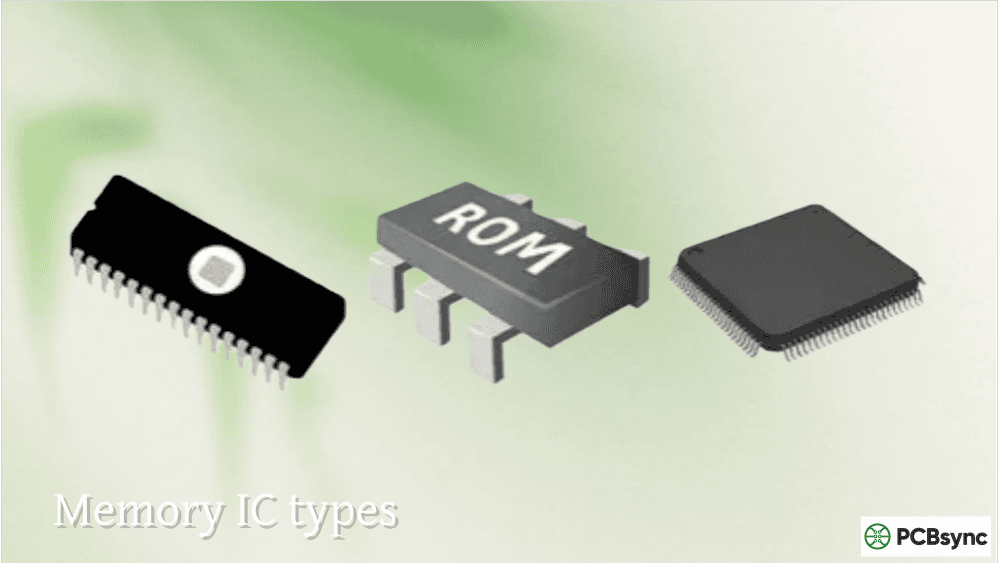
EPROM adds erasability to the programmable ROM concept. Programming uses electrical charges stored on floating-gate transistors. Erasing requires exposing the chip to ultraviolet light for 15-20 minutes through a quartz window in the package.
EPROM dominated embedded development from the late 1970s through the early 1990s. The UV erasure was inconvenient—you needed special equipment, had to remove chips from the board, and wait during the erase cycle—but it enabled iterative firmware development impossible with mask ROM or PROM.
EPROM is effectively obsolete today, completely replaced by flash memory. I mention it primarily for historical context and because you might encounter it in legacy equipment requiring maintenance.
EEPROM represents a significant advancement: electrical erasure and programming without removing the chip from the circuit. You can modify individual bytes while the device operates normally.
Key EEPROM Characteristics:
Byte-level erase and write operations
In-circuit programming and erasure
Write endurance: 100,000 to 1,000,000 cycles
Write time: 1-10ms per byte (slow compared to RAM)
Data retention: 10-100+ years
Typical capacity: 128 bytes to 2MB
How EEPROM Works
EEPROM uses floating-gate transistors similar to EPROM, but employs Fowler-Nordheim tunneling for both programming and erasure. A thin oxide layer between the floating gate and substrate allows electrons to tunnel through when appropriate voltages are applied.
The two-transistor cell structure (one for storage, one for selection) enables byte-level operations but limits density compared to flash memory. Each byte can be independently erased and rewritten without affecting neighboring data.
EEPROM Interface Options
Serial EEPROM uses I²C or SPI protocols, typically in 8-pin packages. The simple interface and small footprint make serial EEPROMs ideal for configuration storage, calibration data, and small parameter sets. Common parts include the 24LCxx (I²C) and 25LCxx (SPI) families.
Parallel EEPROM uses address and data buses similar to SRAM, offering faster access at the cost of more pins and board space. Parallel EEPROM is less common today, largely displaced by parallel flash.
When to Use EEPROM
EEPROM excels for small amounts of data requiring frequent updates:
System configuration parameters
Calibration coefficients
User preferences
Operational counters and logs
Security keys and certificates
The byte-level erasure means you can update a single configuration value without erasing an entire sector. This granularity is EEPROM’s primary advantage over flash memory.
However, EEPROM’s limited capacity and higher cost per bit make it unsuitable for firmware storage or large data sets. For those applications, flash memory is the better choice.
Flash Memory: The Modern Workhorse
Flash memory combines the best features of EEPROM with dramatically higher density and lower cost. It has revolutionized embedded systems, replacing EPROM and mask ROM for code storage while also serving as high-capacity data storage.
Key Flash Characteristics:
Block-level erase (not byte-level like EEPROM)
Fast read access (50-100ns for NOR)
High density (megabytes to terabytes)
Write endurance: 10,000 to 1,000,000 cycles
Low cost per megabyte
Data retention: 10-20+ years
NOR Flash Architecture
NOR flash arranges memory cells in a parallel configuration allowing random byte-level reads. Any byte can be accessed directly using its address—similar to ROM or RAM access patterns.
NOR Flash Characteristics:
Random access reads
Execute-in-place (XIP) capability
Byte or word programming
Block erasure (typically 4KB to 256KB blocks)
Read speed: 50-100ns
Higher cost per bit than NAND
NOR flash is ideal for code storage because processors can execute instructions directly from the memory without copying to RAM first. This execute-in-place capability simplifies boot sequences and reduces RAM requirements. Most microcontrollers with internal flash use NOR architecture.
When I’m designing a system with external code storage, NOR flash is typically my first choice. The direct execution capability and reliable random access make it straightforward to use.
NAND Flash Architecture
NAND flash arranges cells in series strings, optimized for sequential access and maximum density. Individual bytes cannot be directly addressed—data is read and written in pages (typically 512 bytes to 16KB), and erasure operates on larger blocks (typically 128KB to 512KB).
NAND Flash Characteristics:
Page-based read and write operations
Block-based erasure
No execute-in-place capability
Read speed: 25-50µs per page
Highest density and lowest cost per bit
Requires error correction (ECC)
Requires wear leveling and bad block management
NAND flash dominates mass storage: USB drives, SD cards, SSDs, and smartphone storage. The page-based access pattern matches file system operations well, and the enormous capacity at low cost makes it unbeatable for storing large amounts of data.
However, NAND flash cannot replace NOR flash for code execution. A system using NAND for firmware storage must copy the code to RAM before execution, adding complexity and RAM requirements. Many designs combine both: NOR flash for bootloader and critical code, NAND flash for file systems and bulk data.
NOR vs NAND Flash Comparison
Parameter
NOR Flash
NAND Flash
Access Pattern
Random
Sequential (page-based)
Execute-in-Place
Yes
No
Read Speed
50-100ns
25-50µs (per page)
Write Speed
Slow
Fast (per page)
Erase Speed
Slow
Fast
Density
Lower
Higher
Cost per MB
Higher
Lower
Error Rate
Low
Higher (needs ECC)
Typical Use
Code storage, XIP
Mass storage, files
RAM vs ROM vs Flash: Complete Memory Comparison
Understanding RAM vs ROM vs Flash requires comparing multiple characteristics simultaneously. This comprehensive table summarizes the practical differences:
After understanding memory IC types, the selection process becomes more systematic. Consider these factors in order:
Volatility Requirements
First, determine if data must survive power loss. Runtime variables and buffers can use RAM. Firmware, configuration, and user data require non-volatile storage.
Capacity Requirements
Estimate your memory requirements with margin for future growth:
< 1KB: EEPROM is usually most practical
1KB – 1MB: NOR flash or larger EEPROM
1MB – 1GB: NOR or NAND flash
> 1GB: NAND flash (SSD, SD card, eMMC)
Access Pattern
Random byte-level access suggests SRAM, EEPROM, or NOR flash. Sequential bulk transfers work well with NAND flash. Execute-in-place requirements eliminate NAND flash and EEPROM from consideration.
Write Frequency
High-frequency writes (multiple times per second) require RAM or careful flash wear management. Occasional writes (hourly or daily) are fine for EEPROM or flash. Write-once or rare-write data can use any non-volatile type.
Interface Complexity
Simple designs favor serial interfaces (I²C, SPI) despite lower speeds. High-performance designs may justify parallel interfaces despite increased pin count and layout complexity.
PCB Design Considerations for Memory ICs
Each memory IC type presents distinct PCB design challenges:
Power Supply Requirements
Memory ICs are sensitive to power supply quality. Provide adequate decoupling (0.1µF ceramic minimum) close to each VCC pin. Flash programming operations draw higher current—ensure your supply can handle the peaks.
Signal Integrity for High-Speed Memory
DDR DRAM and fast flash interfaces require attention to signal integrity:
Control trace impedance (typically 50Ω single-ended)
Match trace lengths within timing groups
Minimize stubs and vias in critical signals
Follow manufacturer layout guidelines precisely
Protecting Non-Volatile Data
Implement proper voltage supervision to prevent writes during unstable power conditions. Many flash and EEPROM devices include internal brown-out detection, but external protection adds robustness. Write-protect pins, when available, should default to protected during power-up.
Useful Resources for Memory IC Design
Manufacturer Documentation
Manufacturer
Focus Area
Resource
Microchip
Serial EEPROM, Serial Flash
microchip.com
Winbond
SPI Flash, Serial EEPROM
winbond.com
ISSI
SRAM, DRAM, Flash
issi.com
Cypress/Infineon
Flash, SRAM, FRAM
infineon.com
Micron
DRAM, NAND Flash, NOR Flash
micron.com
Samsung
NAND Flash, DRAM
samsung.com/semiconductor
Design Tool Resources
Resource
Description
URL
JEDEC Standards
Memory interface specifications
jedec.org
Memory Web
Cross-reference and selection tools
memory-web.com
Octopart
Parametric search across vendors
octopart.com
FindChips
Availability and pricing data
findchips.com
Technical References
Reference
Description
JEDEC JESD209
LPDDR specifications
JEDEC JESD79
DDR SDRAM specifications
ONFI Specification
NAND Flash interface standard
Serial Flash Discoverable Parameters (SFDP)
SPI Flash identification
Frequently Asked Questions About Memory IC Types
What is the difference between RAM and ROM in simple terms?
RAM (Random Access Memory) is temporary working memory—fast, rewritable, but loses all data when power is removed. Your processor uses RAM for variables, stack, and runtime data. ROM (Read-Only Memory) is permanent storage—slower to write (or impossible), but retains data forever without power. Firmware and configuration data live in ROM or ROM-like memories (flash, EEPROM). Every embedded system needs both: RAM for computation and ROM-type memory for persistent storage. The RAM vs ROM vs Flash decision depends on how often data changes and whether it must survive power cycles.
How do I choose between EEPROM and Flash for my application?
Choose EEPROM when you need byte-level updates to small amounts of data (a few kilobytes or less). Configuration parameters, calibration values, and operational counters are ideal EEPROM applications because you can update individual values without affecting other data. Choose flash when you need larger capacity, lower cost per bit, or code storage with execute-in-place capability. Flash’s block-erase requirement makes it less convenient for frequent small updates, but flash is far more economical for firmware storage, file systems, and bulk data. Many designs use both: EEPROM for configuration and flash for firmware.
Why does NAND Flash require error correction while NOR Flash typically doesn’t?
NAND flash’s higher density comes from tighter manufacturing tolerances and more aggressive cell designs. This creates higher inherent error rates—bit flips during normal operation are expected and handled through error-correcting codes (ECC). Modern NAND flash controllers implement sophisticated ECC algorithms (BCH, LDPC) that correct multiple-bit errors transparently. NOR flash uses more conservative cell designs with wider margins, resulting in error rates low enough that ECC is usually unnecessary for typical applications. However, some high-reliability NOR applications do implement ECC for additional protection.
What determines memory write endurance and why does it matter?
Write endurance specifies how many erase/program cycles a memory location can sustain before wearing out. For flash and EEPROM, each write operation stresses the floating-gate oxide layer. After enough cycles (typically 10,000 to 1,000,000 depending on technology), the cell can no longer reliably store data. This matters because frequently-written data can exhaust memory faster than expected. If your application writes to the same location every second, 100,000-cycle memory lasts only about 28 hours. Solutions include wear leveling (distributing writes across the memory), write caching (reducing write frequency), and selecting higher-endurance memory for critical applications. RAM has effectively unlimited endurance since it uses completely different storage mechanisms.
Can I execute code directly from EEPROM or NAND Flash?
No—neither EEPROM nor NAND flash supports execute-in-place (XIP). EEPROM’s slow access times (100-200ns reads) would cripple execution performance, and most EEPROM interfaces don’t support the memory-mapped access patterns processors require for instruction fetch. NAND flash’s page-based access architecture fundamentally prevents byte-addressable instruction reads. For direct code execution, use SRAM, DRAM, NOR flash, or internal microcontroller flash. Systems using EEPROM or NAND for firmware storage must copy code to RAM before execution, which is standard practice for bootloaders loading application code from NAND-based storage like SD cards.
Conclusion: Matching Memory to Application Requirements
Selecting the right memory IC types comes down to understanding your application’s specific requirements and matching them to available technologies. RAM provides fast volatile storage for runtime operations, with SRAM offering maximum speed and DRAM offering maximum density. Non-volatile options span from small, byte-erasable EEPROM to massive NAND flash arrays.
The RAM vs ROM vs Flash comparison isn’t about finding one “best” memory—it’s about understanding when each type excels. Use EEPROM for small configuration data requiring frequent updates. Choose NOR flash for firmware storage with execute-in-place capability. Select NAND flash for high-capacity data storage where cost matters. Combine multiple types as your system requires.
With this foundation in memory IC types, you can make informed decisions that balance performance, cost, and reliability for your specific application. The right memory choices early in design prevent costly redesigns and field failures later.
Inquire: Call 0086-755-23203480, or reach out via the form below/your sales contact to discuss our design, manufacturing, and assembly capabilities.
Quote: Email your PCB files to Sales@pcbsync.com (Preferred for large files) or submit online. We will contact you promptly. Please ensure your email is correct.
Notes: For PCB fabrication, we require PCB design file in Gerber RS-274X format (most preferred), *.PCB/DDB (Protel, inform your program version) format or *.BRD (Eagle) format. For PCB assembly, we require PCB design file in above mentioned format, drilling file and BOM. Click to download BOM template To avoid file missing, please include all files into one folder and compress it into .zip or .rar format.