Inquire: Call 0086-755-23203480, or reach out via the form below/your sales contact to discuss our design, manufacturing, and assembly capabilities.
Quote: Email your PCB files to Sales@pcbsync.com (Preferred for large files) or submit online. We will contact you promptly. Please ensure your email is correct.
Notes: For PCB fabrication, we require PCB design file in Gerber RS-274X format (most preferred), *.PCB/DDB (Protel, inform your program version) format or *.BRD (Eagle) format. For PCB assembly, we require PCB design file in above mentioned format, drilling file and BOM. Click to download BOM template To avoid file missing, please include all files into one folder and compress it into .zip or .rar format.
As someone who has spent years designing PCBs and working with embedded systems, I know firsthand how challenging it can be to find affordable, well-documented FPGA development boards. When I first came across Invent Logics FPGA development kits, I was genuinely impressed by what they offer at their price point. This comprehensive guide covers everything you need to know about Invent Logics FPGA products, their design services, IP solutions, and why these boards have become popular among students, researchers, and professional engineers worldwide.
What Makes Invent Logics FPGA Stand Out in the Market
Invent Logics is a Chennai-based company that has carved out a niche in the FPGA development board market. Unlike many competitors who focus solely on high-end industrial applications, Invent Logics FPGA products target a specific audience: students, research scholars, and engineers who need feature-rich development platforms without breaking the bank.
The company operates through their platform AllAboutFPGA.com, where they manufacture and sell their EDGE series of FPGA development boards. What sets Invent Logics FPGA boards apart is the combination of comprehensive documentation, built-in peripherals, and after-sales support that you typically find only with boards costing three to four times as much.
Understanding the EDGE FPGA Product Line
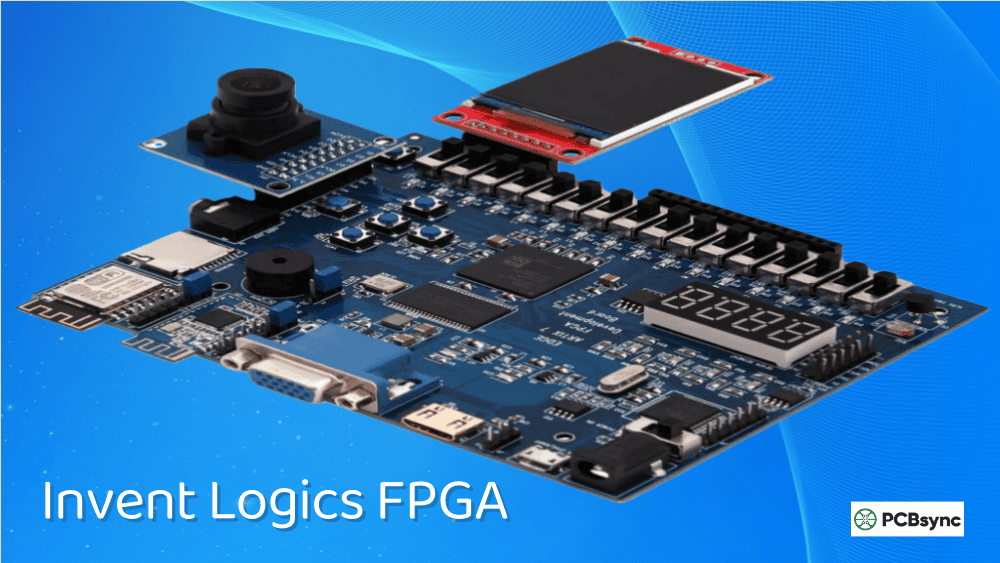
The EDGE series represents the core of Invent Logics FPGA offerings. These boards are built around Xilinx (now AMD) FPGA chips and come loaded with on-board peripherals that eliminate the need for additional expansion boards in most learning scenarios.
Board Model
FPGA Chip
Target Software
Key Features
Best For
EDGE Spartan 6
XC6SLX9 TQG144C
Xilinx ISE 14.7
WiFi, Bluetooth, ADC, DAC, VGA, LCD
Beginners, Basic Digital Design
EDGE Spartan 7
XC7S15FTGB196-1
Vivado Design Suite
All Spartan 6 features + More Logic
Intermediate Projects
EDGE Artix 7
XC7A35T-1FTG256
Vivado Design Suite
32MB SDRAM, HDMI Out, Micro SD
Video Processing, Advanced
EDGE Artix 7 200T
XC7A200T
Vivado Design Suite
Motor Control, PWM Controller
Industrial Applications
EDGE Kintex 7
XC7K160T
Vivado Design Suite
1GB DDR3, 16-ch ADC, USB 3.0
High-Performance Data Acquisition
EDGE ZYNQ SoC
XC7Z010/XC7Z020
Vivado + SDK
Dual ARM Cortex-A9, 512MB DDR3, Ethernet
Embedded Linux, SoC Design
Why Engineers Choose Invent Logics FPGA for Development
From my experience working on various embedded projects, I can tell you that choosing the right development board matters more than most people realize. The wrong choice can add weeks to your development timeline and create unnecessary frustration. Here is why Invent Logics FPGA boards deserve serious consideration.
Comprehensive On-Board Peripheral Integration
One thing that immediately stood out when I examined the EDGE boards was the peripheral count. Most budget FPGA boards give you the bare minimum—some LEDs, buttons, and maybe a VGA port. Invent Logics FPGA boards come with WiFi modules (ESP8266), Bluetooth interfaces, ADC and DAC converters, temperature sensors, LCD connectors, seven-segment displays, camera interfaces, and more. This means you can start prototyping IoT, video processing, or sensor fusion projects right out of the box.
Free Development Tool Compatibility
All EDGE FPGA kits work with the free WebPACK versions of Xilinx tools. The Spartan 6 board uses ISE 14.7, while the 7-series boards (Spartan 7, Artix 7, Kintex 7, and ZYNQ) work with Vivado. This eliminates additional software costs that can run into thousands of dollars with other vendors.
Built-In USB JTAG Programmer
Every Invent Logics FPGA board includes an on-board USB JTAG programmer using the FT2232H chip. This dual-channel USB interface also provides USB-to-UART functionality, eliminating the need for external programming cables that can cost $50 to $200 separately.
FPGA Design Services Offered by Invent Logics
Beyond hardware products, Invent Logics provides FPGA design services for custom projects. This is particularly valuable for companies or research institutions that need specialized FPGA solutions but lack in-house expertise.
Types of Design Services Available
The design services from Invent Logics FPGA team cover several key areas:
RTL Design and Implementation: Custom Verilog or VHDL coding based on your specifications. This includes everything from simple digital logic to complex state machines and data processing pipelines.
IP Core Integration: Assistance with integrating third-party IP cores or Xilinx-provided IPs into your design. This is especially useful for interfaces like PCIe, Ethernet, or video processing pipelines.
Board Customization: If the standard EDGE boards do not match your requirements, Invent Logics can create customized versions with specific peripherals, form factors, or FPGA variants.
Technical Consultation: For teams new to FPGA development, consultation services help with architecture decisions, tool selection, and design methodology.
Understanding IP Solutions in FPGA Development
IP cores (Intellectual Property cores) form the backbone of modern FPGA design. Think of them as pre-built, tested, and optimized functional blocks that you integrate into your design rather than building from scratch.
Categories of FPGA IP Cores
IP Category
Examples
Use Cases
Communication
UART, SPI, I2C, CAN
Sensor interfacing, peripheral control
High-Speed Serial
PCIe, SATA, Ethernet MAC
Data center, storage, networking
Video Processing
HDMI TX/RX, MIPI CSI, Video Scalers
Cameras, displays, streaming
Memory Controllers
DDR3/DDR4, SRAM, Flash
High-bandwidth data buffering
DSP Functions
FFT, FIR Filters, Modulators
Signal processing, communications
Processors
MicroBlaze, RISC-V, ARM
Embedded software execution
How Invent Logics FPGA Boards Support IP Development
The EDGE boards are specifically designed to facilitate IP core development and testing. For example:
The EDGE Artix 7 includes 32MB of SDRAM and HDMI output, making it suitable for developing and testing video processing IPs. The EDGE ZYNQ SoC combines ARM processors with programmable logic, enabling hardware-software co-design where you can offload computationally intensive tasks to custom IP cores while running control software on the ARM cores.
Practical Applications of Invent Logics FPGA Boards
Having worked on numerous embedded projects, I have seen FPGAs used in applications ranging from simple LED controllers to complex radar systems. Invent Logics FPGA boards support a wide range of practical applications.
Internet of Things Implementation
IoT development requires boards that can handle multiple sensor inputs, wireless communication, and efficient power management. The EDGE boards with on-board WiFi and Bluetooth modules, combined with ADC inputs for analog sensors, make them well-suited for IoT prototyping.
The parallel processing capability of FPGAs allows you to handle multiple sensors simultaneously without the timing conflicts you often encounter with microcontrollers. I have personally found this invaluable when working on projects that required reading temperature, humidity, light, and motion sensors concurrently.
Video and Image Processing Projects
Real-time video processing demands the kind of parallel computation that FPGAs excel at. The EDGE Artix 7 board with its CMOS camera interface, HDMI output, and SDRAM provides everything needed for image processing projects like edge detection, object recognition preprocessing, or video format conversion.
Motor Control and Industrial Applications
The EDGE Artix 7 200T variant specifically targets motor drive applications with integrated PWM controllers. This makes it suitable for developing inverter controls, servo motor drivers, or motion control systems. The high-speed ADC inputs allow for current sensing feedback loops essential in closed-loop motor control schemes.
Wireless Communication Prototyping
With on-board WiFi (ESP8266) and Bluetooth modules, the EDGE boards support wireless protocol development. I have used similar setups to prototype wireless sensor networks, remote monitoring systems, and IoT gateway devices. The FPGA handles data processing while the wireless modules manage connectivity, a division of labor that works remarkably well in practice.
Academic Research and Learning
Universities and technical colleges worldwide use Invent Logics FPGA boards for teaching digital design. The comprehensive documentation and example codes accelerate the learning curve significantly. As someone who has mentored junior engineers, I can confirm that having working examples to study and modify is far more effective than starting from scratch.
Getting Started with Invent Logics FPGA Development
For those new to FPGA development, here is a practical roadmap for getting started with Invent Logics FPGA products.
Step 1: Choose the Right Board
Select based on your application requirements and experience level:
Beginners: Start with the EDGE Spartan 6 or Spartan 7. The learning curve is gentler, and ISE/Vivado WebPACK handles these devices comfortably.
Intermediate Users: The EDGE Artix 7 offers more logic resources and advanced features like HDMI and SDRAM for more complex projects.
Advanced Users: The EDGE Kintex 7 or ZYNQ SoC boards provide the resources needed for high-performance or processor-plus-FPGA applications.
Step 2: Install Development Tools
Download and install the appropriate Xilinx software:
For Spartan 6: Xilinx ISE 14.7 WebPACK Edition For 7-Series devices: Xilinx Vivado Design Suite (free WebPACK version)
Step 3: Study the Documentation
Invent Logics provides user manuals, schematics, and XDC constraint files for each board. Spend time understanding the pin assignments and peripheral connections before writing any code.
Step 4: Run Example Projects
Start with the provided example codes to verify your setup works correctly. Modify these examples incrementally to understand how changes affect behavior.
Step 5: Follow FPGA Design Best Practices
After years of FPGA development, I have learned several practices that prevent common headaches:
Simulate Before Synthesizing: Always test your RTL code in simulation before deploying to hardware. Debugging on actual FPGA takes significantly longer than catching issues in simulation.
Use Proper Constraints: Define timing constraints early in your design. Invent Logics provides XDC files for each board, but custom logic requires additional constraint definitions.
Design for Testability: Include internal signal access points and status registers. The Xilinx Integrated Logic Analyzer (ILA) can capture internal signals, but only if you plan for it.
Version Control Everything: Use Git or similar tools to track your HDL files, constraints, and project settings. FPGA debugging often requires comparing working and broken versions.
Document Pin Assignments: Maintain a spreadsheet mapping FPGA pins to board connectors and peripherals. This prevents connection errors and speeds up hardware debugging.
Technical Specifications Comparison
Specification
Spartan 6
Spartan 7
Artix 7 (35T)
Kintex 7
ZYNQ SoC
Logic Cells
9,152
12,800
33,280
162,240
28,000 (Z010)
Block RAM (Kb)
576
360
1,800
11,700
2,100
DSP Slices
16
20
90
600
80
Max I/O Pins
102
100
170
400+
100
On-Board Memory
8MB Flash
8MB Flash
32MB SDRAM
1GB DDR3
512MB DDR3
USB Interface
JTAG + UART
JTAG + UART
JTAG + UART
USB 3.0
OTG + UART
Processor
None
None
None
None
Dual Cortex-A9
Useful Resources for FPGA Development
Here are valuable resources that complement Invent Logics FPGA development:
Xilinx/AMD Documentation Xilinx Documentation Portal: docs.xilinx.com Contains datasheets, user guides, and application notes for all FPGA families
Development Tools Vivado Design Suite: xilinx.com/products/design-tools/vivado.html ISE Design Suite: xilinx.com/products/design-tools/ise-design-suite.html
Learning Resources The Zynq Book (Free PDF): Available at fpgakey.com FPGA Tutorials: nandland.com/tutorials/index.html VHDLwhiz: vhdlwhiz.com
Community Forums Xilinx Community Forums: support.xilinx.com/s/ Reddit FPGA Community: reddit.com/r/FPGA
AllAboutFPGA Resources User Manuals: allaboutfpga.com (available for each board) Tutorial Videos: Available on their YouTube channel Example Codes: Provided with each board purchase
Support and After-Sales Service
One aspect of Invent Logics FPGA that consistently receives positive feedback is their technical support. Based on user reviews and my own observations, they typically respond within 2-3 hours during business days. Support covers installation issues, driver problems, and basic design guidance.
The company ships worldwide, with delivery times ranging from 2-4 days for domestic orders to about 10 days for international shipments. Products come with documentation, example codes, and constraint files—everything needed to start development immediately.
Frequently Asked Questions
What software do I need for Invent Logics FPGA boards?
For EDGE Spartan 6, you need Xilinx ISE 14.7 WebPACK (free download). For EDGE Spartan 7, Artix 7, Kintex 7, and ZYNQ boards, use Xilinx Vivado Design Suite WebPACK edition, which is also free. Both tools are available from the AMD/Xilinx website and include all necessary features for hobbyist and educational use.
Do EDGE boards require external power supplies?
By default, all EDGE FPGA boards receive power through the USB connection, which provides sufficient current for most applications. External 5V power adapters are optional and only required when your design demands higher current than USB can provide, such as when driving multiple LEDs or motors.
Can I use Invent Logics FPGA boards for commercial product development?
Yes, the EDGE boards can serve as development and prototyping platforms for commercial projects. Many engineers use them for proof-of-concept work before designing custom PCBs. The company also offers customization services if you need modified versions for production.
What programming languages work with these FPGA boards?
FPGA development primarily uses hardware description languages: VHDL or Verilog. For the ZYNQ SoC boards, you can also use C/C++ for the ARM processor portions and Python with the PYNQ framework. High-Level Synthesis (HLS) allows using C/C++ to generate hardware, though with some limitations.
How do Invent Logics FPGA boards compare to Digilent or Terasic alternatives?
Invent Logics boards typically cost 30-50% less than comparable Digilent boards while offering similar or more on-board peripherals. The trade-off is that Digilent has more extensive documentation and a larger user community. For students and hobbyists, Invent Logics provides excellent value. For professional development with strict timeline requirements, the larger vendor ecosystem around Digilent might justify the premium.
Comparing FPGA vs Microcontroller for Your Project
Understanding when to choose an FPGA over a microcontroller is crucial for project success. Here is a practical comparison based on my experience:
Factor
FPGA (Invent Logics EDGE)
Microcontroller (Arduino/STM32)
Parallel Processing
True hardware parallelism
Sequential execution
Latency
Deterministic, nanoseconds
Variable, microseconds
Learning Curve
Steeper (HDL required)
Gentler (C/C++)
Power Consumption
Higher for equivalent tasks
Generally lower
Cost
Higher entry point
Lower entry point
Flexibility
Reconfigurable hardware
Fixed architecture
Best For
Signal processing, high-speed I/O
Simple control, UI, networking
Invent Logics FPGA boards bridge this gap effectively. The ZYNQ SoC boards, in particular, give you both worlds: ARM processors for standard software tasks and programmable logic for hardware acceleration. This hybrid approach suits modern embedded applications that demand both flexibility and performance.
When to Choose FPGA for Your Design
Consider using Invent Logics FPGA boards when your project requires:
Processing multiple sensor inputs simultaneously without priority conflicts. Real-time response times in the microsecond or nanosecond range. Custom communication protocols not supported by standard microcontrollers. Video or image processing with frame rates exceeding 30 fps. Prototyping custom digital logic before ASIC development. Learning digital design principles with hands-on hardware.
When Microcontrollers Make More Sense
Standard microcontrollers remain better choices for applications with limited processing requirements, battery-powered designs where sleep modes are critical, projects requiring extensive third-party library support, or rapid prototyping where development speed outweighs performance needs.
Final Thoughts on Invent Logics FPGA Solutions
After examining Invent Logics FPGA products and comparing them against alternatives I have used over the years, they represent solid value for their target market. The EDGE series boards pack impressive feature sets at accessible price points, backed by documentation that actually helps beginners get started.
For universities running digital design courses, research labs on tight budgets, or individual engineers learning FPGA development, these boards deserve serious consideration. The combination of Xilinx 7-series FPGA technology, integrated peripherals, and free tool compatibility creates a practical development environment.
If you are evaluating options for your next FPGA project, visit allaboutfpga.com to review the complete product lineup and documentation. The investment in quality development hardware pays dividends throughout your project lifecycle—and Invent Logics FPGA products deliver that quality without requiring an enterprise budget.
Inquire: Call 0086-755-23203480, or reach out via the form below/your sales contact to discuss our design, manufacturing, and assembly capabilities.
Quote: Email your PCB files to Sales@pcbsync.com (Preferred for large files) or submit online. We will contact you promptly. Please ensure your email is correct.
Notes: For PCB fabrication, we require PCB design file in Gerber RS-274X format (most preferred), *.PCB/DDB (Protel, inform your program version) format or *.BRD (Eagle) format. For PCB assembly, we require PCB design file in above mentioned format, drilling file and BOM. Click to download BOM template To avoid file missing, please include all files into one folder and compress it into .zip or .rar format.