Inquire: Call 0086-755-23203480, or reach out via the form below/your sales contact to discuss our design, manufacturing, and assembly capabilities.
Quote: Email your PCB files to Sales@pcbsync.com (Preferred for large files) or submit online. We will contact you promptly. Please ensure your email is correct.
Notes: For PCB fabrication, we require PCB design file in Gerber RS-274X format (most preferred), *.PCB/DDB (Protel, inform your program version) format or *.BRD (Eagle) format. For PCB assembly, we require PCB design file in above mentioned format, drilling file and BOM. Click to download BOM template To avoid file missing, please include all files into one folder and compress it into .zip or .rar format.
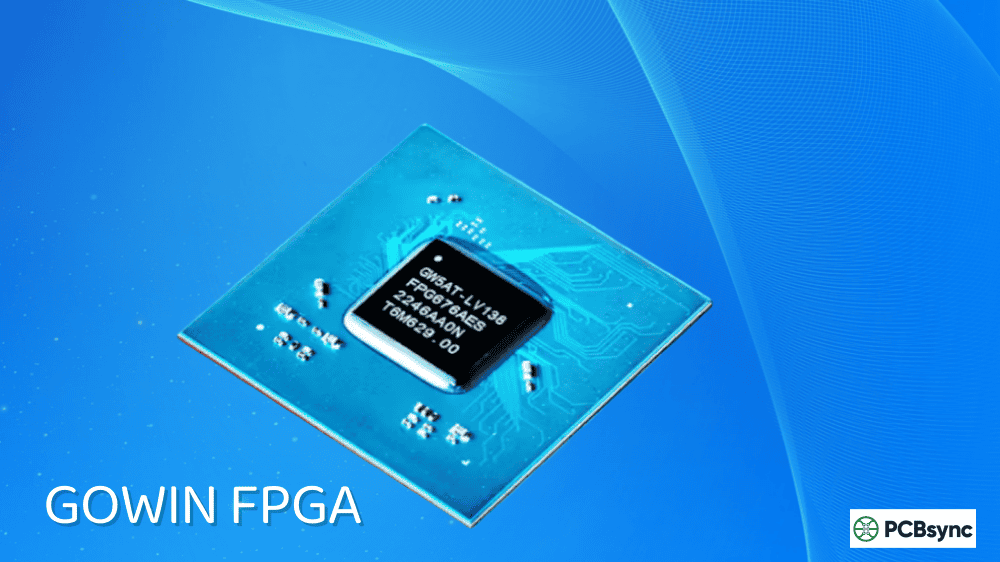
GOWIN Semiconductor was founded in 2014 by Jason Zhu and Dr. Ning Song—both former senior design managers at Lattice Semiconductor. They saw a gap in the market: while Xilinx and Altera (now AMD and Intel) were chasing high-end data center applications, the low-to-mid density FPGA space was underserved and overpriced.
The company moved fast. First silicon came in 2015, first revenues in 2017—that’s remarkably quick for an FPGA startup. They now bill themselves as “The World’s Fastest-Growing FPGA Company,” and based on their trajectory, they’re not wrong.
What sets GOWIN FPGA apart from competitors like Lattice, Xilinx, and Intel? Three things matter most to engineers like us: price, availability, and ecosystem support. GOWIN delivers on all three, especially if you’re working on applications that don’t need the raw horsepower of a Virtex or Stratix.
GOWIN offers two main product families, each targeting different use cases. Understanding the difference will save you headaches when selecting parts for your project.
LittleBee Family (Flash-Based, Non-Volatile)
The LittleBee family is where most makers will start. These are flash-based, non-volatile FPGAs—meaning they retain their configuration when power is removed and boot instantly on power-up. No external configuration memory needed.
Device Series
Logic Elements
Key Features
Best For
GW1N
1K – 9K LUTs
Basic FPGA, flash-based
Simple bridging, LED control
GW1NR
1K – 9K LUTs
Integrated PSRAM
Memory-constrained designs
GW1NS
4K LUTs
ARM Cortex-M3 hardcore
Embedded SoC applications
GW1NSR
4K LUTs
Cortex-M3 + PSRAM
Full embedded systems
GW1NRF
4K LUTs
Bluetooth 5.0 LE
Wireless IoT devices
GW1NZ
1K – 2K LUTs
Ultra-low power
Battery-powered devices
The LittleBee series offers packages as small as 2.4mm x 2.3mm, which is genuinely impressive for FPGA technology. I’ve used the GW1N-9 in several projects where board space was at a premium.
Arora and Arora V Families (SRAM-Based)
For more demanding applications, the Arora family provides SRAM-based FPGAs with higher logic density and performance.
Device Series
Logic Elements
Key Features
Best For
GW2A
18K – 55K LUTs
DSP blocks, high-speed I/O
Video processing, industrial
GW2AR
18K LUTs
Integrated 64Mbit SDRAM
Framebuffers, data buffering
GW5A (Arora V)
25K – 138K LUTs
22nm, SerDes up to 12.5Gbps
High-speed interfaces, AI
GW5AT
15K – 60K LUTs
PCIe 2.1, MIPI C-PHY
Automotive, 4K video
The newer Arora V family uses 22nm technology and integrates features like PCIe 2.1 hard cores, MIPI hard cores at 2.5Gbps per lane, and SerDes transceivers running up to 12.5Gbps. That puts them in the same ballpark as mid-range offerings from the big players, but at significantly lower cost.
Getting Started: Development Boards for Every Budget
One of GOWIN FPGA’s biggest advantages is the ecosystem of affordable development boards, primarily thanks to Sipeed’s Tang series. Here’s what’s currently available:
Board
FPGA Chip
LUTs
RAM
Price (Approx.)
Notable Features
Tang Nano 1K
GW1NZ-LV1
1,152
72Kb BSRAM
$5
Smallest, beginner-friendly
Tang Nano 4K
GW1NSR-4C
4,608
180Kb BSRAM + PSRAM
$15
Cortex-M3 hardcore
Tang Nano 9K
GW1NR-9
8,640
468Kb BSRAM
$20
HDMI output, best value
Tang Nano 20K
GW2AR-18
20,736
828Kb BSRAM + 64Mb
$25
Runs Linux, retro gaming
Tang Primer 25K
GW5A-25K
23,040
1.26Mb BSRAM
$35
MIPI, DDR3 support
Tang Mega 138K
GW5AST-138
138,240
6.12Mb BSRAM
$60
Hard RISC-V core, PCIe
The Tang Nano 9K hits the sweet spot for most hobbyists. At around $20, you get enough logic resources to run RISC-V soft cores, emulate retro game consoles, or handle real-world interfacing tasks. The onboard HDMI output and USB-C for programming make it plug-and-play.
Choosing the Right Board for Your Project
If you’re just learning FPGA basics—blinking LEDs, understanding timing, writing your first FSMs—the Tang Nano 1K is perfect. It’s essentially disposable at $5, so you won’t stress about breaking it.
For serious hobby projects involving video output, the Tang Nano 9K is my go-to recommendation. The HDMI output opens up display projects, and you have enough resources for meaningful designs. I’ve seen people implement VGA signal generators, simple CPUs, and complete retro console emulators on this board.
If you need to interface with cameras or modern sensors, step up to the Tang Primer 25K. The MIPI support and DDR3 capability let you work with contemporary peripherals rather than being limited to legacy interfaces.
For the most demanding applications—or if you want to run actual Linux on a simulated RISC-V core—the Tang Mega 138K delivers performance comparable to mid-range offerings from major vendors, at a fraction of the cost.
GOWIN EDA: The Development Environment
GOWIN provides their own EDA toolchain, and it’s surprisingly capable for a smaller vendor. Here’s what you need to know:
Standard vs. Education Edition
GOWIN EDA comes in two flavors. The Education Edition is completely free with no license required—it supports most of the smaller devices that hobbyists care about. The Standard Edition (now also free as of September 2024) requires a license but supports all devices and includes additional optimization features.
Pro tip: You can use Sipeed’s license server (106.55.34.119, port 10559) instead of applying directly to GOWIN. Works great for hobbyist use.
What’s Included in the Toolchain
The GOWIN EDA suite handles the complete flow from RTL to bitstream, including integrated synthesis with GowinSynthesis, place and route optimization, timing analysis, and built-in programmer support. A particularly nice feature is the IP Core Generator that lets you configure PLLs, DSP blocks, and memory controllers through a GUI. The Gowin Analyzer Oscilloscope (GAO) provides in-system debugging similar to Xilinx’s ChipScope, which is essential for tracking down timing issues.
Open-Source Alternative: Yosys + Apicula
If you prefer open-source tools, the community has reverse-engineered the GOWIN bitstream format through the Apicula project. Combined with Yosys for synthesis and nextpnr for place-and-route, you get a fully open toolchain. The OSS CAD Suite packages everything nicely.
This matters because it means you’re not locked into vendor tools forever—a genuine concern when choosing an FPGA vendor for a product design.
Based on my experience and what I’ve seen in the community, here’s where GOWIN FPGA makes the most sense:
Video and Display Interfacing
GOWIN’s hard MIPI D-PHY and C-PHY support is genuinely competitive. If you need to bridge camera sensors to processors, convert between display interfaces, or aggregate multiple video streams, the LittleBee and Arora devices handle this elegantly. Companies like BOE and LG have adopted GOWIN for automotive display applications.
Retro Gaming and Emulation
The Tang series has become incredibly popular for retro gaming. There are mature cores for NES, SNES, Game Boy, GBA, Mega Drive, and Amiga. The Tang Console board is specifically designed for this use case, with proper joystick ports and controller support.
RISC-V Development
GOWIN provides official RISC-V soft core IP that integrates with their EDA tools. You can also run community cores like PicoRV32 or VexRiscv. The Tang Nano 20K can even boot Linux on a simulated RISC-V system—not fast, but educational.
Industrial and Automotive
GOWIN has AEC-Q100 qualified parts for automotive applications and ISO 26262 certified tools. Their chips are showing up in ADAS systems, instrument clusters, and motor control applications. The supply chain advantage (made entirely in China) also appeals to manufacturers concerned about geopolitical disruptions.
In the automotive space specifically, GOWIN FPGA devices excel at multi-screen display bridging—a common pain point in modern vehicle cockpits. Traditional automotive processors often have limited MIPI channels, but today’s instrument clusters and infotainment systems demand multiple high-resolution displays. GOWIN’s hard MIPI interfaces solve this elegantly. Major automotive suppliers like SAIC Motor have adopted GOWIN for transmission control development, and display manufacturers including BOE and LG are using GOWIN for miniLED local dimming implementations.
IoT and Edge Computing
The ultra-low power GW1NZ series targets battery-powered IoT applications where every microamp counts. Combined with the GW1NRF’s integrated Bluetooth 5.0 LE, you can build complete wireless sensor nodes with minimal external components. The flash-based non-volatile architecture means instant-on operation without the boot delay of SRAM-based FPGAs—critical for energy harvesting applications where power may be intermittent.
Motor Control and Servo Applications
GOWIN recently demonstrated advanced motor control IP implementing field-oriented control (FOC) schemes for permanent magnet synchronous motors. The GW5AS-25K, which combines a 288MHz ARM Cortex-M4 with FPGA fabric, provides precise torque and speed control for industrial motor applications. This hybrid approach—hard processor for supervisory control, FPGA for real-time current loops—represents a cost-effective alternative to dedicated motor control ASICs.
GOWIN FPGA vs. Competition: Honest Comparison
Let me give you a straight comparison with the alternatives:
Factor
GOWIN
Lattice
AMD (Xilinx)
Intel (Altera)
Price (low-end)
$3-15
$5-20
$15-50
$15-40
Dev board cost
$5-60
$25-200
$50-400
$50-300
Free tool limitations
Minimal
Minimal
Moderate
Moderate
Open-source support
Good
Excellent
Limited
Limited
Documentation quality
Fair
Good
Excellent
Good
Supply availability
Good
Variable
Variable
Variable
GOWIN wins on price and typically on availability. Lattice wins on open-source tool maturity (iCE40 is fully open). AMD and Intel win on raw performance and documentation depth. Choose based on what matters for your project.
Useful Resources and Downloads
Here are the resources I actually use when working with GOWIN FPGA devices:
Official Resources
The official GOWIN EDA download page at gowinsemi.com/en/support/download_eda provides the latest toolchain versions. For documentation, the database at gowinsemi.com/en/support/database contains datasheets, user guides, and application notes for all device families. When you need to apply for a license, the license application page is available at gowinsemi.com/en/support/license, though as I mentioned earlier the Sipeed license server works well for hobbyist use.
Community Resources
Sipeed maintains excellent documentation at wiki.sipeed.com/hardware/en/tang, which covers the Tang board series in detail. For open-source toolchain setup, the OSS CAD Suite at github.com/YosysHQ/oss-cad-suite-build packages everything you need. The Tang examples repository at github.com/sipeed/TangNano-9K-example offers sample projects for the Tang Nano 9K. Lushay Labs provides outstanding tutorials at learn.lushaylabs.com/getting-setup-with-the-tang-nano-9k for beginners getting started with the platform.
GitHub Projects Worth Exploring
For retro gaming enthusiasts, the tangcore repository at github.com/YosysHQ provides emulator cores for various platforms. The openFPGALoader project handles device programming across multiple FPGA vendors. There’s also an active community building custom projects and sharing solutions.
Common Issues and How to Solve Them
After working with GOWIN devices for a while, here are the gotchas I’ve learned to avoid:
Programmer connection problems are often the first hurdle newcomers face. The built-in programmer in the IDE can be finicky on Linux. If you’re having trouble, try openFPGALoader instead—it works more reliably across platforms.
License issues can also cause headaches. For the Education Edition, make sure you’re using a supported device. For Standard Edition, the Sipeed license server is the path of least resistance.
If you’re seeing timing failures during implementation, check the Place Options setting in Project Configuration. Setting it to “2” enables timing-optimized placement, which helps but increases build time significantly.
Finally, don’t overlook the importance of pin constraints. Double-check your constraint file against the actual board schematic—pin naming conventions vary between boards even for the same FPGA chip.
Frequently Asked Questions About GOWIN FPGA
Is GOWIN FPGA suitable for production use?
Yes. GOWIN supplies parts to major automotive and consumer electronics manufacturers. They have AEC-Q100 qualified automotive-grade devices and commit to 15+ year product lifecycles. For production, work directly with GOWIN or their distributors like Mouser for proper supply agreements.
Can I use GOWIN FPGAs without Windows?
Absolutely. The GOWIN EDA tools run on Linux, and the open-source toolchain (Yosys + Apicula + nextpnr) works on Linux, macOS, and Windows. As of late 2024, GOWIN also released a macOS-compatible Education Edition.
How does GOWIN FPGA compare to Lattice iCE40 for beginners?
Both are excellent for learning. The iCE40 has more mature open-source tool support and slightly better community documentation. GOWIN offers more logic resources per dollar and better official tool support. If you want pure open-source, start with iCE40. If you want more capability for the money, go GOWIN.
Are there export restrictions on GOWIN FPGAs?
GOWIN was placed on the CCMC list by the US government, which affects some institutional purchases and export scenarios. For hobbyist and most commercial use, parts are readily available through distributors like Mouser and DigiKey. Check current regulations if you’re in a restricted industry.
What programming languages work with GOWIN FPGA?
GOWIN supports standard Verilog and VHDL. The tools also support Verilog-2001 and SystemVerilog subsets. For high-level synthesis, you can use third-party tools that output Verilog, though this isn’t as mature as the Xilinx HLS ecosystem.
Final Thoughts: Is GOWIN FPGA Right for Your Project?
GOWIN FPGA has earned its place in my toolkit. For hobbyist projects, rapid prototyping, and cost-sensitive production designs, it’s genuinely compelling. The combination of low prices, decent tooling, and growing community support makes the barrier to FPGA development lower than it’s ever been.
That said, if you need the absolute best documentation, the most mature IP ecosystem, or the highest-performance devices, AMD and Intel still lead. And if open-source tooling is your priority above all else, Lattice’s iCE40 remains the gold standard.
But for most of us working on practical projects—video bridges, RISC-V experiments, retro gaming, industrial control—GOWIN FPGA delivers exactly what we need without breaking the bank. A $20 Tang Nano 9K and a weekend of tinkering can teach you more about digital design than months of reading textbooks.
The Supply Chain Advantage
One aspect that deserves more attention is GOWIN’s supply chain positioning. During the semiconductor shortages of 2020-2022, many engineers scrambled to find alternatives to Xilinx and Lattice parts that had gone on allocation. GOWIN’s fully Chinese supply chain—from design to fabrication with TSMC and SMIC—provided an alternative source that wasn’t subject to the same constraints.
This isn’t just about crisis management. For companies concerned about single-source dependency, GOWIN offers pin-compatible alternatives to many Lattice and Altera devices. This doesn’t mean drop-in functional replacement (the bitstreams aren’t compatible), but the hardware footprint can remain unchanged, simplifying any potential migration.
GOWIN also commits to 15+ year product lifecycles from first production—a meaningful promise for industrial and automotive customers who need long-term supply assurance.
Looking Forward: GOWIN’s Roadmap
GOWIN continues to push upmarket with their 22nm Arora V family, but they’re not abandoning the low end that made them successful. The company has announced plans for 25K and 60K LUT devices in the Arora V family, filling gaps in their mid-range portfolio.
Their investment in automotive (ISO 26262 certified tools, AEC-Q100 qualified parts) and AI/ML applications suggests they’re positioning for growth markets rather than just commodity replacement.
For makers and hobbyists, this means the ecosystem should only get better. More parts, more development boards, more community projects, and better documentation are all trending in the right direction.
Give it a shot. The worst-case scenario is you’re out twenty bucks and learned something new.
Inquire: Call 0086-755-23203480, or reach out via the form below/your sales contact to discuss our design, manufacturing, and assembly capabilities.
Quote: Email your PCB files to Sales@pcbsync.com (Preferred for large files) or submit online. We will contact you promptly. Please ensure your email is correct.
Notes: For PCB fabrication, we require PCB design file in Gerber RS-274X format (most preferred), *.PCB/DDB (Protel, inform your program version) format or *.BRD (Eagle) format. For PCB assembly, we require PCB design file in above mentioned format, drilling file and BOM. Click to download BOM template To avoid file missing, please include all files into one folder and compress it into .zip or .rar format.