Inquire: Call 0086-755-23203480, or reach out via the form below/your sales contact to discuss our design, manufacturing, and assembly capabilities.
Quote: Email your PCB files to Sales@pcbsync.com (Preferred for large files) or submit online. We will contact you promptly. Please ensure your email is correct.
Notes: For PCB fabrication, we require PCB design file in Gerber RS-274X format (most preferred), *.PCB/DDB (Protel, inform your program version) format or *.BRD (Eagle) format. For PCB assembly, we require PCB design file in above mentioned format, drilling file and BOM. Click to download BOM template To avoid file missing, please include all files into one folder and compress it into .zip or .rar format.
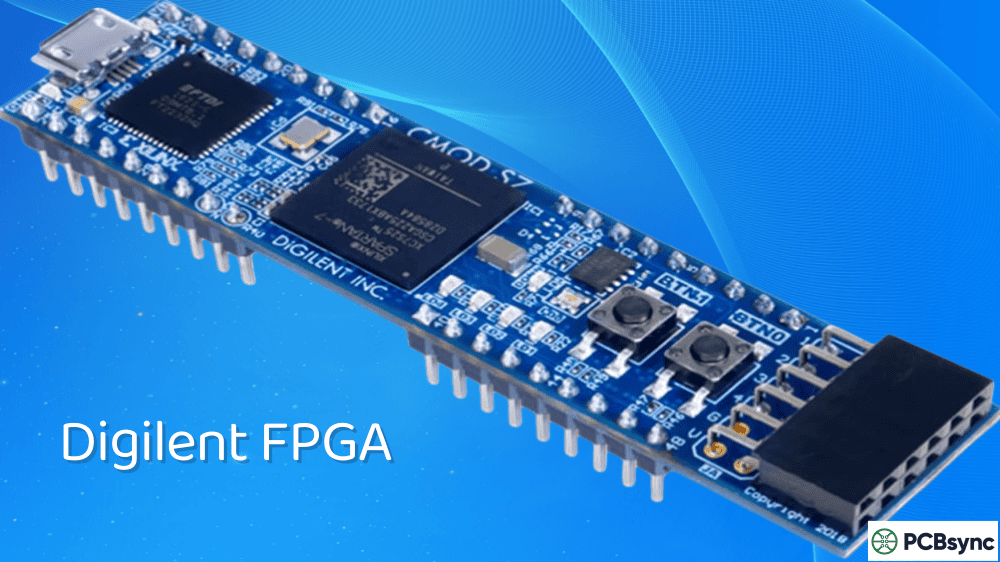
After spending over a decade working with programmable logic devices across dozens of PCB projects, I can tell you that choosing the right development platform makes or breaks your FPGA learning experience. Digilent FPGA boards have become my go-to recommendation for engineers stepping into the world of programmable logic, and there are solid reasons why universities and professionals worldwide share this preference.
In this comprehensive guide, I’ll walk you through everything you need to know about Digilent FPGA development boards, from entry-level trainers to advanced prototyping platforms. Whether you’re a student tackling your first digital logic course or an engineer evaluating platforms for a commercial prototype, this breakdown will help you make an informed decision.
Digilent has partnered with AMD (formerly Xilinx) for over two decades, establishing themselves as a global leader in cost-optimized FPGA and System-on-Chip development boards. What sets them apart isn’t just the hardware quality—it’s the complete ecosystem they’ve built around their products.
From a practical engineering standpoint, three things matter when selecting a development board: documentation quality, toolchain compatibility, and community support. Digilent FPGA boards deliver on all three fronts. Their boards come with extensive reference manuals, schematic files, constraint files ready for Vivado, and pre-built example projects that actually work out of the box.
The built-in programming circuits eliminate the need for external JTAG programmers, which saves you both money and desk space. Every board includes USB connectivity for programming and communication, meaning you can unbox a Digilent FPGA board and have it running your first design within an hour.
Key Benefits of the Digilent Ecosystem
The Pmod (Peripheral Module) system deserves special mention. These standardized expansion modules let you add sensors, displays, motor controllers, and communication interfaces without designing custom daughter boards. With over 70 Pmod peripheral boards available, you can prototype almost any application without touching a soldering iron.
Academic pricing makes these boards accessible to students, while the same hardware scales to professional prototyping. I’ve personally used Digilent boards for everything from teaching undergraduate courses to validating timing-critical designs before committing to custom silicon.
Understanding the Digilent FPGA Board Lineup
Digilent organizes their FPGA boards into distinct categories based on target applications. Let me break down the main product lines so you understand what each brings to the table.
Introductory FPGA Boards for Beginners
The Basys and entry-level Arty boards target students and hobbyists learning digital design fundamentals. These boards come packed with on-board peripherals like switches, buttons, LEDs, and seven-segment displays—everything you need to complete introductory projects without additional hardware.
Mid-Range Development Platforms
The Nexys series and full-featured Arty boards bridge the gap between learning and professional development. These offer larger FPGAs, more memory, and expanded connectivity options like Ethernet, HDMI, and DDR memory interfaces.
Advanced Prototyping Boards
Boards like the Genesys 2 and Genesys ZU pack serious processing power with high-end Xilinx devices, extensive memory subsystems, and high-speed interfaces suitable for demanding applications like video processing, software-defined radio, and machine learning acceleration.
Zynq-Based SoC Platforms
The Zybo, Arty Z7, and Cora Z7 boards feature Xilinx Zynq devices that integrate ARM Cortex-A9 processors with FPGA fabric. These platforms let you develop hybrid hardware-software systems, running Linux on the ARM cores while implementing custom accelerators in the programmable logic.
Top Digilent FPGA Boards Compared
Board
FPGA Device
Logic Cells
RAM
Key Features
Best For
Price Range
Basys 3
Artix-7 XC7A35T
33,280
Block RAM only
VGA, 16 switches, 16 LEDs, 4 Pmod ports
Beginners, education
$150-180
Nexys A7-100T
Artix-7 XC7A100T
101,440
128 MB DDR2
Ethernet, USB, accelerometer, temp sensor
ECE curriculum, intermediate
$270-300
Arty A7-35T
Artix-7 XC7A35T
33,280
256 MB DDR3L
Arduino headers, Ethernet, 4 Pmod
Makers, MicroBlaze development
$130-160
Arty A7-100T
Artix-7 XC7A100T
101,440
256 MB DDR3L
Same as A7-35T with larger FPGA
Advanced prototyping
$220-250
Zybo Z7-20
Zynq XC7Z020
85,000
1 GB DDR3
HDMI in/out, Pcam connector, ARM Cortex-A9
Embedded vision, SoC development
$300-350
Cora Z7-10
Zynq XC7Z010
28,000
512 MB DDR3
Compact form factor, Arduino compatible
Embedded prototyping
$130-150
Genesys 2
Kintex-7 XC7K325T
326,080
1 GB DDR3
PCIe, HDMI 2.0, FMC connector
High-performance applications
$1000+
Genesys ZU
Zynq UltraScale+
Varies
DDR4
4K video, USB 3.0, multiple expansion
Linux systems, AI/ML
$1500+
Choosing the Right Digilent FPGA Board for Your Project
Selecting the appropriate development board depends on your experience level, project requirements, and budget. Let me share some practical guidance based on common use cases.
For Learning Digital Logic and HDL Programming
If you’re just starting with FPGA development, the Basys 3 remains the gold standard for beginners. Its collection of on-board I/O devices means you can implement everything from basic combinational logic to VGA controllers without buying additional hardware. Universities worldwide use this board for introductory digital design courses, which means you’ll find abundant tutorials, example projects, and community support online.
The Basys 3 uses the Artix-7 XC7A35T FPGA, which provides enough resources for learning but won’t overwhelm you with complexity. The board works exclusively with AMD Vivado Design Suite, and the free Standard Edition handles everything you’ll throw at it during the learning phase.
For Intermediate Projects and ECE Curriculum
The Nexys A7 offers significantly more capability while maintaining beginner-friendly usability. With a larger FPGA, DDR2 memory, and built-in sensors, this board supports more ambitious projects like embedded processors, audio processing, and basic computer architectures. The integrated temperature sensor, microphone, and three-axis accelerometer enable sensor fusion projects without external hardware.
I’ve seen students build complete RISC processors, VGA game consoles, and digital audio synthesizers on the Nexys A7. The 128 MB of DDR2 RAM opens up frame buffer applications that simply aren’t possible on the Basys 3.
For Makers and Hobbyists
The Arty A7 series targets makers who want Arduino-style accessibility combined with FPGA power. The Arduino-compatible headers let you use existing shields, while four Pmod ports provide access to Digilent’s expansion ecosystem. The included DDR3L memory and Ethernet PHY enable network-connected projects and memory-intensive applications.
If you’re coming from the microcontroller world, the Arty A7 provides a familiar form factor while introducing you to hardware parallelism. The MicroBlaze soft processor support lets you run software while learning to implement custom peripherals in fabric.
For Embedded Vision and SoC Development
Zynq-based boards like the Zybo Z7 combine ARM processors with FPGA fabric, enabling true hybrid hardware-software development. The dual-core Cortex-A9 runs Linux or bare-metal applications while the programmable logic handles custom acceleration.
The Zybo Z7 particularly shines for embedded vision applications. Its MIPI CSI-2 compatible Pcam connector, HDMI input/output, and high-bandwidth DDR3 interface create a capable computer vision development platform. Digilent provides open-source IP cores for camera interfaces and video processing pipelines.
For High-Performance Prototyping
When you need serious FPGA resources, the Genesys 2 and Genesys ZU deliver. The Genesys 2’s Kintex-7 FPGA offers over 326,000 logic cells, 16 GTX transceivers, and 1 GB of DDR3—suitable for applications like software-defined radio, high-speed data acquisition, and compute acceleration.
The Genesys ZU steps up to Zynq UltraScale+ territory, featuring quad-core ARM Cortex-A53 processors, real-time Cortex-R5 cores, and substantial FPGA fabric. This platform targets Linux-based applications requiring Wi-Fi, cellular connectivity, or 4K video processing.
Setting up your development environment follows a straightforward process regardless of which Digilent FPGA board you choose.
Software Requirements
AMD Vivado Design Suite serves as the primary development tool for all current Digilent boards. The free Standard Edition (formerly WebPACK) supports every device on their mainstream boards. You’ll use Vivado for design entry, simulation, synthesis, implementation, and bitstream generation.
For Zynq-based boards, AMD Vitis Unified Software Platform handles software development for the ARM processors. PetaLinux Tools simplify building and deploying embedded Linux systems.
Digilent’s own Adept software provides additional utilities for board programming and testing, though Vivado handles most programming tasks directly.
First Steps with Your Board
Once you’ve installed Vivado and connected your board, I recommend working through these initial exercises:
Download and run the GPIO test project from Digilent’s Resource Center to verify board functionality
Complete the basic Vivado tutorial using LED blinking or switch-to-LED routing
Implement a simple combinational circuit like a multiplexer or encoder
Add sequential logic with counters and state machines
Interface with on-board peripherals like VGA or seven-segment displays
Each Digilent board includes board support files (master XDC constraint files) that define pin mappings for all on-board peripherals. These files save hours of reference manual consultation during initial development.
Digilent FPGA Applications and Use Cases
The versatility of Digilent FPGA boards enables diverse applications across education, research, and industry.
Educational Applications
Digital logic fundamentals, computer architecture, embedded systems, and signal processing courses commonly use Digilent boards. The combination of accessible hardware, comprehensive documentation, and academic pricing makes them ideal for classroom deployment. Many universities require students to purchase their own Basys 3 or Arty boards for hands-on learning.
Prototyping and Product Development
Engineers use Digilent boards to validate designs before committing to custom hardware. The Pmod ecosystem allows rapid peripheral integration, while standardized interfaces simplify transitioning proven designs to production boards. I’ve used Digilent boards to prototype control systems, communication interfaces, and sensor processing pipelines.
Research and Advanced Applications
High-end boards like the Genesys series support research in areas including reconfigurable computing, neural network acceleration, software-defined radio, and high-speed data acquisition. The combination of substantial FPGA resources, high-speed interfaces, and FMC expansion enables demanding research applications.
Common Project Categories
Application Area
Suitable Boards
Typical Projects
Digital Logic Education
Basys 3, Cmod A7
Combinational circuits, state machines, counters
Computer Architecture
Nexys A7, Arty A7
RISC processors, cache controllers, pipelines
Signal Processing
Arty A7, Zybo Z7
FIR filters, FFT implementations, audio effects
Embedded Vision
Zybo Z7, Genesys ZU
Object detection, video processing, camera interfaces
Motor Control
Arty A7, Cora Z7
PWM generation, encoder interfaces, closed-loop control
Communication Systems
Nexys A7, Genesys 2
UART, SPI, I2C, Ethernet, high-speed transceivers
Essential Resources for Digilent FPGA Development
Success with FPGA development depends heavily on quality learning resources. Here are the essential references I recommend for anyone working with Digilent boards.
Several textbooks specifically target Digilent hardware:
“Introduction to Digital Design Using Digilent FPGA Boards” by Haskell and Hanna covers both Verilog and VHDL approaches
“FPGA Prototyping By VHDL Examples” by Pong Chu provides excellent practical projects
“Free Range VHDL” offers a free, open-source introduction to VHDL fundamentals
Online Courses and Tutorials
Platforms like Coursera, Udemy, and YouTube host numerous FPGA courses using Digilent hardware. Search for courses specifically targeting Vivado and your chosen board model for the most relevant content.
Expanding Your Digilent FPGA Board with Pmods
The Pmod ecosystem represents one of Digilent’s most valuable contributions to the development board landscape. These 6 or 12-pin expansion modules follow a standardized interface specification, enabling plug-and-play functionality across all Pmod-compatible boards.
Communication Pmods: Wi-Fi, Bluetooth, cellular, CAN, RS-485, USB-to-UART
Interface Pmods: DACs, ADCs, motor drivers, relay controllers
Storage Pmods: SD card interfaces, serial flash memory
Each Pmod includes reference designs and documentation, dramatically reducing development time for common peripheral interfaces. The standardized pinout means you can swap modules between projects without redesigning your HDL.
Tips from the Bench: Practical Advice for Digilent FPGA Development
After years of working with these boards, I’ve accumulated some practical wisdom worth sharing.
Power Supply Considerations
Most Digilent boards power adequately from USB for development purposes. However, if you’re driving significant external loads through Pmod connectors or GPIO pins, consider using the barrel jack power input where available. The Arty and Nexys boards support higher current through external supplies.
Constraint File Management
Always start with the master XDC file from Digilent’s reference page for your specific board revision. Comment out unused pin assignments rather than deleting them—you’ll want those references later. Pay attention to I/O standards; mixing incompatible standards within a bank causes cryptic implementation failures.
Clock Domain Considerations
Most Digilent boards include 100 MHz crystal oscillators. Use MMCM or PLL primitives to generate derived clocks rather than clock dividers. Proper clock domain crossing becomes critical as your designs grow—establish good habits early.
Version Control Your Projects
Vivado projects don’t version control well due to generated files. Create TCL scripts to rebuild your project from source files, and version control only the HDL, constraints, and block design TCL exports. This approach also makes collaboration and backup straightforward.
Frequently Asked Questions About Digilent FPGA Boards
Which Digilent FPGA board should I buy as a complete beginner?
The Basys 3 remains the best choice for absolute beginners. Its comprehensive on-board I/O, extensive documentation, and widespread educational adoption mean you’ll find abundant tutorials and community support. The student-friendly price point doesn’t hurt either. Start here, learn the fundamentals, then upgrade to a more capable board as your skills develop.
Can I use Digilent FPGA boards for commercial prototyping?
Absolutely. Many engineers use Digilent boards for proof-of-concept development before designing custom hardware. The boards themselves aren’t suitable for deployment, but they provide excellent platforms for validating designs, developing IP cores, and demonstrating functionality to stakeholders. The Genesys series and Zybo boards particularly suit commercial prototyping workflows.
What’s the difference between pure FPGA boards and Zynq-based boards?
Pure FPGA boards like the Basys 3 and Arty A7 contain only programmable logic fabric—you implement everything in hardware description languages. Zynq-based boards like the Zybo Z7 add ARM processor cores tightly integrated with the FPGA fabric. This combination lets you run software (including Linux) on the ARM cores while implementing hardware acceleration in the FPGA. Choose pure FPGA for learning digital design fundamentals; choose Zynq for embedded systems and software-hardware integration.
Do I need to buy an external programmer for Digilent boards?
No. All Digilent FPGA boards include built-in programming circuits accessible through USB. You connect the board to your computer, and Vivado programs the FPGA directly. The onboard circuits support both volatile configuration (lost on power cycle) and non-volatile flash programming (persistent across power cycles).
Is AMD Vivado difficult to learn?
Vivado has a learning curve, but Digilent’s extensive tutorials and example projects smooth the path considerably. The tool handles everything from simulation through implementation, which actually simplifies the workflow compared to older approaches requiring multiple separate tools. Start with guided tutorials rather than trying to learn everything at once. Most users become comfortable with basic workflows within a week of regular practice.
Making Your Decision
Selecting a Digilent FPGA board ultimately depends on matching your requirements to board capabilities. For educational purposes and learning fundamentals, start with the Basys 3. For more ambitious projects requiring memory and connectivity, consider the Nexys A7 or Arty A7. For embedded systems development, the Zynq-based platforms offer compelling hybrid hardware-software capabilities.
The Digilent ecosystem’s real strength lies in its coherence—consistent documentation quality, standardized expansion interfaces, and active community support across the entire product range. Whatever board you choose, you’re joining a well-supported platform that scales from first projects through professional development.
Invest in understanding the fundamentals with a capable starter board, and you’ll have skills that transfer directly to more advanced platforms and eventually custom designs. The journey into programmable logic rewards patience and systematic learning—Digilent boards provide an excellent foundation for that journey.
Inquire: Call 0086-755-23203480, or reach out via the form below/your sales contact to discuss our design, manufacturing, and assembly capabilities.
Quote: Email your PCB files to Sales@pcbsync.com (Preferred for large files) or submit online. We will contact you promptly. Please ensure your email is correct.
Notes: For PCB fabrication, we require PCB design file in Gerber RS-274X format (most preferred), *.PCB/DDB (Protel, inform your program version) format or *.BRD (Eagle) format. For PCB assembly, we require PCB design file in above mentioned format, drilling file and BOM. Click to download BOM template To avoid file missing, please include all files into one folder and compress it into .zip or .rar format.