Inquire: Call 0086-755-23203480, or reach out via the form below/your sales contact to discuss our design, manufacturing, and assembly capabilities.
Quote: Email your PCB files to Sales@pcbsync.com (Preferred for large files) or submit online. We will contact you promptly. Please ensure your email is correct.
Notes: For PCB fabrication, we require PCB design file in Gerber RS-274X format (most preferred), *.PCB/DDB (Protel, inform your program version) format or *.BRD (Eagle) format. For PCB assembly, we require PCB design file in above mentioned format, drilling file and BOM. Click to download BOM template To avoid file missing, please include all files into one folder and compress it into .zip or .rar format.
As a PCB engineer with over a decade of experience, I’ve worked with everything from simple single-sided boards to complex 16-layer HDI designs. But if there’s one PCB type that continues to dominate the electronics industry, it’s the humble 2 layer PCB. These double-sided boards account for approximately 40% of global PCB production, and for good reason—they hit the sweet spot between cost, complexity, and performance that most electronic products need.
In this comprehensive guide, I’ll walk you through everything you need to know about 2 layer PCBs, from fundamental concepts to advanced design techniques. Whether you’re a hobbyist building your first project or a seasoned engineer optimizing production costs, this article will give you the practical knowledge you need.
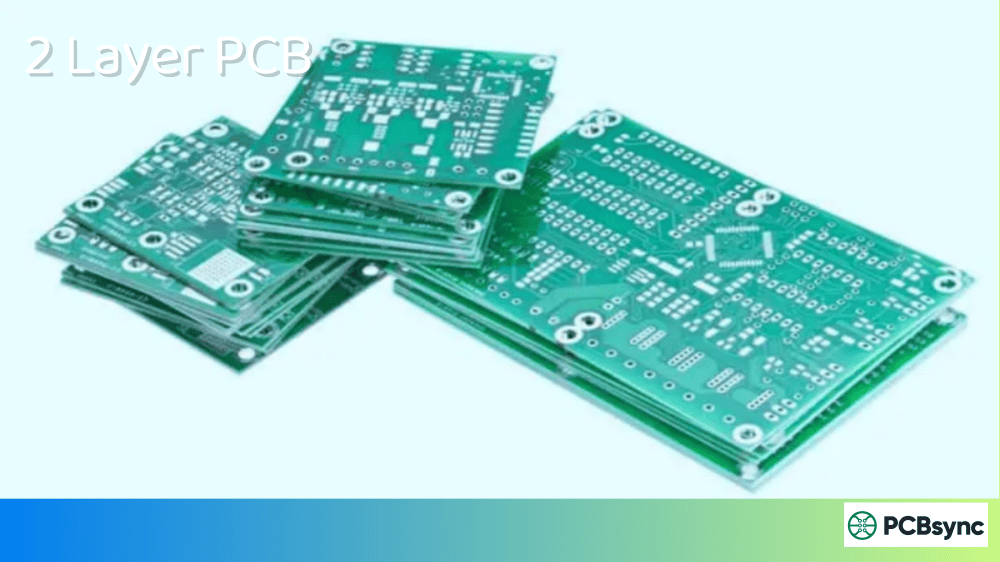
A 2 layer PCB, also known as a double-sided PCB or double layer PCB, is a printed circuit board featuring two conductive copper layers—one on each side of an insulating substrate. These layers are typically connected through plated through-holes (PTH), commonly called vias, which allow electrical signals to pass between the top and bottom surfaces.
Unlike single-sided boards where components and traces exist on only one side, a 2 layer PCB allows designers to place components on both surfaces and route traces across two layers. This fundamental difference opens up significantly more design flexibility without the cost and complexity of multilayer PCB construction.
The structure is straightforward: imagine a sandwich where the bread slices are copper foil and the filling is FR-4 fiberglass laminate. The copper layers are etched to create circuit patterns, and tiny drilled holes connect the two sides wherever electrical connections are needed.
FR-4 is the workhorse material for 2 layer PCB fabrication. It’s a composite of woven fiberglass cloth and epoxy resin that offers excellent electrical insulation, mechanical strength, and temperature resistance. For specialized applications, you might encounter:
Aluminum-backed FR-4: Enhanced thermal dissipation for LED applications
Polyimide: Flexible PCB applications requiring bend tolerance
For most 2 layer PCB designs, 1oz copper is sufficient. I typically recommend stepping up to 2oz only when current requirements exceed what proper trace sizing can handle with standard copper.
2 Layer PCB vs Single Layer vs Multilayer: When to Choose Each
The decision between layer counts isn’t just about complexity—it’s about matching your design requirements to the most cost-effective solution.
Your circuit has moderate complexity with 50-200 nets
Operating frequencies stay below 50 MHz for digital signals
Budget constraints require cost optimization
You can tolerate slightly larger board dimensions
Production volume justifies tooling costs
Through-hole components are part of the design
Consider 4+ Layers When:
BGA packages require fanout routing
High-speed signals (USB 3.0, HDMI, DDR) are present
EMC compliance is critical for certification
Board space is severely constrained
Dedicated power and ground planes are necessary
Key Advantages of 2 Layer PCB
After designing hundreds of 2 layer boards, I’ve come to appreciate their unique strengths:
Cost-Effectiveness: Manufacturing costs run 30-50% lower than 4-layer boards. With simpler fabrication processes and reduced material usage, you’re looking at significant savings on medium to high-volume production runs.
Faster Turnaround: Most PCB fabricators can turn around 2 layer boards in 24-48 hours for prototypes. This accelerated timeline means faster design iterations and shorter time-to-market.
Easier Debugging and Repair: With all traces accessible from the outside, troubleshooting becomes straightforward. I can probe signals directly without worrying about buried layers, making prototype bring-up significantly easier.
Simplified Manufacturing: Fewer layers mean fewer opportunities for registration errors, delamination, or drilling defects. Yield rates for 2 layer PCBs consistently exceed those of complex multilayer boards.
Design Accessibility: Newer engineers can master 2 layer PCB design fundamentals before tackling the additional complexity of layer stackup optimization in multilayer designs.
Common Applications of 2 Layer PCB
The versatility of 2 layer boards makes them suitable for diverse applications:
Consumer Electronics
Calculators, remote controls, TV controllers, simple smart home devices, and power banks frequently use 2 layer PCBs. These products need cost optimization without sacrificing reliability.
LED Lighting
LED driver circuits and control modules benefit from the improved thermal performance when using aluminum-backed 2 layer PCBs. The double-sided construction allows proper heat sinking while maintaining circuit density.
Industrial Control Systems
Sensor interface boards, motor controllers, and automation equipment often employ 2 layer designs. The accessibility of traces simplifies field repairs—a crucial factor in industrial environments.
Automotive Electronics
Simple automotive control units, dashboard displays, and lighting controllers use 2 layer PCBs for their reliability and cost profile. However, safety-critical systems typically require multilayer construction.
Medical Devices
Portable diagnostic equipment, patient monitoring systems, and non-life-support medical testing equipment commonly use 2 layer boards where cost and lead time matter.
Telecommunications
Low-frequency communication modules including USB interfaces, RS-485 networks, and 10/100 Base-T Ethernet can be successfully implemented on 2 layer PCBs when proper design practices are followed.
Power Supplies
Linear power supplies, simple switching converters, and battery management systems are natural fits for 2 layer construction. The wide traces needed for power distribution work well with the available routing space.
2 Layer PCB Design Guidelines and Best Practices
Here’s where my real-world experience becomes valuable. These guidelines come from lessons learned (sometimes the hard way):
Ground Plane Strategy
The most critical decision in 2 layer PCB design is how to handle the ground plane. I recommend dedicating the entire bottom layer to ground whenever possible. This approach:
When a continuous ground plane isn’t achievable, use wide ground traces directly beneath signal routes on the opposite layer. Keep any ground plane splits to an absolute minimum, and never route high-speed signals across a split.
Trace Routing Rules
After years of debugging problematic boards, these rules have become non-negotiable:
Place decoupling capacitors within 5mm of IC power pins
Keep oscillators and clock sources away from board edges
Group analog and digital sections separately
Orient similar components consistently for automated assembly
Leave adequate spacing (100 mils minimum) from board edges
Routing Best Practices
Route horizontal traces on one layer, vertical on the other
Use 45° angles instead of 90° corners
Keep parallel runs between layers short to minimize crosstalk
Route high-speed signals over continuous ground
Add return path stitching vias along long traces
Signal Integrity Considerations
For signals above 10 MHz, pay attention to:
Controlled impedance traces (50Ω typical for single-ended)
Length matching for differential pairs
Termination resistors at line ends
Ground guard traces around sensitive signals
2 Layer PCB Manufacturing Process
Understanding the PCB manufacturing process helps you design boards that fabricators can build reliably. Here’s the typical flow for double-sided boards:
Step 1: Design File Preparation
The process begins with your Gerber files (RS-274X format) or ODB++ data. These files define copper patterns, drill locations, solder mask openings, and silkscreen artwork for each layer.
Step 2: Material Preparation
Copper-clad laminate (CCL) sheets are cut to panel size. Standard panels measure 18×24 inches, accommodating multiple individual boards for efficiency.
Step 3: Drilling
CNC drilling machines create holes for vias and through-hole components. Modern machines achieve positional accuracy within ±0.05mm, essential for proper pad alignment.
Step 4: Plated Through-Hole (PTH) Process
This critical step deposits copper inside drilled holes to create electrical connections between layers:
Electroless copper deposition creates an initial conductive seed layer
Electrolytic copper plating builds thickness to 18-25µm on hole walls
The result: reliable connections meeting IPC Class 2/3 standards
Step 5: Photolithography
A photosensitive dry film is laminated onto copper surfaces. UV exposure through artwork film hardens the resist in a pattern matching your circuit design.
Step 6: Etching
Chemical etchant (typically ammoniacal copper chloride) removes unprotected copper, leaving only the desired circuit pattern. Proper etching chemistry prevents undercutting and maintains trace width accuracy.
Step 7: Solder Mask Application
Liquid photoimageable solder mask (LPI) is applied, exposed, and developed to protect copper traces while exposing pads for soldering. Green is standard, though other colors are available.
Step 8: Surface Finish
Various finishes protect exposed copper and ensure solderability:
Component designators, polarity markings, and other reference information are printed using inkjet or screen printing processes.
Step 10: Electrical Testing
Flying probe or bed-of-nails testing verifies continuity and isolation according to your netlist. This step catches manufacturing defects before boards ship.
Step 11: Final Inspection and Routing
Visual inspection (manual or AOI) catches cosmetic defects. V-scoring or routing separates individual boards from the production panel.
2 Layer PCB Cost Factors
Budgeting accurately requires understanding what drives PCB pricing:
Factor
Impact on Cost
How to Optimize
Board size
Direct multiplier
Minimize dimensions through tight layout
Quantity
Lower per-unit at volume
Order production quantities when proven
Copper weight
+15-30% for 2oz
Use standard 1oz unless current demands otherwise
Surface finish
ENIG +20-40% vs HASL
Match finish to actual requirements
Minimum features
Tighter specs = higher cost
Use standard capabilities when possible
Lead time
Rush orders +50-100%
Plan ahead for standard delivery
Testing
E-test included; flying probe extra
Budget for appropriate testing level
Cost Optimization Tips
Panelize efficiently: Work with your fabricator to maximize panel utilization
Use standard thickness: 1.6mm boards cost less than non-standard options
Avoid blind/buried vias: These aren’t even possible in 2 layer PCBs
Standard drill sizes: Stick to 0.3mm minimum holes for best pricing
Keep traces and spaces reasonable: 6/6 mil costs less than 4/4 mil
Design Software for 2 Layer PCB
Quality design tools make a significant difference in productivity:
Professional Tools
Altium Designer: Industry standard with excellent DRC capabilities
The industry standard thickness for a 2 layer PCB is 1.6mm (approximately 0.062 inches). This thickness provides good mechanical rigidity while fitting standard card-edge connectors. However, manufacturers offer various options ranging from 0.4mm to 3.2mm for specialized applications. Thinner boards (0.8mm-1.0mm) suit space-constrained designs, while thicker options (2.4mm-3.2mm) provide enhanced mechanical strength for boards requiring insertion into connectors or handling significant mechanical stress.
Can you do impedance control on a 2 layer PCB?
Yes, impedance control is achievable on 2 layer PCBs, though with some limitations. By maintaining a continuous ground plane on one layer and routing controlled-impedance traces above it, you can achieve reasonable impedance targets. For microstrip configurations on standard 1.6mm FR-4 with 1oz copper, expect trace widths around 2.8-3.0mm for 50Ω impedance—significantly wider than on 4-layer boards. This width requirement limits 2 layer PCB usefulness for high-density, high-speed applications, but works fine for USB 2.0, I2C, SPI, and similar interfaces below 100 MHz.
What is the maximum frequency suitable for 2 layer PCB designs?
While there’s no hard cutoff, practical limits exist. For digital signals, 2 layer PCBs work reliably up to approximately 50 MHz with careful design practices. Above this frequency, signal integrity challenges (reflections, crosstalk, EMI) become increasingly difficult to manage without dedicated power and ground planes. For RF applications with proper microstrip design, 2 layer boards can function into the low GHz range for short traces, but this requires specialized substrate materials like Rogers and careful attention to transmission line geometry. For most designers, I recommend moving to 4+ layers when clock frequencies exceed 25-50 MHz.
How do I choose between 2 layer and 4 layer PCB?
Consider these factors: First, analyze your routing density—if you can’t complete routing on two layers without excessive via usage, add layers. Second, evaluate signal integrity requirements—high-speed interfaces like USB 3.0, HDMI, or DDR memory need the dedicated reference planes that 4-layer boards provide. Third, assess EMC requirements—if the product requires FCC/CE certification with tight emissions limits, the improved shielding of 4-layer construction often proves worthwhile. Fourth, calculate total cost—while per-board cost increases, smaller board dimensions or reduced EMC filtering components may offset this. Finally, consider your timeline—2 layer boards manufacture faster, which matters for prototyping iterations.
What are the main limitations of 2 layer PCBs?
The primary limitations include: constrained routing density (limited to approximately 2 traces between standard 0.1″ pitch pads), difficulty maintaining signal integrity above 50 MHz, challenges with EMC compliance due to larger current loop areas, limited power distribution options without dedicated planes, and inability to use advanced interconnect technologies like blind or buried vias. For complex designs featuring BGA packages, high-speed memory interfaces, or demanding EMC environments, these limitations often necessitate additional layers despite the cost increase.
Conclusion
The 2 layer PCB remains a fundamental building block of modern electronics. Its combination of cost efficiency, manufacturing simplicity, and design accessibility makes it the right choice for countless applications—from IoT sensors to industrial controllers to consumer products.
Success with 2 layer design comes from understanding its strengths and working within its limitations. Dedicate your bottom layer to ground, keep signal frequencies reasonable, follow proven routing practices, and your designs will work reliably from prototype through production.
As you advance in your PCB design journey, you’ll develop an intuition for when 2 layer construction is appropriate and when additional layers become necessary. That judgment—knowing when simplicity serves the design and when complexity is warranted—marks the difference between a novice and an experienced engineer.
Whether you’re designing your first board or your thousandth, I hope this guide serves as a practical reference. The principles here have guided my work for years, and they’ll serve you well too.
Have questions about your specific 2 layer PCB design? Consider consulting with your fabrication partner early in the design process—their application engineers can provide stack-up recommendations, impedance calculations, and DFM guidance specific to their manufacturing capabilities.
Inquire: Call 0086-755-23203480, or reach out via the form below/your sales contact to discuss our design, manufacturing, and assembly capabilities.
Quote: Email your PCB files to Sales@pcbsync.com (Preferred for large files) or submit online. We will contact you promptly. Please ensure your email is correct.
Notes: For PCB fabrication, we require PCB design file in Gerber RS-274X format (most preferred), *.PCB/DDB (Protel, inform your program version) format or *.BRD (Eagle) format. For PCB assembly, we require PCB design file in above mentioned format, drilling file and BOM. Click to download BOM template To avoid file missing, please include all files into one folder and compress it into .zip or .rar format.