Inquire: Call 0086-755-23203480, or reach out via the form below/your sales contact to discuss our design, manufacturing, and assembly capabilities.
Quote: Email your PCB files to Sales@pcbsync.com (Preferred for large files) or submit online. We will contact you promptly. Please ensure your email is correct.
Notes: For PCB fabrication, we require PCB design file in Gerber RS-274X format (most preferred), *.PCB/DDB (Protel, inform your program version) format or *.BRD (Eagle) format. For PCB assembly, we require PCB design file in above mentioned format, drilling file and BOM. Click to download BOM template To avoid file missing, please include all files into one folder and compress it into .zip or .rar format.
As a PCB engineer with over a decade of hands-on experience in multilayer board design, I’ve worked with everything from simple 2-layer prototypes to complex 16-layer high-speed digital systems. Among all the configurations I’ve encountered, the 7 layer PCB stands out as a unique choice that sparks plenty of questions from fellow designers and project managers alike.
Why seven layers? Isn’t that an odd number? How does the stack-up work? These are questions I hear regularly, and today I’m going to share everything you need to know about 7 layer PCB design, stack-up configuration, and manufacturing considerations.
A 7 layer PCB is a multilayer printed circuit board that consists of seven conductive copper layers separated by insulating dielectric materials. These layers typically include signal routing layers, ground planes, and power planes, all compressed together through a lamination process to form a single, integrated board.
Unlike the more common 4-layer, 6-layer, or 8-layer configurations, the 7 layer PCB represents an odd-layer design. This might seem unusual at first—and it does present some unique manufacturing challenges—but there are legitimate scenarios where a 7 layer PCB makes perfect engineering sense.
The typical composition of a 7 layer PCB includes:
Top and bottom signal layers for component mounting and surface routing
Inner signal layers for high-speed trace routing
Ground planes for signal reference and EMI shielding
Power planes for stable voltage distribution
Prepreg and core materials providing dielectric isolation between layers
Understanding the 7 Layer PCB Stack-Up
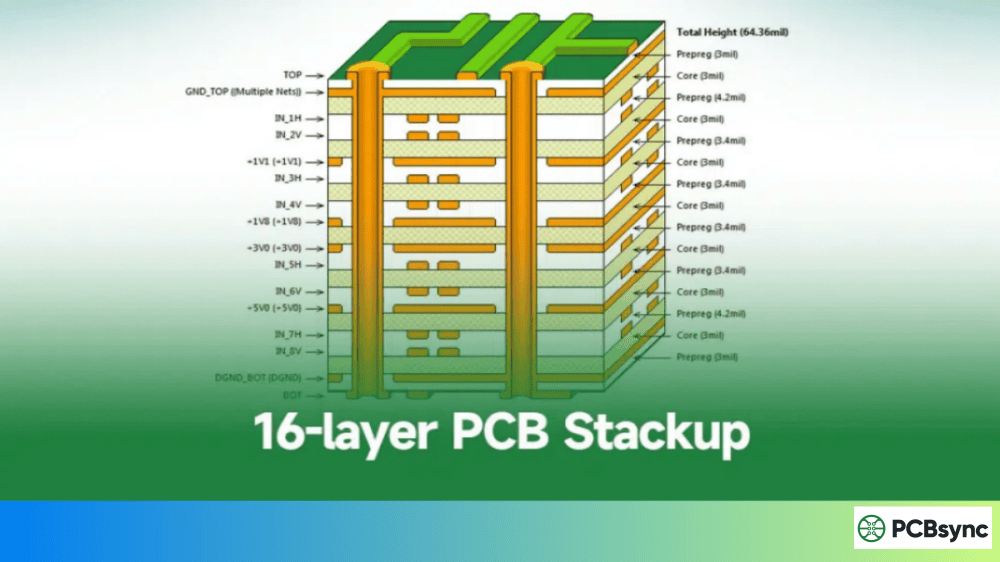
The stack-up is essentially the blueprint of your PCB’s internal architecture. Getting the 7 layer PCB stack-up right is critical for signal integrity, EMC performance, and overall board reliability.
Recommended 7 Layer PCB Stack-Up Configuration
Here’s a stack-up configuration that I’ve found works well for most high-speed digital applications:
Layer
Function
Typical Thickness
Material
Layer 1
Signal (Top)
1.4 mil (35μm)
Copper
Prepreg
Dielectric
4-5 mil
2116 or 7628
Layer 2
Ground Plane
1.4 mil (35μm)
Copper
Core
Dielectric
8-10 mil
FR-4
Layer 3
Signal (Inner)
0.7 mil (18μm)
Copper
Prepreg
Dielectric
4-5 mil
2116
Layer 4
Power Plane
0.7 mil (18μm)
Copper
Core
Dielectric
8-10 mil
FR-4
Layer 5
Signal (Inner)
0.7 mil (18μm)
Copper
Prepreg
Dielectric
4-5 mil
2116 or 7628
Layer 6
Ground Plane
1.4 mil (35μm)
Copper
Core
Dielectric
8-10 mil
FR-4
Layer 7
Signal (Bottom)
1.4 mil (35μm)
Copper
Stack-Up Design Principles
When designing a 7 layer PCB stack-up, keep these principles in mind:
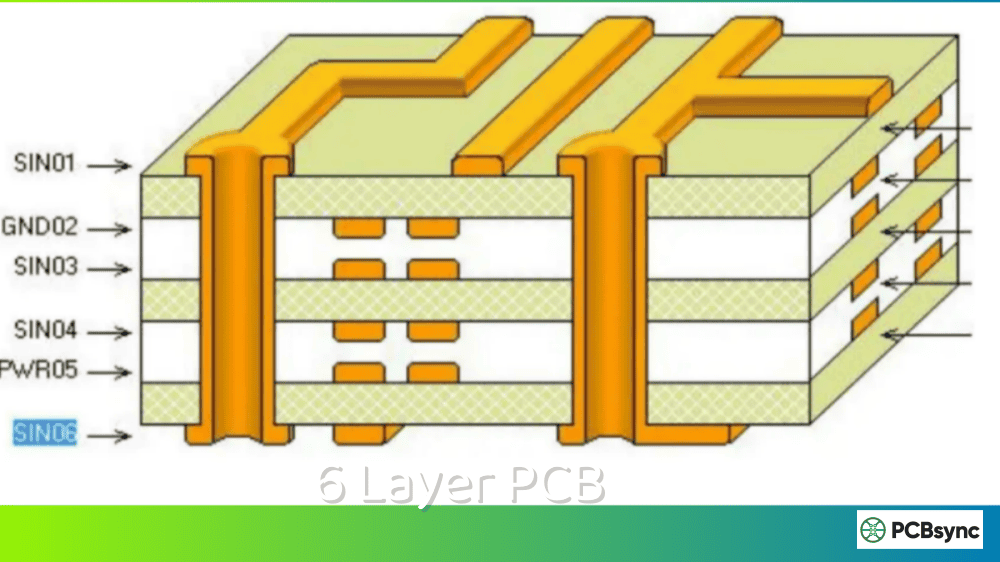
Adjacent plane coupling: Every signal layer should be adjacent to at least one reference plane (ground or power). This provides a clear return path for high-frequency signals and minimizes EMI emissions.
Ground plane placement: Position ground planes as close as possible to your primary signal routing layers. In the stack-up above, layers 2 and 6 serve as ground planes, providing excellent shielding for the top, bottom, and inner signal layers.
Power plane considerations: The power plane on layer 4 sits at the center of the stack-up. While this isn’t ideal for all applications, it works well when you need to distribute multiple voltages across the board.
Symmetry concerns: This is where things get tricky with odd-layer designs. A 7 layer PCB cannot achieve perfect symmetry around the center axis, which can lead to warpage issues during manufacturing.
You might wonder why anyone would choose a 7 layer PCB when 6-layer and 8-layer options are more readily available. Here are the legitimate reasons I’ve seen in real-world projects:
Design Optimization
Sometimes your routing requirements fall right between a 6-layer and 8-layer design. You’ve exhausted the routing capacity of 6 layers, but adding a full 8 layers feels like overkill. In these cases, a 7 layer PCB can provide exactly the routing density you need without paying for unused capacity.
Legacy Design Updates
I’ve encountered situations where an existing 6-layer design needed one additional signal layer for a feature upgrade, but the board outline couldn’t change. Rather than completely redesigning for 8 layers, adding a single layer made more practical sense.
Specific Impedance Requirements
Certain RF and high-frequency applications require precise dielectric spacing that might only be achievable with an odd-layer configuration. When your impedance calculations demand specific layer-to-layer distances, the numbers sometimes work out to 7 layers.
7 Layer PCB Applications
The 7 layer PCB finds its home in applications that demand high routing density and excellent signal integrity:
Telecommunications Equipment
Telecom devices including base stations, routers, and network switches often use 7 layer PCBs. These applications require multiple signal layers for dense BGA routing while maintaining solid ground and power planes for noise immunity.
Computer Systems
Graphics cards, motherboards, and server components frequently incorporate multilayer designs. A 7 layer PCB provides sufficient routing channels for high-pin-count processors and memory interfaces.
Medical Devices
Patient monitoring systems, imaging equipment, and diagnostic devices require boards that combine analog signal processing with digital control. The extra layers in a 7 layer PCB help isolate sensitive analog circuits from noisy digital sections.
Industrial Controls
Programmable logic controllers, motor drives, and automation systems benefit from the routing flexibility and EMC performance that a 7 layer PCB provides.
Consumer Electronics
High-end smartphones, tablets, and wearable devices occasionally use 7 layer PCBs when the product design demands maximum component density in a minimal footprint.
Design Guidelines for 7 Layer PCB
Drawing from my experience with multilayer PCB designs, here are the critical guidelines for a successful 7 layer PCB:
Layer Assignment Strategy
Top and bottom layers (1 and 7): Reserve these for low-speed signals, component fanout, and test points. Keep high-speed traces away from the board edges where EMI radiation is highest.
Inner signal layers (3 and 5): Route your critical high-speed signals here. These layers benefit from adjacent ground planes, which provide excellent shielding and controlled impedance.
Ground planes (2 and 6): Keep these as solid as possible. Avoid splitting ground planes unless absolutely necessary, and when you must split, ensure each section connects through multiple vias.
Power plane (4): This central layer handles power distribution. Consider using multiple power islands if your design requires different voltages.
Via Design Considerations
A 7 layer PCB supports several via types:
Via Type
Description
Best Use Case
Through-hole
Passes through all 7 layers
General connections, power distribution
Blind via
Connects outer layer to inner layer
BGA fanout, high-density routing
Buried via
Connects inner layers only
Internal routing, layer transitions
Microvia
Laser-drilled, single layer span
HDI designs, fine-pitch components
Impedance Control
Maintaining controlled impedance is essential for high-speed signals. For a typical 7 layer PCB with FR-4 material (Dk ≈ 4.2-4.5), you can achieve:
Single-ended traces: 50Ω using approximately 4-5 mil trace width on inner layers adjacent to ground planes
Differential pairs: 100Ω differential impedance with proper spacing calculated based on your actual stack-up
Always request impedance calculations from your fabricator or use their stack-up calculator tools. The actual values depend heavily on your specific material choices and manufacturing tolerances.
EMI and Signal Integrity
Electromagnetic compatibility becomes increasingly important as layer count increases. For your 7 layer PCB:
Route high-speed signals on inner layers: The shielding from adjacent ground planes significantly reduces radiated emissions.
Use stitching vias: Place ground vias around high-speed signal routes to contain electromagnetic fields and provide nearby return paths.
Keep traces short: Every inch of trace length adds to delay and increases susceptibility to interference.
Match trace lengths: For differential pairs and parallel buses, length matching prevents timing skew issues.
7 Layer PCB Manufacturing Process
Understanding the manufacturing process helps you design boards that are easier to fabricate reliably. Here’s what happens during PCB manufacturing of a 7 layer PCB:
Inner Layer Processing
The process begins with core material—copper-clad FR-4 laminates that already have copper on both sides. For a 7 layer PCB, manufacturers typically start with three double-sided cores.
Each core undergoes:
Photoresist application: A light-sensitive coating covers the copper
Exposure: UV light transfers the circuit pattern from the photomask
Development: Unexposed photoresist washes away
Etching: Chemical baths remove unwanted copper
Resist stripping: Remaining photoresist is removed
Here’s where the 7 layer PCB differs from even-layer boards. The lamination process presses all layers together under heat and pressure, melting the prepreg to bond everything into a solid structure.
With an even number of layers, manufacturers achieve a symmetric stack that distributes pressure evenly. A 7 layer PCB lacks this symmetry, creating challenges:
Warpage risk: Asymmetric thermal expansion during cooling can cause the board to bow or twist. Manufacturers counter this by carefully balancing copper distribution across layers and using appropriate prepreg combinations.
Registration accuracy: Misalignment between layers becomes more likely when the stack isn’t symmetric. Tight tolerances require experienced manufacturers with precise lamination equipment.
Cost implications: Many factories charge a premium for odd-layer boards due to these challenges and the non-standard nature of the process. Some manufacturers handle odd layers by adding a dummy layer, essentially making your 7 layer PCB into an 8-layer board with one unused layer.
Drilling and Plating
After lamination, the board undergoes drilling:
Mechanical drilling: Standard through-holes and larger vias use high-speed CNC drilling machines. For a 7 layer PCB with a typical thickness of 1.6mm, aspect ratios up to 10:1 are achievable.
Laser drilling: Microvias and blind vias require laser drilling for accuracy. The depth control becomes critical in multilayer boards.
Electroless copper: A thin copper layer deposits on all hole walls through a chemical process.
Electroplating: Additional copper builds up the hole walls to the required thickness, ensuring reliable electrical connections between layers.
Outer Layer Processing and Finishing
The outer layers follow a process similar to inner layers, with additional steps:
Surface preparation: Chemical cleaning ensures proper adhesion
Photolithography: Pattern transfer for outer circuits
Plating: Copper thickness builds up to specification
Etching: Unwanted copper removal
Solder mask: Protective coating application
Silkscreen: Legend printing for component identification
Surface finish: HASL, ENIG, OSP, or other finishes applied
Cost Factors for 7 Layer PCB
Understanding cost drivers helps you make informed design decisions:
Cost Factor
Impact on 7 Layer PCB
Optimization Tip
Layer count
High
Consider if 6 layers could work
Board size
Medium to High
Optimize component placement
Material type
Medium
FR-4 is most economical
Minimum trace/space
Medium
Use 4/4 mil or larger when possible
Via types
Medium
Minimize blind/buried vias
Surface finish
Low to Medium
HASL is most economical
Quantity
High
Volume discounts are significant
Lead time
Medium
Standard lead times cost less
Typical Price Comparison
Based on current market rates for a 100mm × 100mm board with standard specifications:
Layer Count
Relative Cost
4 Layer
1.0× (baseline)
6 Layer
1.5-1.8×
7 Layer
1.8-2.2×
8 Layer
1.9-2.3×
Notice that 7 layer PCBs often cost nearly as much as 8-layer boards, and sometimes more. This is due to the non-standard manufacturing process and lower volume production.
Design Software and Resources
Modern EDA tools handle 7 layer PCB design without issues. Here are recommended options:
Professional Software
Altium Designer: Excellent layer stack manager and impedance calculator
Cadence Allegro/OrCAD: Industry standard for complex multilayer designs
Mentor PADS/Xpedition: Strong manufacturing integration features
Zuken CR-8000: Popular in automotive and aerospace sectors
Free and Lower-Cost Options
KiCad: Open-source with good multilayer support
Eagle (Autodesk): Suitable for simpler 7 layer designs
EasyEDA: Web-based option with integrated manufacturing
Useful Resources
Stack-up calculators: Most PCB manufacturers provide online tools for calculating impedance and generating stack-ups. Saturn PCB Toolkit is a free offline option.
IPC standards: IPC-2221 (generic design), IPC-2222 (rigid boards), and IPC-6012 (qualification and performance) provide essential guidance.
Manufacturer design guides: Companies like Sierra Circuits, JLCPCB, and PCBWay publish detailed design guidelines specific to their capabilities.
Online communities: The PCB design subreddit, EEVblog forums, and Stack Exchange’s Electrical Engineering section offer peer support.
Common Mistakes to Avoid
After reviewing hundreds of 7 layer PCB designs, these are the mistakes I see most often:
Ignoring the odd-layer challenges: Don’t assume your fabricator will handle everything. Discuss the 7-layer requirement upfront and get their recommended stack-up.
Poor copper balance: Uneven copper distribution across layers exacerbates warpage. Try to maintain similar copper percentages on each layer.
Inadequate ground plane coverage: Cutting corners on ground planes to save routing space inevitably creates signal integrity problems.
Forgetting about thermal management: Seven layers generate more heat during operation. Plan your thermal vias and copper pours accordingly.
Not consulting your manufacturer: Stack-up capabilities vary significantly between fabricators. Get their input before finalizing your design.
Frequently Asked Questions
Is a 7 layer PCB more expensive than an 8 layer PCB?
Surprisingly, yes—a 7 layer PCB often costs the same or even more than an 8 layer PCB. This seems counterintuitive, but the odd-layer configuration requires non-standard manufacturing processes. Many fabricators actually build 7 layer boards as 8 layers with one dummy layer, which means you pay for 8 layers anyway. The manufacturing challenges with asymmetric lamination also add to the cost. Unless you have a specific technical reason for exactly 7 layers, consider whether 6 or 8 layers might be more economical.
What are the main challenges in manufacturing a 7 layer PCB?
The primary manufacturing challenges stem from the asymmetric layer structure. During lamination, the uneven distribution of copper and dielectric materials creates unequal thermal expansion, leading to potential warpage. Registration accuracy between layers is harder to maintain without symmetric reference points. The non-standard nature of odd-layer production also means fewer fabricators are set up to handle these boards efficiently, potentially leading to longer lead times and higher costs.
When should I choose a 7 layer PCB over a 6 layer or 8 layer design?
Choose a 7 layer PCB when your routing requirements genuinely fall between 6 and 8 layers and you’ve verified that the additional cost is justified. Specific scenarios include: legacy designs that need exactly one more layer for an upgrade, RF applications where precise dielectric spacing calculations result in 7 layers, or projects where your impedance and shielding requirements are best met with this specific configuration. For most new designs, I recommend starting with an even layer count and only moving to 7 layers if analysis proves it’s the optimal solution.
Can all PCB manufacturers produce 7 layer PCBs?
Not all PCB manufacturers have the capability or willingness to produce 7 layer PCBs. Many smaller fabricators focus on standard even-layer configurations (2, 4, 6, 8 layers) because these are more common and easier to produce reliably. Before committing to a 7 layer design, confirm that your chosen manufacturer has experience with odd-layer boards and can meet your quality requirements. Ask for references or sample boards if possible.
How do I optimize signal integrity in a 7 layer PCB?
Signal integrity optimization in a 7 layer PCB follows the same principles as other multilayer boards, with extra attention to ground plane placement. Ensure every signal layer has an adjacent reference plane. Route high-speed signals on inner layers (typically layers 3 and 5 in a 7-layer stack) where they benefit from shielding on both sides. Use continuous ground planes without splits whenever possible. Calculate controlled impedance based on your actual stack-up, and verify your design with signal integrity simulation tools before sending files for fabrication.
Material Selection for 7 Layer PCB
Choosing the right materials significantly impacts your 7 layer PCB’s performance and reliability. Here’s what you need to consider:
Base Laminate Options
Standard FR-4 (Tg 130-140°C): Suitable for most applications with operating temperatures below 110°C. This is the most economical choice and works well for consumer electronics and general industrial applications.
High-Tg FR-4 (Tg 170-180°C): Required for lead-free assembly processes and applications with elevated operating temperatures. The increased glass transition temperature prevents delamination during reflow soldering.
High-Speed Laminates: Materials like Isola FR408HR, Panasonic Megtron 6, or Rogers RO4350B provide lower dielectric loss for applications above 1 GHz. These add significant cost but are necessary for RF and high-frequency digital designs.
Prepreg Selection
Prepreg thickness and type affect both your stack-up dimensions and dielectric properties:
For a 7 layer PCB, combining different prepreg types allows you to achieve target thicknesses while maintaining proper impedance control on each signal layer.
Testing and Quality Assurance
Before your 7 layer PCB ships from the factory, it undergoes several quality checks:
Electrical testing: Flying probe or bed-of-nails testing verifies all connections and checks for shorts and opens. For multilayer boards, this catches any issues with via plating or inner layer connections.
Impedance testing: Coupon testing on the production panel verifies that controlled impedance traces meet specifications, typically within ±10%.
Cross-section analysis: Sample boards are cut and examined microscopically to verify layer registration, copper thickness, and plating quality.
X-ray inspection: Non-destructive testing reveals internal via structures and checks for voids in BGA connections during assembly.
Request test reports from your manufacturer, especially for first article builds. These reports provide confidence in the production process and documentation for quality management systems.
Conclusion
The 7 layer PCB represents a specialized solution for specific design challenges. While it’s not the most common choice—and comes with unique manufacturing considerations—understanding when and how to use it adds a valuable tool to your PCB design toolkit.
Before committing to a 7 layer design, carefully evaluate whether an even-layer alternative might work. If you determine that 7 layers truly is the optimal choice, work closely with an experienced manufacturer from the early design stages. Their input on stack-up configuration, material selection, and design-for-manufacturing guidelines will significantly improve your chances of success.
The multilayer PCB landscape continues to evolve with new materials and manufacturing techniques. What seems challenging today may become routine tomorrow. For now, approach 7 layer PCB design with a thorough understanding of both its advantages and limitations, and you’ll be well-positioned to deliver successful products.
Inquire: Call 0086-755-23203480, or reach out via the form below/your sales contact to discuss our design, manufacturing, and assembly capabilities.
Quote: Email your PCB files to Sales@pcbsync.com (Preferred for large files) or submit online. We will contact you promptly. Please ensure your email is correct.
Notes: For PCB fabrication, we require PCB design file in Gerber RS-274X format (most preferred), *.PCB/DDB (Protel, inform your program version) format or *.BRD (Eagle) format. For PCB assembly, we require PCB design file in above mentioned format, drilling file and BOM. Click to download BOM template To avoid file missing, please include all files into one folder and compress it into .zip or .rar format.