Inquire: Call 0086-755-23203480, or reach out via the form below/your sales contact to discuss our design, manufacturing, and assembly capabilities.
Quote: Email your PCB files to Sales@pcbsync.com (Preferred for large files) or submit online. We will contact you promptly. Please ensure your email is correct.
Notes: For PCB fabrication, we require PCB design file in Gerber RS-274X format (most preferred), *.PCB/DDB (Protel, inform your program version) format or *.BRD (Eagle) format. For PCB assembly, we require PCB design file in above mentioned format, drilling file and BOM. Click to download BOM template To avoid file missing, please include all files into one folder and compress it into .zip or .rar format.
If you’ve been designing on 4-layer boards and hitting routing limitations, you’re probably wondering whether it’s time to step up to a 6 layer PCB. I’ve spent years working with both configurations, and I can tell you that making the jump isn’t just about adding two more layers—it’s about fundamentally changing how you approach signal integrity, power distribution, and EMC performance.
In this guide, I’ll walk you through everything you need to know about 6 layer PCB design, from choosing the right stackup configuration to understanding true manufacturing costs. Whether you’re building high-speed networking equipment or complex IoT devices, this information will help you make informed decisions for your next project.
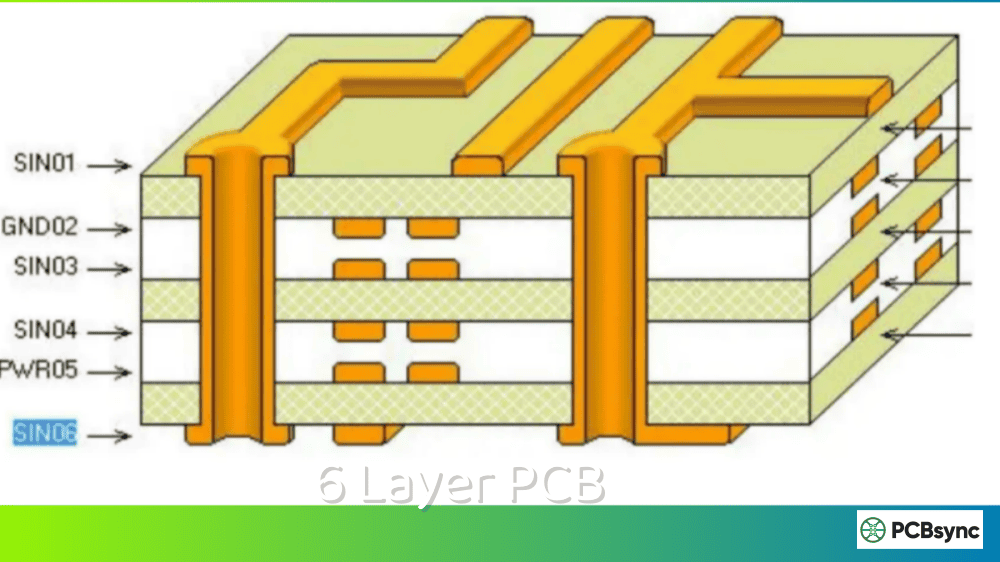
A 6 layer PCB consists of six conductive copper layers separated by insulating dielectric materials, typically FR-4 epoxy resin. Unlike simpler 2-layer or 4-layer boards, a 6 layer PCB provides dedicated planes for power distribution and ground reference while leaving multiple layers available for signal routing.
The basic structure includes alternating layers of copper foil and prepreg (pre-impregnated fiberglass), laminated together under heat and pressure. This creates a rigid, reliable structure that can handle complex circuit designs without sacrificing signal quality.
Here’s what makes a 6 layer PCB different from its 4-layer counterpart:
Feature
4-Layer PCB
6 Layer PCB
Signal Layers
2 (Top + Bottom)
4 (Top + 2 Internal + Bottom)
Plane Layers
2 (Power + Ground)
2 (Power + Ground)
Routing Density
Moderate
High
EMI Performance
Good
Excellent
High-Speed Capability
Limited
Strong
Typical Cost Increase
Baseline
30-50% more
Manufacturing Time
24-48 hours
48-72 hours
The extra internal signal layers in a 6 layer PCB give you room to separate high-speed traces from slower signals, route differential pairs with proper impedance control, and maintain clean return paths throughout the board.
6-Layer PCB Stackup Selector
6-Layer PCB Stackup Selector 6L
Configure layer thicknesses for your 6-layer PCB stackup
Copper Layers
Prepreg Layers
Core Layers
Total Board Thickness
1.200mm
1200 µm
vs 1.2mm target:+0 µm
Component
Thickness
Copper (6 layers)
210 µm
Prepreg (3 layers)
456 µm
Core (2 layers)
400 µm
Stackup Visualization
SOLDER MASK (TOP)
L1 – Top SignalOUTER35µm
Prepreg 1 (PP1)114µm
L2 – GND PlanePLANE35µm
Core 1 (FR-4)200µm
L3 – Inner SignalSIGNAL35µm
Prepreg 2 (PP2)228µm
L4 – Inner SignalSIGNAL35µm
Core 2 (FR-4)200µm
L5 – PWR PlanePLANE35µm
Prepreg 3 (PP3)114µm
L6 – Bottom SignalOUTER35µm
SOLDER MASK (BOTTOM)
Outer Copper
Plane (GND/PWR)
Inner Signal
Prepreg (PP)
Core (FR-4)
Solder Mask
💡 Common 6-Layer Targets
1.0mm: High-density, compact designs 1.2mm: Standard thin multilayer 1.6mm: Most common thickness 2.0mm: Power applications, thermal management
⚡ Layer Arrangement Tips
L2 (GND) & L5 (PWR): Place planes adjacent to outer signal layers for better impedance control and EMI shielding. L3 & L4: Inner signal layers – route high-speed signals here for protection.
Why Choose a 6 Layer PCB Over 4-Layer?
Before committing to the additional cost and complexity, you need honest criteria for making this decision. Based on my experience, here are the situations where upgrading to a 6 layer PCB makes practical sense:
High Pin Count Components: When you're working with BGAs that have 200+ pins or multiple high-IO devices, breakout routing becomes nearly impossible on 4 layers. The internal signal layers in a 6 layer PCB provide escape routes that don't conflict with power delivery.
Multiple High-Speed Interfaces: If your design includes USB 3.0, HDMI, PCIe, DDR memory, or multi-gigabit Ethernet, you need dedicated layers for differential pairs with controlled impedance. Trying to squeeze these onto a 4-layer board typically results in crosstalk and timing violations.
Mixed-Signal Designs: When analog and digital sections share the same board, a 6 layer PCB lets you physically separate these domains while maintaining proper ground referencing for each section.
Power Integrity Requirements: High-current devices or boards with multiple voltage rails benefit from the additional plane area available in a 6 layer stackup. You get better decoupling and lower PDN impedance.
Size Constraints: Sometimes you simply need more routing density in a smaller footprint. The internal layers give you options that don't exist on a 4-layer board.
If none of these apply to your project, stick with 4 layers. There's no point paying for capability you don't need.
6 Layer PCB Stackup Configurations
The stackup configuration you choose determines everything from signal integrity to manufacturability. I've worked with dozens of different arrangements, but three configurations handle about 90% of real-world applications.
Configuration 1: SIG/GND/SIG/PWR/GND/SIG
This is the most commonly used 6 layer PCB stackup, and for good reason. It provides complete ground reference planes adjacent to all critical signal layers.
Layer
Function
Typical Thickness
L1
Signal (High-Speed)
1.4 mil (35μm)
L2
Ground Plane
1.4 mil (35μm)
L3
Signal (Internal)
1.4 mil (35μm)
L4
Power Plane
1.4 mil (35μm)
L5
Ground Plane
1.4 mil (35μm)
L6
Signal (High-Speed)
1.4 mil (35μm)
When to use this stackup: High-speed digital designs, mixed-signal boards, and applications where signal integrity is the primary concern. The sandwich of power between two ground planes creates an effective distributed capacitor for power integrity.
Configuration 2: SIG/GND/SIG/SIG/PWR/GND
This arrangement prioritizes routing density over optimal signal integrity. You get two adjacent internal signal layers, which increases your routing capacity significantly.
Layer
Function
Best Use
L1
Signal
Components, high-speed traces
L2
Ground
Reference plane for L1 and L3
L3
Signal
Internal routing (horizontal)
L4
Signal
Internal routing (vertical)
L5
Power
Power distribution
L6
Ground
Reference plane for L6 signals
When to use this stackup: Dense designs with moderate speed requirements where you need maximum routing channels. The trade-off is reduced shielding between L3 and L4.
Configuration 3: SIG/GND/SIG/GND/PWR/SIG
This is the premium configuration for signal integrity. By adding an extra ground layer, you ensure every signal layer has an adjacent ground reference.
Layer
Function
Performance Notes
L1
Signal
Impedance-controlled routing
L2
Ground
Return path for L1
L3
Signal
Shielded internal routing
L4
Ground
Return path for L3, shields L3 from L5
L5
Power
Power distribution
L6
Signal
Impedance-controlled routing
When to use this stackup: GHz-level designs, RF sections, or any application where EMC performance is critical. You sacrifice one signal layer for optimal electrical performance.
Getting the stackup right is only the beginning. Here are the design rules I follow to ensure 6 layer PCB projects succeed:
Layer Assignment Best Practices
Route your fastest signals on the outer layers (L1 and L6) where they can be tightly coupled to the adjacent ground planes. The thin dielectric between surface layers and their reference planes gives you better impedance control.
Internal signal layers work well for slower signals, clock distribution (if you're careful about routing), and power routing when you need to split planes. Never route high-speed differential pairs on layers that don't have an adjacent solid reference plane.
When assigning layers, consider the signal frequency and sensitivity:
Signal Type
Recommended Layer
Reference Plane
Routing Priority
DDR/High-Speed Digital
L1, L6
Adjacent GND
Highest
Differential Pairs
L1, L6
Adjacent GND
Highest
Clock Signals
L1, L6
Adjacent GND
High
General Digital
L3, L4
Any solid plane
Medium
Power Distribution
L4, L5
GND plane
Medium
Low-Speed Control
Any layer
Any plane
Low
Signal Routing Rules for 6 Layer PCB
Maintain consistent trace widths throughout your signal paths. Impedance discontinuities occur wherever trace geometry changes, causing reflections that degrade signal quality. If you must change width, do it gradually over several millimeters rather than abruptly.
Keep differential pairs as symmetric as possible. Match trace lengths within 5 mils for signals above 1 GHz, and maintain consistent spacing throughout the route. Avoid routing differential pairs near board edges or over plane splits.
Use the 3W rule for spacing between traces: keep the center-to-center distance at least three times the trace width to minimize crosstalk. For sensitive signals, increase this to 5W or route on different layers.
Thermal Management Considerations
High-power components generate heat that must be dissipated through the 6 layer PCB structure. Use thermal vias under power devices to conduct heat to internal planes and the opposite board surface. A grid of 0.3mm vias with 1mm spacing provides effective thermal transfer without excessive plane disruption.
Ground and power planes serve as heat spreaders within the stackup. Heavier copper weights (2oz instead of 1oz) improve thermal conductivity but increase cost and affect impedance calculations.
Impedance Control Techniques
For a typical 6 layer PCB with 1.6mm total thickness and FR-4 dielectric (Dk ≈ 4.2), you can achieve 50Ω single-ended impedance with trace widths around 5-6 mils on the outer layers. Differential pairs typically need 5 mil traces with 5 mil spacing for 100Ω differential impedance.
Always use your manufacturer's impedance calculator or request their standard stackup. Small variations in dielectric thickness have significant effects on impedance, and your fab house knows their actual materials better than the datasheet values suggest.
Via Design and Placement
Through-hole vias in a 6 layer PCB connect all six layers, which creates stubs for high-speed signals. If you're running traces above 3 GHz, consider back-drilling to remove unused via barrel or use blind/buried vias.
Place ground return vias near every signal via that transitions between layers. This maintains a low-inductance return path and prevents your signals from finding creative (and problematic) routes through the power plane.
Power Distribution Network
The PCB manufacturing process creates closely-spaced power and ground planes that act as distributed capacitance. In a well-designed 6 layer PCB, this planar capacitance can provide decoupling at frequencies above 100 MHz.
Supplement the plane capacitance with ceramic decoupling capacitors placed close to IC power pins. Use multiple values (0.1μF, 1μF, 10μF) to cover different frequency ranges, and connect them with wide, short traces to both power and ground planes.
6 Layer PCB Applications
The 6 layer PCB hits a sweet spot between capability and cost that makes it ideal for a specific range of applications:
Networking and Telecommunications
Routers, switches, and base stations commonly use 6 layer PCBs to handle multiple high-speed Ethernet channels, DDR memory interfaces, and processor I/O. The layer count provides enough routing density for complex ASICs while maintaining signal integrity for multi-gigabit data rates.
Consumer Electronics
Smartphones, tablets, and wearable devices benefit from the compact designs possible with 6 layer PCBs. The additional layers allow designers to miniaturize products without sacrificing functionality or reliability.
Industrial Control Systems
PLCs, motor controllers, and automation equipment often combine high-power sections with sensitive analog measurements. A 6 layer PCB provides the isolation and routing flexibility needed to keep these sections from interfering with each other.
Medical Devices
Diagnostic equipment, patient monitors, and imaging systems require reliable, noise-free operation. The enhanced EMI shielding and signal integrity of a 6 layer PCB helps meet stringent regulatory requirements.
Automotive Electronics
As vehicles incorporate more advanced driver assistance systems, infotainment, and electric powertrain controls, 6 layer PCBs provide the necessary density and reliability for these safety-critical applications.
Application
Primary Benefit
Typical Interfaces
Networking
High-speed routing
Ethernet, PCIe, DDR4/5
Consumer
Compact size
USB, MIPI, WiFi/BT
Industrial
Noise immunity
CAN, RS-485, Analog I/O
Medical
Reliability
Low-noise analog, isolated power
Automotive
Thermal performance
CAN-FD, Ethernet, LIN
6 Layer PCB Thickness Options
Standard 6 layer PCB thickness is 1.6mm, but you have options depending on your mechanical requirements:
Thickness
Application
Notes
1.0mm
Card-edge connectors, thin products
Limited via aspect ratio
1.2mm
Compact enclosures
Good balance
1.6mm
Standard applications
Most cost-effective
2.0mm
High-power, mechanical strength
Longer drilling time
2.4mm
Connector stress, thermal mass
Increased cost
Thinner boards cost more despite using less material because they require tighter process control and have higher scrap rates. If your application doesn't specifically require thin boards, stick with 1.6mm.
6 Layer PCB Cost Analysis
Let's talk real numbers. The cost of a 6 layer PCB depends on multiple factors, but here's what you can typically expect:
Prototype Pricing (5-10 pieces)
Board Size
4-Layer Cost
6 Layer PCB Cost
Increase
50×50mm
$15-25
$25-40
~60%
100×100mm
$40-60
$65-100
~65%
150×100mm
$70-90
$110-150
~57%
Production Pricing (1000+ pieces)
At volume, the per-unit cost difference narrows:
Board Size
4-Layer Cost
6 Layer PCB Cost
Increase
100×100mm
$3-5/unit
$5-8/unit
~60%
150×100mm
$5-8/unit
$8-12/unit
~50%
Factors That Increase 6 Layer PCB Cost
Material Selection: Standard FR-4 keeps costs low. Moving to high-Tg FR-4 (Tg170) adds 10-15%, while Rogers or other RF materials can double the price.
Surface Finish: HASL is cheapest, ENIG adds 15-20%, and hard gold for edge connectors adds more.
Controlled Impedance: Expect 10-15% more for impedance-controlled stackups with tighter tolerances.
Blind/Buried Vias: These require additional lamination cycles and can add 25-50% to the base price.
Quick Turn: 48-hour delivery versus standard 5-7 day lead time often doubles the cost.
Cost Optimization Strategies
The smartest way to reduce 6 layer PCB costs is designing within your manufacturer's standard capabilities. Use their recommended stackup, standard trace/space, and common materials. The more you deviate from their established processes, the more you pay.
Panelization matters too. If you can fit 4 boards on a panel versus 3, you've reduced per-unit cost by 25% without changing anything about the design itself.
6 Layer PCB vs 4-Layer vs 8-Layer: Decision Matrix
Knowing when to use each layer count prevents both over-engineering and under-designing:
Requirement
4-Layer
6 Layer PCB
8-Layer
Simple digital
✓
Basic mixed-signal
✓
✓
Multiple high-speed interfaces
✓
✓
400+ pin BGA
✓
✓
DDR4/DDR5 memory
✓
✓
Complex RF + Digital
✓
1000+ net designs
✓
The Multilayer PCB decision should always start with your actual requirements, not assumptions about what "professional" designs need.
Common 6 Layer PCB Design Mistakes
After reviewing hundreds of 6 layer designs, these are the errors I see most frequently:
Splitting Reference Planes: Cutting slots in ground planes for routing disrupts return current paths and creates EMI problems. Use vias to jump layers instead of cutting planes.
Ignoring Layer Transitions: Every signal via needs a nearby ground via for the return current. Forgetting this creates loop inductance that radiates at high frequencies.
Wrong Layer for High-Speed Signals: Routing differential pairs on L3/L4 in a SIG/GND/SIG/SIG/PWR/GND stackup puts them far from their reference plane. Keep controlled-impedance traces on outer layers.
Asymmetric Stackup: Unbalanced copper distribution causes board warping during reflow soldering. Keep the stackup symmetric around the center.
Over-Constraining Impedance: Specifying ±5% impedance tolerance when ±10% would work fine adds cost without benefit. Match your tolerance to actual signal requirements.
Materials for 6 Layer PCB Manufacturing
The substrate material directly impacts both performance and cost:
Material
Dk
Df
Cost Factor
Best Application
Standard FR-4
4.2-4.5
0.02
1x
General purpose, ≤1 GHz
High-Tg FR-4
4.2-4.5
0.02
1.2x
Lead-free assembly, thermal
Isola 370HR
3.9
0.009
1.5x
High-speed digital, ≤3 GHz
Rogers RO4350B
3.5
0.0037
3x
RF, microwave, ≥5 GHz
Megtron 6
3.4
0.002
4x
Premium high-speed
For most 6 layer PCB applications below 3 GHz, standard FR-4 or high-Tg variants perform adequately. Save the expensive materials for true RF sections or when signal integrity simulations prove they're necessary.
6 Layer PCB Manufacturing Process
Understanding how 6 layer PCBs are manufactured helps you make better design decisions. The process involves multiple lamination cycles that add complexity compared to 4-layer boards.
Inner Layer Processing: The manufacturing starts with two double-sided copper-clad laminates (cores). Each core is imaged with your inner layer patterns, etched to create traces, and inspected using automated optical inspection (AOI).
Layer Alignment and Lamination: The two processed cores are stacked with prepreg sheets and outer copper foils. Precise alignment using tooling holes ensures layer-to-layer registration within ±3 mils for standard processes. The entire stack is laminated under heat (350-375°F) and pressure (300-500 PSI) to bond the layers.
Drilling and Plating: Through holes are drilled using high-speed CNC machines. The holes are then plated with copper to create electrical connections between layers. This plating process is critical for via reliability—poor plating leads to barrel cracks and open circuits.
Outer Layer Processing: The outer copper layers are imaged and etched to create the surface layer circuitry. This happens after drilling so that drill registration can be verified before committing to outer layer patterns.
Surface Finishing and Testing: Final steps include applying soldermask, silkscreen, and the surface finish (HASL, ENIG, etc.). Every 6 layer PCB should undergo electrical testing—either flying probe for prototypes or fixture testing for production—to verify connectivity.
Quality Considerations for 6 Layer PCB
Request impedance coupons from your manufacturer. These test structures are built alongside your boards and allow verification of actual impedance values. For critical designs, ask for time-domain reflectometry (TDR) reports that show impedance along the entire trace length.
Cross-section analysis reveals internal quality that electrical testing might miss: copper thickness, dielectric uniformity, via plating integrity, and layer registration. For production quantities, periodic cross-section samples catch process drift before it affects your boards.
Useful Resources for 6 Layer PCB Design
Here are tools and references I actually use when designing 6 layer boards:
JLCPCB Impedance Calculator (Free, matched to their processes)
Design Rule References
IPC-2221B: Generic Standard on Printed Board Design
IPC-2141A: Design Guide for High-Speed Controlled Impedance Circuit Boards
IPC-6012D: Qualification and Performance Specification for Rigid Printed Boards
Manufacturer Resources
JLCPCB Standard Stackups and Capabilities
PCBWay Design Guidelines
Sierra Circuits Technical Resources
Simulation Tools
Altium Designer (Built-in impedance and SI analysis)
Cadence Allegro/Sigrity (Advanced signal integrity)
HyperLynx (Signal integrity simulation)
Ansys SIwave (Power integrity analysis)
FAQs About 6 Layer PCB
What is the standard thickness of a 6 layer PCB?
The industry standard thickness for a 6 layer PCB is 1.6mm (0.063 inches). This dimension accommodates typical layer thicknesses of 1.4 mil copper and 4-8 mil dielectric between layers while maintaining good mechanical strength. You can request thinner (1.0mm, 1.2mm) or thicker (2.0mm, 2.4mm) options, but these may increase cost and lead time.
How much more does a 6 layer PCB cost compared to 4-layer?
A 6 layer PCB typically costs 30-60% more than an equivalent 4-layer board. For prototype quantities (5-10 pieces), expect to pay roughly $25-40 for a small 6-layer board versus $15-25 for 4-layer. At production volumes (1000+ pieces), the per-unit premium narrows to about 40-50% more. Factors like material choice, surface finish, and impedance control requirements affect final pricing.
When should I upgrade from 4-layer to 6 layer PCB?
Consider moving to a 6 layer PCB when you encounter these situations: your design includes high-speed interfaces like USB 3.0, HDMI, or DDR memory; you're working with high pin-count BGAs that require escape routing through internal layers; your board combines analog and digital circuits that need physical separation; or you've exhausted routing space on a 4-layer board and can't increase board size. If your design works comfortably on 4 layers, there's no benefit to adding more.
What is via-in-pad and why use it in 6 layer PCB designs?
Via-in-pad places plated through holes directly on component pads instead of routing traces to separate via locations. This technique saves space in dense designs, particularly under fine-pitch BGAs where escape routing is challenging. For 6 layer PCBs, via-in-pad improves signal integrity by shortening trace lengths and reducing inductance. The vias are typically filled and plated over to create a flat surface for component soldering. Most manufacturers offer this as a standard option for 6+ layer boards.
What's the typical manufacturing lead time for 6 layer PCB prototypes?
Standard lead time for 6 layer PCB prototypes is 5-7 business days from order confirmation. Quick-turn options can deliver in 48-72 hours at premium pricing (often 50-100% more). Production orders typically run 10-15 business days depending on quantity and complexity. Factors that extend lead time include controlled impedance requirements, blind/buried vias, special materials, and unusual specifications outside the manufacturer's standard process capabilities.
Conclusion
The 6 layer PCB represents a practical step up from 4-layer boards for designs that genuinely need the additional routing capacity, improved signal integrity, or better power distribution. It's not about making your project look more sophisticated—it's about solving real engineering challenges that simpler stackups can't address.
Before committing to 6 layers, honestly evaluate whether your speed, density, and EMC requirements justify the 30-60% cost increase. If they do, choose a stackup that matches your priorities (signal integrity versus routing density), follow established design guidelines, and work with your manufacturer early to validate that your stackup is manufacturable within their standard processes.
The best 6 layer PCB designs come from engineers who understand both the capabilities and limitations of the stackup they've chosen. Now you have the information to make that choice intelligently.
Inquire: Call 0086-755-23203480, or reach out via the form below/your sales contact to discuss our design, manufacturing, and assembly capabilities.
Quote: Email your PCB files to Sales@pcbsync.com (Preferred for large files) or submit online. We will contact you promptly. Please ensure your email is correct.
Notes: For PCB fabrication, we require PCB design file in Gerber RS-274X format (most preferred), *.PCB/DDB (Protel, inform your program version) format or *.BRD (Eagle) format. For PCB assembly, we require PCB design file in above mentioned format, drilling file and BOM. Click to download BOM template To avoid file missing, please include all files into one folder and compress it into .zip or .rar format.