Inquire: Call 0086-755-23203480, or reach out via the form below/your sales contact to discuss our design, manufacturing, and assembly capabilities.
Quote: Email your PCB files to Sales@pcbsync.com (Preferred for large files) or submit online. We will contact you promptly. Please ensure your email is correct.
Notes: For PCB fabrication, we require PCB design file in Gerber RS-274X format (most preferred), *.PCB/DDB (Protel, inform your program version) format or *.BRD (Eagle) format. For PCB assembly, we require PCB design file in above mentioned format, drilling file and BOM. Click to download BOM template To avoid file missing, please include all files into one folder and compress it into .zip or .rar format.
If you’ve been designing circuit boards for any length of time, you’ve probably hit that wall where a 2-layer board just doesn’t cut it anymore. Too many signals crossing, not enough room for proper ground planes, and EMI issues that make you want to pull your hair out. That’s exactly where a 4 layer PCB comes in—and honestly, it’s one of the most practical upgrades you can make to your designs.
I’ve worked with countless PCB projects over the years, and the 4 layer PCB remains the workhorse of the electronics industry. It strikes that sweet spot between complexity and cost, giving you dedicated ground and power planes without breaking the bank. In this guide, I’ll walk you through everything you need to know about 4 layer PCB design—from stackup configurations to manufacturing considerations—so you can make informed decisions for your next project.
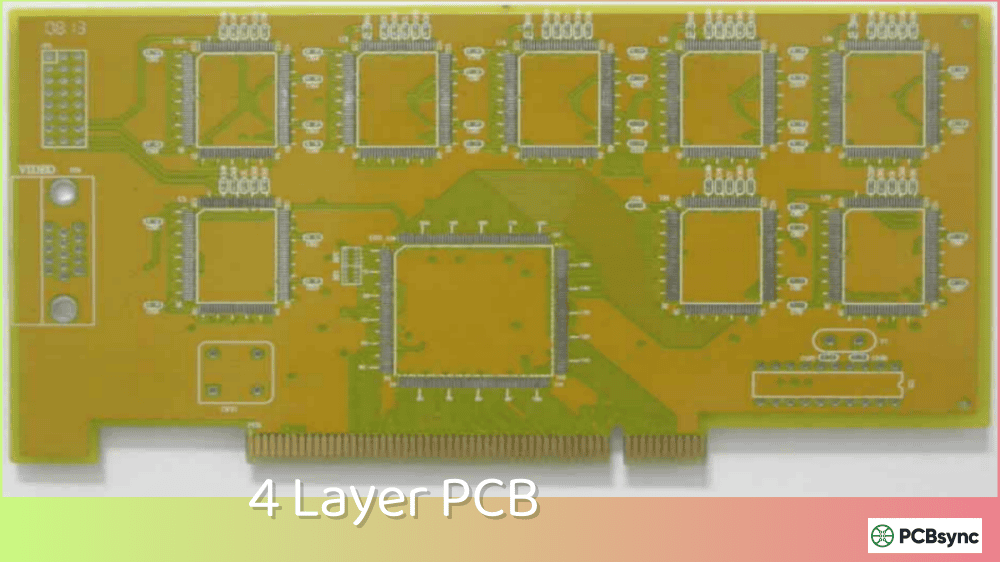
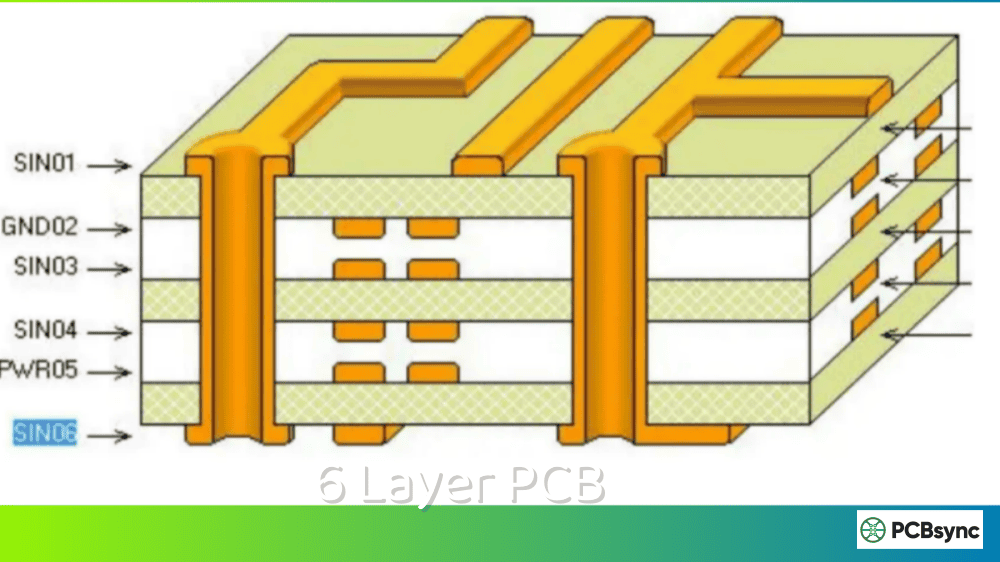
A 4 layer PCB is a printed circuit board consisting of four conductive copper layers separated by insulating dielectric materials. Unlike simpler 2-layer boards where you’re constantly jumping between top and bottom layers, a 4 layer PCB gives you two additional inner layers that typically serve as dedicated ground and power planes.
The basic structure looks like this:
Layer
Position
Typical Function
Layer 1 (Top)
Outer
Signal routing + Component placement
Layer 2
Inner
Ground plane (GND)
Layer 3
Inner
Power plane (VCC)
Layer 4 (Bottom)
Outer
Signal routing + Component placement
The magic happens in those inner layers. When you have a solid ground plane sitting right beneath your signal traces, several good things happen: your return currents have a nice, low-impedance path to follow, electromagnetic interference drops significantly, and you can actually achieve controlled impedance for high-speed signals.
Think of it this way—a 2-layer board is like trying to have a conversation in a noisy room, while a 4 layer PCB gives you a quiet conference room with proper acoustics. The dedicated planes act as shields and provide clean reference planes for your signals.
4-Layer PCB Stackup Selector
4-Layer PCB Stackup Selector
Configure layer thicknesses and visualize your PCB stackup
Layer Configuration
Total Board Thickness
1.238mm
1238 µm
vs 1.2mm target:+38 µm
Stackup Visualization
SOLDER MASK
L1 – Top Copper35µm
Prepreg (PP)114µm
L2 – Inner Copper35µm
Core (FR-4)800µm
L3 – Inner Copper35µm
Prepreg (PP)114µm
L4 – Bottom Copper35µm
SOLDER MASK
Copper Layer
Prepreg (PP)
Core (FR-4)
Solder Mask
💡 Common Stackup Targets
0.8mm: Thin boards, mobile devices 1.0mm: Compact designs 1.6mm: Standard thickness (most common) 2.0mm: Power electronics, ruggedized
Why Choose a 4 Layer PCB Over 2-Layer?
Before diving into the technical details, let's address the elephant in the room: why bother with more layers when 2-layer boards are cheaper?
Here's a comparison that should help clarify the decision:
Feature
2-Layer PCB
4 Layer PCB
EMI Performance
Limited shielding
Excellent shielding
Signal Integrity
Adequate for low-speed
Supports high-speed interfaces
Power Distribution
Uses traces
Dedicated power plane
Routing Density
Lower
Higher
Controlled Impedance
Difficult
Easy to achieve
Cost
Lower
30-50% higher
Design Complexity
Simple
Moderate
The real benefits become apparent when you're dealing with:
Signal Integrity Requirements: If your design includes USB, Ethernet, DDR, HDMI, or any interface running above 50 MHz, you'll appreciate the continuous ground plane reference. Without it, your return currents wander around, creating loops that radiate like tiny antennas.
EMC Compliance: I've seen plenty of 2-layer designs fail EMC testing because of inadequate grounding. A 4 layer PCB with proper plane layers gives you inherent shielding that's hard to achieve otherwise.
Power Integrity: When you're powering multiple ICs with different current requirements, a dedicated power plane distributes current more evenly than traces ever could. The low inductance of a plane also improves decoupling capacitor effectiveness.
Compact Designs: Counterintuitively, 4-layer boards can sometimes be smaller than 2-layer alternatives because you're not wasting surface area on power and ground traces.
4 Layer PCB Stackup Configurations
The stackup—how you arrange those four layers—makes or breaks your design. Not all configurations are created equal, and choosing the wrong one will give you headaches down the road.
This is the industry standard stackup and the one I recommend for most applications:
Layer
Function
Thickness
L1 (Top)
Signal + Components
35μm (1oz) copper
Prepreg
Insulation
0.2mm
L2
Ground Plane
35μm (1oz) copper
Core
FR-4 substrate
1.0mm
L3
Power Plane
35μm (1oz) copper
Prepreg
Insulation
0.2mm
L4 (Bottom)
Signal + Components
35μm (1oz) copper
Why it works: Your top signal layer sits directly above the ground plane, creating excellent coupling and a clear return path. The power plane below provides good decoupling between power and ground. Bottom layer signals reference the power plane, which works well for lower-speed signals.
Best for: Digital circuits, mixed-signal designs, moderate-speed interfaces (USB 2.0, SPI, I2C), and general-purpose applications.
Configuration 2: Signal-Power-Ground-Signal
Sometimes you need to flip the inner layers:
Layer
Function
L1 (Top)
Signal + Components
L2
Power Plane
L3
Ground Plane
L4 (Bottom)
Signal + Components
When to use it: This configuration works better when you have more signals on the bottom layer that need a good ground reference, or when your power distribution requirements favor having the power plane closer to the top components.
For RF designs or high-speed digital where maximum shielding is critical:
Layer
Function
L1 (Top)
Ground Plane
L2
Signal routing
L3
Signal routing
L4 (Bottom)
Ground Plane (or Signal)
Best for: RF circuits, sensitive analog designs, or when external EMI protection is paramount. The outer ground planes act as shields, protecting the inner signals from environmental noise.
Trade-off: You lose component mounting space on the outer layers since they're mostly copper pour.
4 Layer PCB Design Guidelines
Getting the stackup right is just the beginning. Here are the design rules that separate good 4 layer PCB designs from problematic ones:
Ground Plane Integrity
Rule #1: Never split your ground plane unnecessarily. A continuous ground plane is your best friend for signal integrity. Every slot, cut, or gap creates impedance discontinuities and forces return currents to take longer paths.
If you absolutely must have splits (for analog/digital isolation, for instance), make sure your signals don't cross the split. Return currents will try to follow the path of least impedance directly beneath the signal trace—if there's a gap, they'll go around it, creating a loop antenna.
Via Placement Strategy
Vias connect your layers, but they're not free—each via introduces inductance and takes up routing space on inner planes.
Good practices:
Use stitching vias near signal vias to provide local return paths
Place decoupling capacitor vias close to IC power pins (within 1-2mm)
Avoid via fences that create resonant cavities in your ground plane
Standard via size for most applications: 0.3mm drill, 0.6mm pad
Power Distribution Network Design
A 4 layer PCB with dedicated power and ground planes gives you excellent power integrity—if you design it right.
Decoupling capacitor placement: The goal is to provide low-impedance power delivery across all frequencies. Different capacitor values target different frequency ranges:
Capacitor Value
Target Frequency
Placement
10-100μF
Low frequency (kHz)
Near power input
1-10μF
Medium frequency
Per power region
0.1μF (100nF)
High frequency (MHz)
Every IC power pin
10-100nF
Very high frequency
Critical ICs only
1-10pF
RF applications
RF components
Power plane considerations:
Avoid splitting power planes unless absolutely necessary
If multiple voltages are required, use separate regions with clear boundaries
Add decoupling capacitors at the boundary between voltage regions
Keep high-current paths wide and short
Signal Routing Rules
Parameter
Recommended Value
Minimum trace width
0.15mm (6mil) for signals
Minimum spacing
0.15mm (6mil) trace-to-trace
Differential pair spacing
2× dielectric thickness
Via-to-trace clearance
0.2mm minimum
Copper pour clearance
0.25mm from signals
High-speed signal routing tips:
Route clock signals on layers adjacent to ground planes
Keep high-speed traces short and direct
Match trace lengths for differential pairs within 0.1mm
Avoid 90-degree corners (use 45-degree or curved)
Reference all high-speed signals to the same ground plane
Impedance Control
A 4 layer PCB makes controlled impedance design practical. Common requirements include:
Interface
Impedance Type
Target Value
USB 2.0
Differential
90Ω ±10%
USB 3.0
Differential
90Ω ±10%
Ethernet 10/100
Differential
100Ω ±10%
HDMI
Differential
100Ω ±15%
Single-ended general
Single
50Ω ±10%
To achieve these values, you'll need to work with your fabricator on the exact stackup dimensions. The trace width required depends on the dielectric thickness and material properties—this isn't something you can guess.
4 Layer PCB Thickness Options
The total board thickness affects mechanical fit, impedance, and cost. Standard options include:
Total Thickness
Use Case
0.8mm
Compact devices, smartphones
1.0mm
Portable electronics
1.2mm
General purpose
1.6mm
Standard (most common)
2.0mm
Increased rigidity
2.4mm
Heavy components, connectors
The 1.6mm thickness is the de facto standard for good reason—it fits standard card edge connectors, provides adequate rigidity for most board sizes, and is the most cost-effective option since fabricators optimize their processes around it.
A typical 1.6mm 4 layer PCB stackup breaks down like this:
Component
Thickness
Top copper
35μm
Prepreg (1080)
0.08mm
Inner copper L2
35μm
Core (FR-4)
1.2mm
Inner copper L3
35μm
Prepreg (1080)
0.08mm
Bottom copper
35μm
Total
~1.6mm
4 Layer PCB Materials and Specifications
Before diving into manufacturing, let's cover the materials that make up your 4 layer PCB. The choices you make here affect performance, reliability, and cost.
Base Material (Substrate)
FR-4 is the standard substrate material for most 4 layer PCBs. It's a glass-reinforced epoxy laminate that offers a good balance of electrical properties, mechanical strength, and cost.
High-Tg (170-180°C): Required for lead-free assembly, automotive applications
For RF applications above 2 GHz, consider specialized materials like Rogers or Isola with lower Dk and Df values. These materials maintain better signal integrity at high frequencies but cost significantly more than FR-4.
Copper Weight Options
Copper weight (specified in oz/ft²) determines the thickness of your copper layers and their current-carrying capacity:
Copper Weight
Thickness
Current Capacity
Common Use
0.5 oz
17.5μm
Low current signals
Fine-pitch, dense routing
1 oz
35μm
Standard
Most applications
2 oz
70μm
Moderate power
Power electronics, LED drivers
3 oz
105μm
High current
Power supplies, motor drives
For a typical 4 layer PCB design, 1 oz copper on all layers is the standard choice. If you're dealing with power traces that carry more than 1-2A, consider using 2 oz copper on outer layers or dedicated heavy copper areas.
Prepreg and Core Materials
The insulating layers between copper consist of prepreg (pre-impregnated fiberglass) and core (cured fiberglass laminate):
Common prepreg styles:
1080: Thin (0.08mm), used when tight layer spacing is needed
2116: Medium (0.12mm), good all-around choice
7628: Thick (0.2mm), when more insulation is required
The prepreg resin content affects how well layers bond during lamination. Higher resin content provides better fill around inner layer copper features.
4 Layer PCB Manufacturing Process
Understanding how your board gets made helps you design better and avoid costly mistakes. Here's what happens at the factory:
Step 1: Inner Layer Fabrication
The process starts with the core—a double-sided copper-clad laminate. The manufacturer images your L2 and L3 patterns onto the copper using photoresist, then etches away the unwanted copper.
Step 2: Oxide Treatment
The inner layer copper gets a special oxide coating that helps it bond to the prepreg layers during lamination.
Step 3: Lamination
This is where your 4 layer PCB actually becomes a multilayer board. The stack is assembled:
Copper foil (becomes L1)
Prepreg
Inner core (L2 and L3)
Prepreg
Copper foil (becomes L4)
High temperature and pressure bond everything together, and the prepreg resin flows and cures.
Step 4: Drilling
Mechanical drills create all the through-holes and vias. For standard 4 layer PCBs, you typically only have plated through-holes (PTH) that connect all layers. Blind and buried vias are possible but increase cost significantly.
Step 5: Outer Layer Processing
The outer layers are imaged and etched, then the board goes through plating, solder mask application, silkscreen printing, and surface finish.
Surface Finish Options
The surface finish protects exposed copper and affects solderability. Here are your options for 4 layer PCB production:
Finish
Cost
Shelf Life
Flatness
Best For
HASL (Hot Air Solder Leveling)
Low
12 months
Poor
Through-hole, large SMD
Lead-Free HASL
Low-Medium
12 months
Poor
RoHS compliance
ENIG (Electroless Nickel Immersion Gold)
Medium-High
12+ months
Excellent
Fine-pitch, BGA, wire bonding
OSP (Organic Solderability Preservative)
Low
6 months
Excellent
High-volume, fine-pitch
Immersion Silver
Medium
6-12 months
Good
RF applications
Immersion Tin
Medium
6 months
Good
Press-fit connectors
For most 4 layer PCB prototypes, HASL provides the best value. Switch to ENIG when you're working with fine-pitch components (0.5mm pitch and below), BGA packages, or when you need excellent surface flatness for reliable soldering.
Quality Testing and Inspection
Reputable manufacturers perform several tests on your 4 layer PCB:
Electrical Testing:
Flying probe test (prototypes): Tests continuity and isolation
Fixture test (production): Faster, requires custom test fixture
Hi-pot testing: Verifies isolation between layers
Visual Inspection:
AOI (Automated Optical Inspection): Checks for defects, shorts, opens
X-ray inspection: Verifies inner layer registration and via quality
For detailed information about the complete production process, check out this resource on PCB manufacturing.
4 Layer PCB vs. 6 Layer PCB: When to Upgrade
Sometimes four layers aren't enough. Here's how to know when you need to step up to a Multilayer PCB with six or more layers:
Consideration
4 Layer PCB
6 Layer PCB
High-speed interfaces
USB 2.0, basic Ethernet
DDR3/4, PCIe, Gigabit Ethernet
BGA routing
Up to 0.8mm pitch
0.5mm pitch and below
Power rails
1-3 voltages
4+ voltage rails
Cost increase
Baseline
30-40% more
Design complexity
Moderate
Higher
Upgrade indicators:
You can't fit all your routing in two signal layers
You need multiple isolated power planes
Your BGA packages have too many pins to breakout on two layers
EMI requirements are stringent (medical, automotive, aerospace)
4 Layer PCB Applications
The 4 layer PCB has found its way into virtually every industry. Here's where you'll commonly see them:
Consumer Electronics
Smartphones and tablets (using thin stackups)
Gaming controllers
Smart home devices
Wearable technology
Laptop motherboards (simpler models)
Automotive Electronics
Engine control units (ECUs)
Infotainment systems
ADAS sensor modules
Dashboard electronics
Body control modules
Industrial Equipment
PLC controllers
Motor drives
Sensor interfaces
Human-machine interfaces (HMIs)
Industrial IoT gateways
Medical Devices
Portable diagnostic equipment
Patient monitoring devices
Hearing aids
Insulin pumps
Medical imaging components
Communication Equipment
Wi-Fi routers
Bluetooth modules
RF transceivers
Network switches (lower-end)
GPS receivers
4 Layer PCB Cost Factors
Let's talk money. A 4 layer PCB typically costs 30-50% more than an equivalent 2-layer board, but the actual price depends on several factors:
Factor
Impact on Cost
Board size
Larger = more expensive
Quantity
Higher volume = lower unit cost
Material (FR-4 Tg)
High-Tg materials cost more
Copper weight
>1oz adds cost
Minimum trace/space
<6/6mil increases cost
Via size
<0.3mm drill adds cost
Surface finish
ENIG > HASL
Lead time
Rush orders cost premium
Cost optimization tips:
Stick to standard 1.6mm thickness
Use 6/6mil (0.15mm) minimum trace/space if possible
Choose HASL surface finish unless you need fine-pitch components
Panelize small boards to improve material utilization
Order in quantities of 10+ for prototype discounts
Price range examples (as of 2025):
5x 100×100mm boards, standard specs: $15-30
10x 100×100mm boards, standard specs: $25-50
100x 100×100mm boards, standard specs: $100-200
Common 4 Layer PCB Design Mistakes to Avoid
After reviewing hundreds of designs, I've seen the same mistakes come up repeatedly:
Mistake 1: Routing Signals Across Plane Splits
Your return current wants to flow directly beneath your signal trace. When you route across a split in your ground or power plane, you force that current to take a detour, creating a current loop that radiates EMI.
Fix: Always check that your signal routes don't cross plane gaps. If you must cross a split, add stitching vias or capacitors to bridge the gap.
Mistake 2: Insufficient Decoupling
Placing one bulk capacitor somewhere on the board and calling it done won't cut it for most ICs.
Fix: Place 0.1μF ceramic capacitors within 2mm of every IC power pin, with short, fat traces to the plane vias.
Mistake 3: Ignoring Return Paths for Signals Changing Layers
When a signal vias from L1 to L4, its return current needs to also transition from L2 (ground) to wherever it can reference on the bottom.
Fix: Place a ground via near (within 2mm) every signal via that transitions between reference planes.
Mistake 4: Using Inner Layers for Signal Routing Without Proper References
Sometimes designers get creative and try to route signals on the power or ground layers. This rarely ends well.
Fix: Keep L2 as a continuous ground plane and L3 as a power plane. Route signals only on L1 and L4.
Mistake 5: Forgetting Thermal Considerations
Those inner planes can act as heat spreaders, but they can also make soldering harder if you connect large planes directly to component pads.
Fix: Use thermal reliefs on plane connections to pads. Set your CAD tool to add thermal spokes rather than direct connections.
Design for Manufacturing (DFM) Checklist for 4 Layer PCB
Before sending your design to fabrication, run through this checklist to avoid common manufacturing issues:
Layer and Stackup Verification
Confirm layer order matches your design intent
Verify copper weights are specified correctly
Check total board thickness meets requirements
Validate dielectric thicknesses for impedance targets
Drill and Via Specifications
Parameter
Recommended Minimum
Notes
Via drill size
0.3mm
Smaller costs more
Via pad diameter
0.6mm
At least 2× drill
Via annular ring
0.15mm
Per side
PTH drill size
0.8mm
For component leads
Aspect ratio
8:1 max
Drill depth / diameter
Clearance and Spacing Rules
Trace-to-trace: minimum 0.15mm (6mil)
Trace-to-pad: minimum 0.15mm
Pad-to-pad: minimum 0.15mm
Copper-to-edge: minimum 0.3mm (12mil)
Via-to-via: minimum 0.5mm center-to-center
Solder Mask and Silkscreen
Solder mask expansion: 0.05-0.1mm per side
Solder mask between pads: minimum 0.1mm
Silkscreen line width: minimum 0.15mm
Silkscreen-to-pad clearance: 0.2mm
File Output Checklist
Gerber files for all layers (RS-274X format)
Drill file (Excellon format)
Stackup documentation
Impedance requirements document
Pick and place file (if PCBA)
BOM with component values
Useful Resources for 4 Layer PCB Design
Here are some tools and references that will help you design better boards:
Design Software
KiCad (Free): Full-featured PCB design with good 4-layer support
Altium Designer: Industry standard, comprehensive stackup management
Eagle/Fusion 360: Popular for hobbyists and small businesses
OrCAD/Allegro: Enterprise-level design tools
Online Calculators
Saturn PCB Toolkit: Via current capacity, trace width, impedance
IPC-6012: Qualification and performance spec for rigid PCBs
Manufacturer Resources
Most PCB fabricators provide stackup guides, design rule checks, and impedance specifications. Check your chosen manufacturer's website for their specific capabilities before finalizing your design.
Frequently Asked Questions
What is the standard thickness of a 4 layer PCB?
The standard thickness for a 4 layer PCB is 1.6mm (0.063 inches). This dimension has become the industry default because it fits standard edge connectors, provides good mechanical rigidity, and is the most cost-effective option. However, 4 layer PCBs can be manufactured in thicknesses ranging from 0.8mm to 3.2mm depending on your application requirements. Thinner boards (0.8-1.0mm) are common in mobile devices, while thicker boards (2.0-2.4mm) are used when extra rigidity is needed.
How much does a 4 layer PCB cost compared to a 2 layer PCB?
A 4 layer PCB typically costs 30-50% more than an equivalent 2-layer board. For prototype quantities (5-10 boards), you might pay $15-30 for a small 4-layer board compared to $5-15 for a 2-layer version. The cost difference comes from the additional materials (two more copper layers, prepreg, and core), extra processing steps (inner layer imaging, lamination), and more complex quality control. However, overseas manufacturers have narrowed this gap significantly, and some offer 4-layer prototypes at prices approaching 2-layer boards with slightly longer lead times.
When should I use a 4 layer PCB instead of a 2 layer PCB?
Choose a 4 layer PCB when your design includes: high-speed digital interfaces (USB, Ethernet, DDR), sensitive analog circuits requiring good grounding, dense routing that can't fit on two layers, strict EMI requirements, or when you need controlled impedance traces. A good rule of thumb is that if you're constantly fighting signal integrity issues or struggling to route your 2-layer design, stepping up to 4 layers will save you time and produce a more reliable product. The extra cost is usually justified by improved first-pass success rates and better EMC performance.
What is the best layer stackup for a 4 layer PCB?
The most versatile and commonly recommended stackup is Signal-Ground-Power-Signal (L1: Signal, L2: GND, L3: VCC, L4: Signal). This arrangement places a solid ground plane directly beneath your top signal layer, providing excellent signal integrity and EMI performance. The power plane on L3 creates natural decoupling capacitance with the adjacent ground plane. Alternative configurations include Signal-Power-Ground-Signal (when bottom layer needs better ground reference) or Ground-Signal-Signal-Ground (for RF applications requiring maximum shielding).
Can a 4 layer PCB support high-speed signals like USB 3.0 or DDR?
Yes, a 4 layer PCB can support many high-speed interfaces including USB 2.0, USB 3.0, HDMI, basic DDR memory, and Gigabit Ethernet. The key is proper stackup design with continuous reference planes, controlled impedance traces, and careful attention to return paths. For USB 3.0 (5 Gbps), ensure 90Ω differential impedance and keep traces short. For DDR memory, length-matching becomes critical. While a 4 layer PCB handles most applications adequately, very demanding designs like DDR4 at high speeds or multiple high-speed interfaces may benefit from 6+ layer stackups for additional routing flexibility and isolation.
Conclusion
The 4 layer PCB remains one of the most practical choices for modern electronics design. It gives you the benefits of dedicated ground and power planes—better signal integrity, improved EMI performance, and cleaner power distribution—without the cost and complexity of higher layer counts.
The key takeaways for successful 4 layer PCB design are straightforward: choose the right stackup for your application (Signal-Ground-Power-Signal works for most designs), keep your ground plane continuous, respect return current paths, and work with your fabricator on impedance requirements.
Whether you're designing consumer electronics, automotive systems, or industrial equipment, understanding these fundamentals will help you create boards that work right the first time. And if you find yourself running out of routing space or needing more isolation between power domains, that's your signal to consider moving up to a 6-layer design.
Start with a clear understanding of your signal integrity and power requirements, choose an appropriate stackup, and follow the design rules we've covered. Your boards—and the engineers who have to debug them later—will thank you.
Inquire: Call 0086-755-23203480, or reach out via the form below/your sales contact to discuss our design, manufacturing, and assembly capabilities.
Quote: Email your PCB files to Sales@pcbsync.com (Preferred for large files) or submit online. We will contact you promptly. Please ensure your email is correct.
Notes: For PCB fabrication, we require PCB design file in Gerber RS-274X format (most preferred), *.PCB/DDB (Protel, inform your program version) format or *.BRD (Eagle) format. For PCB assembly, we require PCB design file in above mentioned format, drilling file and BOM. Click to download BOM template To avoid file missing, please include all files into one folder and compress it into .zip or .rar format.