Inquire: Call 0086-755-23203480, or reach out via the form below/your sales contact to discuss our design, manufacturing, and assembly capabilities.
Quote: Email your PCB files to Sales@pcbsync.com (Preferred for large files) or submit online. We will contact you promptly. Please ensure your email is correct.
Notes: For PCB fabrication, we require PCB design file in Gerber RS-274X format (most preferred), *.PCB/DDB (Protel, inform your program version) format or *.BRD (Eagle) format. For PCB assembly, we require PCB design file in above mentioned format, drilling file and BOM. Click to download BOM template To avoid file missing, please include all files into one folder and compress it into .zip or .rar format.
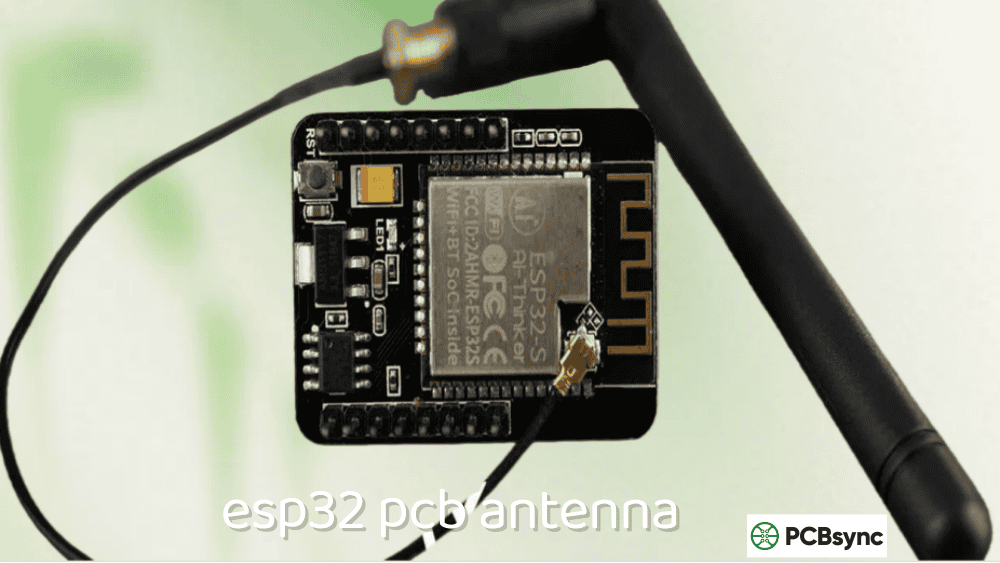
Designing a 2.4G PCB antenna for ESP32 or ESP8266 projects is where most makers hit their first real RF challenge. I’ve seen countless forum posts where someone built a beautiful custom ESP32 board, only to discover their WiFi range dropped from 50 meters to barely working across the room. The culprit is almost always the antenna—either the design itself or how it’s placed relative to the ground plane.
This guide focuses specifically on 2.4G PCB antenna design for Espressif chips. Whether you’re designing a custom ESP32-C3 board from scratch or integrating an ESP-WROOM module into a carrier board, antenna performance makes or breaks your project. I’ll give you actual dimensions, placement rules, and matching network values that work—not theory, but practical guidance based on what Espressif recommends and what I’ve verified on real hardware.
Understanding 2.4G Antenna Requirements for ESP32/ESP8266
Before diving into antenna design, let’s understand what the ESP32 and ESP8266 chips actually need from their antennas.
ESP32 and ESP8266 RF Specifications
Parameter
ESP8266
ESP32
ESP32-C3
ESP32-S3
Frequency Range
2.4 – 2.5 GHz
2.4 – 2.5 GHz
2.4 – 2.5 GHz
2.4 – 2.5 GHz
TX Power (max)
+20 dBm
+20 dBm
+21 dBm
+21 dBm
RX Sensitivity
-91 dBm
-97 dBm
-97 dBm
-97 dBm
Antenna Impedance
50Ω
50Ω
50Ω
50Ω
Protocols
WiFi b/g/n
WiFi b/g/n + BLE
WiFi b/g/n + BLE 5.0
WiFi b/g/n + BLE 5.0
All ESP chips expect a 50Ω antenna with good return loss (S11 ≤ -10 dB) across the 2.4–2.5 GHz WiFi band. The antenna must handle both WiFi and Bluetooth (for ESP32 variants) simultaneously since they share the same RF front-end.
Wavelength Calculations for 2.4G
Parameter
Value
Notes
Center frequency
2.45 GHz
Mid-band design target
Wavelength (free space)
122.4 mm
λ = c/f
Quarter wavelength
30.6 mm
λ/4 theoretical
λ/4 on FR4 (εr=4.4)
~15.3 mm
Effective length on PCB
Effective εr (microstrip)
~3.0–3.5
Depends on stackup
The quarter-wavelength dimension is critical because most 2.4G PCB antenna designs—IFA, MIFA, monopole—are based on λ/4 resonance. On FR4 substrate, the effective dielectric constant reduces this to approximately 15–18mm depending on your specific antenna geometry.
2.4G PCB Antenna Types for ESP32 Projects
Several antenna topologies work well for ESP32/ESP8266 boards. Your choice depends on available space, required performance, and design complexity.
Antenna Type Comparison for ESP Boards
Antenna Type
Footprint
Gain
Complexity
Best For
Inverted-F (IFA)
15–20 × 5–7 mm
2–3 dBi
Medium
Custom ESP32 boards
Meandered IFA (MIFA)
8–12 × 10–15 mm
1–2 dBi
Medium
Compact modules
Meander Line
10–15 × 3–5 mm
0–2 dBi
Low
Very small boards
Chip Antenna
2–5 × 1–2 mm
0–2 dBi
Low
Extreme space constraints
Monopole (trace)
31 × 1 mm
2–3 dBi
Very low
Simple prototypes
Which Antenna for Your ESP32 Project?
Project Type
Recommended Antenna
Reason
Custom ESP32-C3 board
IFA
Best performance, proven design
Compact IoT sensor
MIFA
Good balance of size and performance
ESP module on carrier
Use module’s antenna
Already optimized
Prototype/learning
Trace monopole
Simple, easy to implement
Wearable device
Chip antenna
Smallest footprint
Maximum range needed
External antenna (U.FL)
Best performance option
For most custom ESP32 designs, the Inverted-F Antenna (IFA) provides the best balance of performance, size, and ease of implementation. It’s what Espressif uses on their reference designs and what Silicon Labs, Infineon, and other vendors recommend for 2.4 GHz applications.
Inverted-F Antenna (IFA) Design for ESP32
The IFA is the workhorse of 2.4G PCB antenna design. Understanding its geometry helps you adapt it to your specific board size.
IFA Structure and Dimensions
An IFA consists of four key elements:
Radiating arm – The main resonant element (determines frequency)
Shorting arm – Connects radiating arm to ground (sets impedance)
Feed arm – Connects to the RF trace from ESP32
Ground plane – Essential part of the antenna system
IFA Dimensions for 2.4G on 1.6mm FR4 (εr=4.4):
Parameter
Dimension
Tolerance
Notes
Radiating arm length
15.2 – 18.5 mm
±0.5 mm
Tune for exact frequency
Radiating arm width
1.0 – 1.5 mm
±0.1 mm
Affects bandwidth
Feed arm length
2.5 – 4.0 mm
±0.3 mm
Impedance adjustment
Feed arm width
0.5 – 1.0 mm
±0.1 mm
Match to trace width
Shorting arm length
4.0 – 6.0 mm
±0.3 mm
Ground clearance
Shorting arm width
0.5 – 1.0 mm
±0.1 mm
Fine impedance tuning
Total footprint
15–20 × 5–7 mm
—
Keep-out zone larger
Silicon Labs Reference IFA (from AN1088)
Silicon Labs provides a well-documented IFA design in application note AN1088:
Parameter
62 mil (1.6mm) Board
0.8mm Board
Radiating arm
15.24 mm × 1.0 mm
15.24 mm × 1.0 mm
Feed point position
2.5 mm from short
2.5 mm from short
Ground clearance
5.0 mm
5.0 mm
Board width
25.4 mm (1 inch)
25.4 mm (1 inch)
Feed trace width
0.36 mm (14 mil)
0.43 mm
Bandwidth
> 200 MHz
> 200 MHz
This reference design can be directly copied for ESP32-C3 or ESP32-S3 custom boards using bare chips.
Infineon/Cypress MIFA for BLE/WiFi (from AN91445)
For more compact designs, Infineon’s application note AN91445 provides a MIFA design:
Parameter
Dimension
Total footprint
7.2 × 11.1 mm
Trace width
0.5 mm
Ground clearance
10 mm minimum
Designed for
PSoC BLE, but works with ESP32
ESP32 Module Placement on Carrier Boards
If you’re using pre-made ESP modules (ESP-WROOM-32, ESP32-C3-MINI, etc.), proper placement is critical for antenna performance.
Module Placement Rules from Espressif
Espressif’s hardware design guidelines specify exactly how to position modules:
Placement
Performance
Recommendation
Antenna overhanging board edge
✅ Best
Strongly recommended
Antenna at board corner
✅ Good
Acceptable
Antenna along board edge
⚠️ Fair
Check clearance
Antenna over base board ground
❌ Poor
Avoid
Antenna surrounded by ground
❌ Very poor
Never do this
Keep-Out Zone Requirements
Scenario
Keep-Out Distance
Notes
Antenna overhanging edge
0 mm (ideal)
Antenna extends past board
Antenna on board edge
15 mm all directions
No copper, components, or traces
Feed point position
Closest to board edge
Maximizes radiation efficiency
Ground plane edge
10 mm minimum from antenna
Critical for impedance
Visual Placement Guide
Good placements (✓):
Module at corner with antenna extending past board
Module along edge with antenna overhanging
Feed point at board edge, antenna radiating outward
Bad placements (✗):
Module in center of board
Antenna over ground plane
Components or traces near antenna
If the antenna cannot overhang, Espressif recommends cutting out the base board under the antenna area to minimize detuning.
The ground plane is half your 2.4G PCB antenna system. Getting it wrong is the most common cause of poor WiFi range on custom ESP boards.
Ground Plane Size Requirements
Board Application
Minimum Ground
Recommended Ground
ESP32 IoT sensor
20 × 30 mm
25 × 40 mm
ESP32 development board
25 × 50 mm
30 × 60 mm
ESP8266 module carrier
20 × 35 mm
25 × 45 mm
Custom ESP32-C3
25 × 35 mm
30 × 45 mm
Ground Plane Rules
Rule
Requirement
Why It Matters
No copper under antenna
Remove from ALL layers
Prevents severe detuning
Solid ground near antenna
No splits or gaps
Reduces impedance discontinuities
Via stitching along edge
< 3mm spacing
Prevents slot radiation
Ground continuity
Connect all ground layers
Consistent reference
Distance from antenna
≥ 10mm from radiating element
Avoids field distortion
Multi-Layer Board Ground Planes
For 4-layer ESP32 boards:
Layer
Ground Plane Treatment
Layer 1 (Top)
Keep-out under antenna, ground elsewhere
Layer 2
Solid ground, keep-out under antenna
Layer 3
Signal routing, avoid antenna area
Layer 4 (Bottom)
Solid ground, keep-out under antenna
Critical: The ground plane cutout must extend through ALL layers. A ground plane on an inner layer under your antenna will still cause significant detuning.
RF Trace and Feed Line Design
The connection between your ESP32 chip and the 2.4G PCB antenna requires proper impedance control.
Starting Values (no tuning needed if antenna is well-designed):
Component
Default Value
Purpose
C1
0 pF (open) or 100 pF bypass
DC blocking if needed
L1
0Ω (short)
Series inductance
C2
0 pF (open)
Shunt capacitance
Tuning Component Values
If your antenna needs matching (S11 > -10 dB), use these typical ranges:
Component
Typical Range
Effect
Series L
1.0 – 6.8 nH
Shifts impedance, cancels capacitance
Shunt C (to ground)
0.5 – 3.0 pF
Shifts resonant frequency down
Series C
0.5 – 2.0 pF
DC blocking, slight frequency shift
Component Selection Guidelines
Parameter
Requirement
Inductor type
Thin-film or wirewound, high Q
Inductor package
0402 or 0201
Capacitor type
C0G/NP0 (NOT X7R/X5R)
Capacitor package
0402 or 0201
Component tolerance
±5% or better
Self-resonant frequency
> 4 GHz
Important: Always include matching network footprints even if you don’t expect to use them. Plastic enclosures, nearby metal, and manufacturing variations can detune your antenna, and having footprints ready saves board respins.
Testing Your 2.4G PCB Antenna
Proper testing ensures your 2.4G PCB antenna works before production.
Required Measurements
Measurement
Equipment
Target
Return loss (S11)
VNA
< -10 dB across 2.4–2.5 GHz
Bandwidth
VNA
> 100 MHz at -10 dB
Center frequency
VNA
2.44–2.45 GHz
WiFi RSSI
ESP32 + router
Compare to reference board
Range test
ESP32 + router
Compare to known-good design
Budget Testing Methods
If you don’t have a VNA:
Method
What It Tells You
NanoVNA
S11, bandwidth (affordable option)
WiFi RSSI comparison
Relative performance vs reference
Range testing
Practical performance
Throughput testing
Actual data rate at distance
NanoVNA Setup for 2.4G
Calibrate from 2.0 to 3.0 GHz
Connect to antenna feed point (may need adapter)
Look for S11 dip at 2.45 GHz
Verify S11 < -10 dB from 2.4 to 2.5 GHz
Adjust matching network if needed
WiFi Performance Benchmarks
Compare your board against a known reference (like ESP32-DevKit):
Metric
Good
Acceptable
Poor
RSSI at 5m (indoor)
> -50 dBm
-50 to -65 dBm
< -65 dBm
RSSI at 20m (indoor)
> -70 dBm
-70 to -80 dBm
< -80 dBm
Max range (open area)
> 50m
30–50m
< 30m
Throughput at 10m
> 20 Mbps
10–20 Mbps
< 10 Mbps
Common ESP32 Antenna Mistakes
Mistake 1: Ground Plane Under Antenna
Problem: Ground copper on inner layers extends under antenna. Effect: Severe detuning, frequency shift up, poor efficiency. Solution: Check ALL layers in your Gerber files. Create keep-out on every layer.
Mistake 2: Module Antenna Over Base Board
Problem: ESP module placed with antenna over the carrier board. Effect: Ground coupling, reduced range, pattern distortion. Solution: Position module so antenna overhangs board edge or cut out PCB under antenna.
Mistake 3: Wrong RF Trace Width
Problem: RF trace impedance doesn’t match 50Ω. Effect: Reflections, reduced power transfer. Solution: Calculate correct width for your stackup. Use impedance calculator.
Mistake 4: No Matching Network Footprints
Problem: No provision for antenna tuning. Effect: Cannot correct manufacturing variations or enclosure detuning. Solution: Always include Pi network footprints, even if not populated.
Mistake 5: Digital Signals Near Antenna
Problem: UART, SPI, or other digital traces routed near antenna area. Effect: Interference, noise in received signals. Solution: Route digital signals away from antenna. Add ground guard traces.
Mistake 6: 90° Bends in RF Trace
Problem: Sharp corners in the RF feed line. Effect: Impedance discontinuities, reflections. Solution: Use 45° mitered corners or smooth curves.
Can I use the ESP module’s built-in antenna, or do I need a custom design?
For most projects, using the module’s built-in antenna (like on ESP-WROOM-32) is the best choice. These antennas are already tuned and certified. You only need a custom 2.4G PCB antenna when: (1) you’re using bare ESP32 chips without modules, (2) you need specific antenna characteristics, or (3) space constraints require a different antenna location. If you’re using a module, focus on proper placement—ensure the antenna portion extends past your base board edge, and maintain the required keep-out zones. Custom antenna design is more complex than most projects require.
What’s the minimum board size for an ESP32 with PCB antenna?
The minimum practical board size depends on your antenna type. For an IFA, you need approximately 25mm × 35mm minimum—about 15–20mm for the antenna footprint plus adequate ground plane. For a MIFA, you can go slightly smaller (around 20mm × 30mm), but performance degrades with smaller ground planes. Below 20mm × 25mm, consider using a chip antenna instead of a PCB antenna. Remember that the ESP32 chip itself, supporting components, and ground plane all need space. Espressif’s smallest module designs show that 18mm × 25mm is about the practical limit for integrated PCB antennas with acceptable WiFi performance.
How do I fix poor WiFi range on my custom ESP32 board?
Start by checking the obvious: verify no ground plane exists under the antenna on ANY layer—this is the most common mistake. Next, check module/antenna placement; if the antenna is over your base board rather than overhanging, performance will suffer. If basic placement is correct, you likely need antenna tuning. Use a NanoVNA to measure S11; if the resonance is off 2.45 GHz, adjust with the matching network. Adding a small series inductor (2–4 nH) can shift frequency down; a small shunt capacitor (0.5–1.5 pF) can also help. Finally, check for interference—ensure UART lines, USB traces, and other digital signals are routed away from the antenna with adequate ground shielding.
Should I use a chip antenna or PCB antenna for my ESP32 project?
PCB antennas are free (just copper traces) and offer better performance than most chip antennas when properly designed. Use a 2.4G PCB antenna when you have space (at least 25mm × 35mm board), want best WiFi range, and are willing to follow layout rules carefully. Use a chip antenna when board space is extremely limited (< 20mm × 25mm), you want simpler design (just follow chip antenna datasheet), or the board shape doesn’t allow proper PCB antenna placement. For most custom ESP32 projects with reasonable board sizes, a PCB antenna (specifically IFA or MIFA) provides better performance at zero component cost.
How does a plastic enclosure affect my ESP32’s 2.4G antenna?
Plastic enclosures shift the antenna’s resonant frequency downward, typically by 50–100 MHz at 2.4 GHz. The exact shift depends on the plastic material (ABS, polycarbonate, etc.), thickness, and proximity to the antenna. To compensate: (1) design your antenna to resonate slightly high (around 2.50–2.55 GHz) so it shifts to 2.45 GHz when enclosed; (2) always perform final tuning with the production enclosure in place; (3) maintain at least 5mm clearance between antenna and plastic if possible; (4) use your matching network to fine-tune after enclosure testing. Metal enclosures are far worse—they require cutouts or RF-transparent windows for the antenna area.
Conclusion
Designing a working 2.4G PCB antenna for ESP32 or ESP8266 projects isn’t difficult once you understand the rules. The key points are simple: keep ground plane away from the antenna area on all layers, position modules so the antenna extends past your board edge, use correct trace widths for 50Ω impedance, and always include matching network footprints for tuning.
For most makers and engineers, the safest path is using ESP modules with their built-in antennas and following Espressif’s placement guidelines exactly. The modules are pre-tuned and certified—you just need to position them correctly. Custom 2.4G PCB antenna design makes sense when you’re using bare chips or have specific requirements that modules can’t meet.
If you do design a custom antenna, start with the Silicon Labs AN1088 IFA reference or Infineon AN91445 MIFA design. Copy the dimensions exactly for your first board, verify performance with a NanoVNA, then iterate if needed. The forums are full of people who tried to “optimize” their first antenna design and ended up with boards that barely connect to WiFi across the room. Get a working baseline first, then refine.
Your antenna is only as good as your testing validates. Compare your custom board against a known-good reference like the ESP32-DevKit, measure RSSI at various distances, and tune your matching network based on actual VNA measurements. Following these practices, your ESP32 projects will have the reliable WiFi connectivity your applications require.
Inquire: Call 0086-755-23203480, or reach out via the form below/your sales contact to discuss our design, manufacturing, and assembly capabilities.
Quote: Email your PCB files to Sales@pcbsync.com (Preferred for large files) or submit online. We will contact you promptly. Please ensure your email is correct.
Notes: For PCB fabrication, we require PCB design file in Gerber RS-274X format (most preferred), *.PCB/DDB (Protel, inform your program version) format or *.BRD (Eagle) format. For PCB assembly, we require PCB design file in above mentioned format, drilling file and BOM. Click to download BOM template To avoid file missing, please include all files into one folder and compress it into .zip or .rar format.