Inquire: Call 0086-755-23203480, or reach out via the form below/your sales contact to discuss our design, manufacturing, and assembly capabilities.
Quote: Email your PCB files to Sales@pcbsync.com (Preferred for large files) or submit online. We will contact you promptly. Please ensure your email is correct.
Notes: For PCB fabrication, we require PCB design file in Gerber RS-274X format (most preferred), *.PCB/DDB (Protel, inform your program version) format or *.BRD (Eagle) format. For PCB assembly, we require PCB design file in above mentioned format, drilling file and BOM. Click to download BOM template To avoid file missing, please include all files into one folder and compress it into .zip or .rar format.
If you’ve landed here, chances are you’re dealing with a complex design that a 4 or 8 layer board just won’t cut it for. I’ve been designing multilayer boards for over a decade, and 16 layer PCB designs remain one of the most challenging yet rewarding projects in electronics engineering. This guide covers everything from stackup configurations to manufacturing considerations that will help you get your 16 layer PCB right the first time.
A 16 layer PCB is a printed circuit board consisting of 16 individual copper layers separated by insulating dielectric materials. These boards typically provide 10 signal routing layers, with the remaining layers dedicated to ground planes and power distribution. Each layer serves a specific purpose in maintaining signal integrity, distributing power, and managing thermal performance.
Unlike simpler 4 or 6 layer designs, a 16 layer PCB handles the routing complexity that modern high-density applications demand. When you’re working with BGA packages featuring 500+ pins, high-speed differential pairs running at 10+ Gbps, or mixed-signal designs requiring careful isolation, 16 layers give you the real estate and flexibility you need.
The basic structure alternates between signal layers and reference planes (ground and power), creating a sandwich that provides controlled impedance paths and electromagnetic shielding between sensitive traces.
16-Layer PCB Stackup Selector
16-Layer PCB Stackup Selector 16LPRO
Configure layer thicknesses for enterprise-grade 16-layer server, networking, and AI accelerator PCB designs
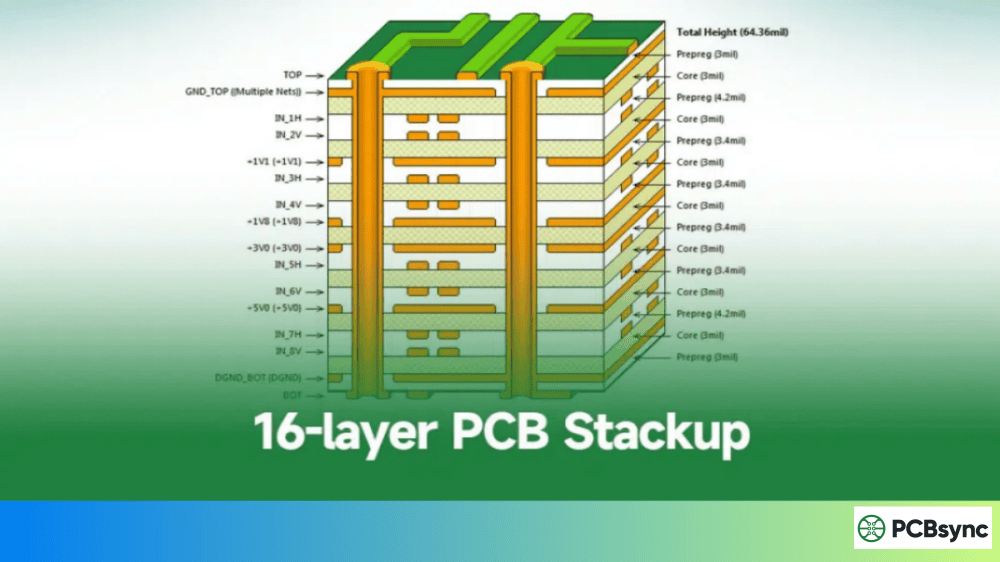
8 Signal Layers: L1, L3, L5, L7, L10, L12, L14, L16 — Maximum routing density for complex BGA fanout (0.4mm pitch+), DDR4/5, PCIe Gen4/5, and 112G SerDes. 4 GND Planes: L2, L6, L9, L13 — Distributed ground reference every 4 layers minimizes return path inductance and provides EMI shielding. 4 PWR Planes: L4, L8, L11, L15 — Support multiple voltage rails (VCore, VIO, VDDA, etc.); L8-L9 form tightly-coupled power/ground pair for superior decoupling. Signal Integrity: Every signal layer has an adjacent reference plane within 0.1-0.2mm for controlled impedance. Inner signal layers (L3,5,7,10,12,14) are fully shielded striplines. Symmetry: Structure is symmetric about Core 4 center axis for optimal CTE matching, warpage control, and reflow reliability.
Why Choose a 16 Layer PCB for Your Design?
Before committing to a 16 layer stackup, it’s worth understanding when this layer count makes sense. Here are the scenarios where 16 layer PCBs become essential:
High-Density Interconnect Requirements When component density increases and BGA packages dominate your design, breakout routing alone can consume multiple layers. A 16 layer PCB provides adequate routing channels without resorting to expensive HDI processes.
Signal Integrity in High-Speed Designs Data rates above 5 Gbps demand careful attention to return paths and shielding. With 16 layers, you can sandwich every signal layer between ground planes, minimizing crosstalk and maintaining clean impedance profiles.
Mixed-Signal Isolation Designs combining analog, digital, and RF sections benefit from dedicated layers that keep sensitive circuits separate. A 16 layer stackup allows physical separation between noisy digital switching and sensitive analog or RF traces.
Complex Power Distribution Networks Multiple voltage rails, split power planes for different domains, and high-current paths all require dedicated copper. More layers mean cleaner power distribution with lower impedance paths.
16 Layer PCB Stackup Fundamentals
Getting your stackup right is probably the single most important decision you’ll make in a 16 layer PCB design. A poorly planned stackup leads to signal integrity issues, EMI problems, and manufacturing challenges that are expensive to fix.
Core Stackup Principles
When planning your 16 layer PCB stackup, keep these principles in mind:
Symmetry prevents warping. Split your layers evenly between top and bottom. An asymmetric stackup creates mechanical stresses during lamination that cause the board to bow or twist.
Ground planes adjacent to signal layers. Every high-speed signal layer should have a solid ground plane immediately above or below it. This provides a clear return path and controlled impedance.
Shield sensitive signals. Place critical signals between ground planes (stripline configuration) for maximum noise immunity.
Power plane placement matters. Position power planes near the board center, adjacent to ground planes, to create effective decoupling capacitance within the stackup itself.
Recommended 16 Layer PCB Stackup Configuration
Here’s a stackup configuration that works well for most high-speed digital applications:
Layer
Function
Description
L1
Signal (TOP)
High-speed signals, component connections
L2
Ground
Reference plane for L1 and L3
L3
Signal
High-speed routing
L4
Ground
Shield layer
L5
Signal
General routing
L6
Power (3.3V)
Primary power distribution
L7
Signal
Inner signal routing
L8
Ground
Central reference plane
L9
Power (1.8V/1.2V)
Secondary power rails
L10
Signal
Inner signal routing
L11
Ground
Shield layer
L12
Signal
General routing
L13
Power (5V)
Auxiliary power
L14
Ground
Reference plane for L15 and L16
L15
Signal
High-speed routing
L16
Signal (BOT)
Component connections, low-speed signals
This configuration provides five dedicated ground planes and three power planes, leaving ten layers for signal routing. The arrangement ensures that most signal layers reference a solid ground plane, which is critical for controlled impedance.
Alternative Stackup for RF and Mixed-Signal Designs
For designs incorporating RF sections alongside digital logic, consider this modified approach:
Layer
Function
Application
L1
RF Signal
RF traces, antenna connections
L2
Ground
RF reference, continuous copper
L3
Analog Signal
Low-frequency analog routing
L4
Power (Analog)
Clean analog power
L5
Digital Signal
Digital routing
L6
Ground
Digital/analog boundary
L7
Digital Signal
High-speed digital
L8
Power (Digital)
Digital power rails
L9
Digital Signal
General digital routing
L10
Ground
Central shield
L11
Digital Signal
Digital routing
L12
Power
Secondary digital power
L13
Analog Signal
Analog return paths
L14
Ground
Analog reference
L15
RF Signal
RF return traces
L16
Ground
Bottom shield for RF
This stackup physically separates RF, analog, and digital domains while providing dedicated reference planes for each section.
Signal integrity becomes increasingly challenging as layer count grows. With 16 layers, you’re likely dealing with signals fast enough that transmission line effects dominate your design.
Impedance Control Requirements
Most high-speed interfaces specify impedance targets that you’ll need to hit within ±10% tolerance:
Interface Type
Single-Ended Impedance
Differential Impedance
DDR4/DDR5
40-50Ω
80-100Ω
PCIe Gen3/4
50Ω
85Ω
USB 3.0/3.1
45Ω
90Ω
HDMI 2.0
—
100Ω
Ethernet
—
100Ω
SATA
—
100Ω
Achieving these targets requires coordinating trace width, dielectric thickness, and copper weight with your fabricator. For a typical 16 layer PCB using FR-4 with 4-5 mil dielectric spacing, a 50Ω microstrip trace on an outer layer runs about 5-6 mils wide. Stripline traces in inner layers need to be narrower, often 4-5 mils, due to the reference planes on both sides.
High-Speed Signal Routing Best Practices
When routing high-speed signals in your 16 layer PCB:
Maintain reference plane continuity. Never route over splits or voids in your reference plane. If a trace must change reference planes, add stitching vias near the transition to provide a return path.
Match trace lengths for differential pairs. Keep the length mismatch between P and N traces below 5 mils for signals above 5 Gbps. Phase skew kills eye diagrams faster than almost anything else.
Control via stub length. Through-hole vias create stubs that cause reflections at high frequencies. For signals above 8 Gbps, consider back-drilling to remove unused via barrels or use blind/buried vias.
Separate signal classes. Don’t route 10 Gbps SerDes lanes next to I2C buses. Keep fast signals grouped together on dedicated layers with appropriate spacing from slower, noisier signals.
Crosstalk Management
Crosstalk between adjacent traces is one of the biggest signal integrity challenges in 16 layer PCB designs. When parallel traces run close together for extended distances, electromagnetic coupling transfers energy between them.
The 3W Rule: Maintain center-to-center spacing of at least three times the trace width between sensitive signals. For a 5-mil trace, this means 15-mil center-to-center spacing minimum.
Reduce parallel run length. When traces must run parallel, limit the coupled length to reduce accumulated crosstalk. Orthogonal routing on adjacent layers helps minimize coupling.
Use ground guards. For particularly sensitive signals, route ground traces on either side. Connect these guard traces to the ground plane with vias every 1/10 wavelength at your maximum frequency of interest.
Layer assignment matters. Route high-speed signals on layers directly adjacent to ground planes rather than power planes. Power planes often have splits and islands that create discontinuities in the return path.
Power Integrity for 16 Layer PCB
Your signal integrity is only as good as your power delivery network. Voltage droop during fast edge transitions can look like signal integrity problems but actually stem from inadequate power distribution.
Target PDN impedance should be below the target Ztarget = Vripple / Itransient. For a processor with 50A transient currents and 50mV allowed ripple, you need PDN impedance under 1 milliohm.
Decoupling capacitor placement is critical. Place small capacitors (100nF-1µF) as close as possible to power pins. Larger bulk capacitors (10µF-100µF) can be farther away. The effective frequency range of each capacitor depends on its ESR and ESL.
Use multiple power-ground plane pairs. In a 16 layer PCB, placing power and ground planes adjacent to each other creates significant interplane capacitance that helps suppress high-frequency noise.
Material Selection for 16 Layer PCB
The choice of base materials significantly impacts your 16 layer PCB’s electrical performance, thermal behavior, and cost. Here’s what you need to know:
Standard FR-4
FR-4 remains the workhorse material for most Multilayer PCB designs. For 16 layer boards:
Dielectric constant (Dk): 4.2-4.5 at 1 MHz
Glass transition temperature (Tg): 130-140°C standard
Dissipation factor (Df): ~0.02 at 1 GHz
FR-4 works well for designs with signals up to about 3-5 Gbps. Beyond that, the relatively high loss tangent starts eating into your signal margin.
High-Tg FR-4
When your design faces lead-free assembly temperatures or thermal cycling, upgrade to high-Tg FR-4:
Tg range: 150-180°C
Better thermal stability during assembly
Improved z-axis expansion characteristics
High-Tg materials cost 10-15% more than standard FR-4 but provide meaningful reliability improvements for 16 layer PCBs that will see multiple reflow cycles.
High-Frequency Materials (Rogers, Isola)
For RF sections or signals above 10 GHz, consider hybrid stackups using Rogers or Isola laminates on critical layers:
Material
Dk
Df
Best For
FR-4 Standard
4.3
0.020
< 3 GHz digital
FR-4 High-Tg
4.3
0.018
Thermal demanding
Isola I-Speed
3.6
0.009
10+ Gbps digital
Rogers 4350B
3.48
0.004
RF, microwave
Rogers 4003C
3.38
0.003
High-frequency
A cost-effective approach uses Rogers materials only for the outer RF layers while keeping FR-4 for inner digital layers. This hybrid stackup can reduce material costs by 30-40% compared to an all-Rogers board.
Via Technologies in 16 Layer PCB Design
With 16 layers, via selection becomes strategic. The wrong via choices lead to routing congestion, signal integrity problems, or manufacturing yield issues.
Through-Hole Vias
Standard through-hole vias punch through all 16 layers. They’re simple and cheap but create problems:
Stub resonance at high frequencies from unused via barrel sections
Routing blockage through all layers
Thermal paths that may not be desirable
For a 16 layer board at 2.0mm thickness, typical minimum via sizes are 0.25mm drill with 0.5mm pad.
Blind Vias
Blind vias connect an outer layer to one or more inner layers without penetrating the entire board. Common configurations for 16 layer PCBs include:
L1-L2 or L1-L3 blind vias for BGA fanout
L15-L16 or L14-L16 bottom-side blind vias
Blind vias require additional drilling cycles and add cost, but they free up routing channels on inner layers.
Buried Vias
Buried vias connect inner layers without reaching either surface. They’re invisible from outside the board and provide excellent routing flexibility for dense designs.
Typical buried via combinations: L3-L14, L4-L13, L6-L11
Microvia (Laser-Drilled)
For the highest density designs, laser-drilled microvias with 0.1mm holes enable escape routing from fine-pitch BGAs. Microvias are typically limited to spanning two adjacent layers (L1-L2 or L2-L3) but can be stacked or staggered for deeper connections.
Manufacturing Process for 16 Layer PCB
Understanding the PCB manufacturing process helps you make design decisions that improve yield and reduce cost.
Lamination Sequence
A 16 layer PCB requires multiple lamination cycles:
Sequential lamination builds the board in stages:
Laminate inner core pairs (L7-L8, L8-L9, etc.)
Add outer cores in subsequent pressing cycles
Final lamination with outer prepreg and copper
This process enables buried vias but increases cost and lead time.
Single-press lamination stacks all layers at once:
Faster and cheaper
Limited to through-hole vias only
Requires careful material thickness control
Critical Manufacturing Parameters
When specifying your 16 layer PCB, pay attention to these parameters:
Parameter
Typical Value
Notes
Total thickness
2.0-2.4mm
Standard for 16 layers
Layer-to-layer tolerance
±0.05mm
Affects impedance
Minimum trace/space
3/3 mil
Standard process
Minimum via drill
0.2mm
Mechanical drilling
Registration accuracy
±0.05mm
Critical for fine-pitch
Copper weight
0.5-1 oz inner, 1-2 oz outer
Application dependent
Design for Manufacturing (DFM) Tips
Working with 16 layer PCBs requires close collaboration with your fabricator. Here are DFM practices that improve success rates:
Request stackup review early. Send your intended stackup to the fabricator before finalizing your design. They’ll confirm material availability and identify any issues with impedance targets or layer spacing.
Provide impedance requirements clearly. Document each controlled impedance net class, target value, and tolerance. Include test coupon requirements if you need impedance verification reports.
Account for registration tolerances. Pad sizes, annular rings, and clearances all need to account for layer-to-layer misalignment. For 16 layer boards, budget ±3 mils registration error.
Balance copper distribution. Uneven copper coverage causes lamination problems. If one layer has dense copper and an adjacent layer is mostly empty, the prepreg won’t flow evenly, creating thickness variations.
Thermal Management in 16 Layer PCB
Heat dissipation becomes increasingly important as power density rises in modern electronics. A 16 layer PCB provides both challenges and opportunities for thermal management.
Thermal Via Arrays
Thermal vias transfer heat from hot components on the surface to inner copper planes that act as heat spreaders. For effective thermal vias:
Use via arrays under thermal pads (7×7 or larger patterns)
Fill vias with copper or conductive epoxy for better thermal conductivity
Connect vias to internal ground planes that have large continuous copper areas
Copper Pour Optimization
Ground planes in your 16 layer PCB double as heat spreaders. Maximize their effectiveness by:
Maintaining solid, continuous copper on ground layers
Avoiding unnecessary splits in planes under high-power components
Using heavier copper (2 oz) on layers adjacent to heat sources when practical
Component Placement Considerations
Plan component placement with thermal performance in mind:
Spread power dissipation across the board rather than concentrating hot components
Provide adequate clearance around high-power devices for airflow
Position temperature-sensitive components away from heat sources
Applications of 16 Layer PCB
The complexity and cost of 16 layer PCBs are justified in applications where simpler boards can’t meet requirements.
Telecommunications and 5G Infrastructure
Base station equipment, network routers, and switches rely heavily on 16 layer PCBs. These designs typically feature:
Multiple high-speed SerDes interfaces
Complex power delivery for high-current processors
Long product lifecycles justify higher board costs
Industrial Control Systems
Factory automation, motor drives, and process control equipment use 16 layer PCBs for:
Mixed-signal designs combining power electronics with digital control
Real-time processing requirements
Harsh environment operation with extended temperature ranges
EMC compliance in electrically noisy factory settings
Cost Factors for 16 Layer PCB
Budget reality checks are important. Here’s what drives 16 layer PCB costs:
Factor
Cost Impact
Optimization Strategy
Layer count
Baseline high
Verify 16 layers is necessary
Via types
+20-50% for HDI
Minimize blind/buried vias
Materials
+15-100% for specialty
Hybrid stackups
Board size
Linear scaling
Optimize panel utilization
Impedance control
+10-15%
Consolidate requirements
Testing
+15-20% for flying probe
Design for ICT if volume justifies
Quantity
Volume discounts significant
Batch orders when possible
For prototype quantities (1-10 boards), expect $50-150 per board depending on size and complexity. Production volumes (1000+) can bring costs down to $15-40 per board for standard specifications.
Testing and Quality Assurance
Before your 16 layer PCB reaches assembly, it should pass several verification steps.
Electrical Testing
Continuity testing verifies all connections are made and no shorts exist. Flying probe testers handle low-volume production economically.
Impedance testing uses TDR (Time Domain Reflectometry) on test coupons fabricated alongside your boards. Request impedance reports for critical signal classes.
IPC-6012D: Qualification and Performance Specification for Rigid PCBs
Signal Integrity Simulation
Ansys HFSS for electromagnetic simulation
Cadence Sigrity for SI/PI analysis
HyperLynx for board-level simulation
Material Datasheets
Rogers Corporation Technical Resources
Isola Group Laminate Documentation
Shengyi Technology Material Library
Frequently Asked Questions About 16 Layer PCB
What is the typical thickness of a 16 layer PCB?
A standard 16 layer PCB with 1oz copper and standard prepreg thickness measures approximately 2.0-2.4mm (80-95 mils). Using thinner dielectrics (3-4 mils instead of 5-6 mils) can reduce overall thickness to 1.6mm, though this requires tighter manufacturing tolerances and may limit impedance options.
How many signal layers does a 16 layer PCB provide?
Most 16 layer stackups provide 10 signal routing layers, with 5-6 layers dedicated to ground planes and power distribution. The exact split depends on your power architecture complexity and signal integrity requirements. Some designs use only 8 signal layers to achieve better shielding with more reference planes.
What materials work best for high-frequency 16 layer PCBs?
For RF and high-frequency applications, Rogers RO4350B or RO4003C provide low loss tangent (Df < 0.004) and stable dielectric properties. Many designs use hybrid stackups with Rogers on outer layers for RF traces and standard FR-4 on inner layers for digital routing, reducing cost while maintaining RF performance.
How do I reduce costs for 16 layer PCB production?
Cost reduction strategies include: using standard FR-4 where possible instead of exotic materials, minimizing blind and buried vias, optimizing board size for standard panel sizes, consolidating impedance requirements to reduce testing complexity, and ordering in larger quantities. Working with your fabricator early to understand their standard processes often reveals cost-saving opportunities.
What lead time should I expect for 16 layer PCB fabrication?
Standard lead time for 16 layer PCBs runs 15-20 working days for production quantities. Quick-turn services can deliver prototypes in 8-10 days at premium pricing. Complex designs requiring HDI processes, special materials, or tight tolerances may require 4-6 weeks. Always confirm lead time with your fabricator before finalizing project schedules.
Conclusion
Designing a 16 layer PCB successfully requires balancing signal integrity, thermal management, manufacturability, and cost. Start with a solid stackup that places reference planes adjacent to high-speed signal layers, select materials appropriate for your frequency range, and work closely with your fabricator throughout the design process.
The extra effort required for 16 layer designs pays off in products that meet performance specifications, pass EMC testing, and manufacture reliably at volume. Whether you’re building telecommunications infrastructure, medical devices, or high-performance computing systems, mastering 16 layer PCB design opens doors to the most demanding applications in electronics engineering.
Take time to simulate your critical signals before committing to fabrication, and never underestimate the value of a thorough DFM review. Your future self will thank you when prototypes work on the first spin.
Inquire: Call 0086-755-23203480, or reach out via the form below/your sales contact to discuss our design, manufacturing, and assembly capabilities.
Quote: Email your PCB files to Sales@pcbsync.com (Preferred for large files) or submit online. We will contact you promptly. Please ensure your email is correct.
Notes: For PCB fabrication, we require PCB design file in Gerber RS-274X format (most preferred), *.PCB/DDB (Protel, inform your program version) format or *.BRD (Eagle) format. For PCB assembly, we require PCB design file in above mentioned format, drilling file and BOM. Click to download BOM template To avoid file missing, please include all files into one folder and compress it into .zip or .rar format.